About this template
Present an accessories brand through bold campaign imagery, expressive copy, and clear paths to browse the edit and get in touch. The sample store focuses on bags, jewelry, eyewear, and other accessories selected for personal style.
A point-of-view section explains the brand's approach, while product-focused storytelling gives a featured bag its own space. The layout pairs oversized headlines and colorful photography with practical store information, helping visitors understand the assortment and the character behind it.
Who it’s for
Independent accessories retailers and fashion brands selling bags, jewelry, eyewear, or other style-focused goods, especially businesses that want to communicate a distinctive point of view.
What’s included
The page moves from a campaign-led introduction to the brand perspective, a featured product story, and practical contact details. Its strong visual hierarchy gives shoppers an immediate sense of the store's style and invites them to browse or start a conversation.
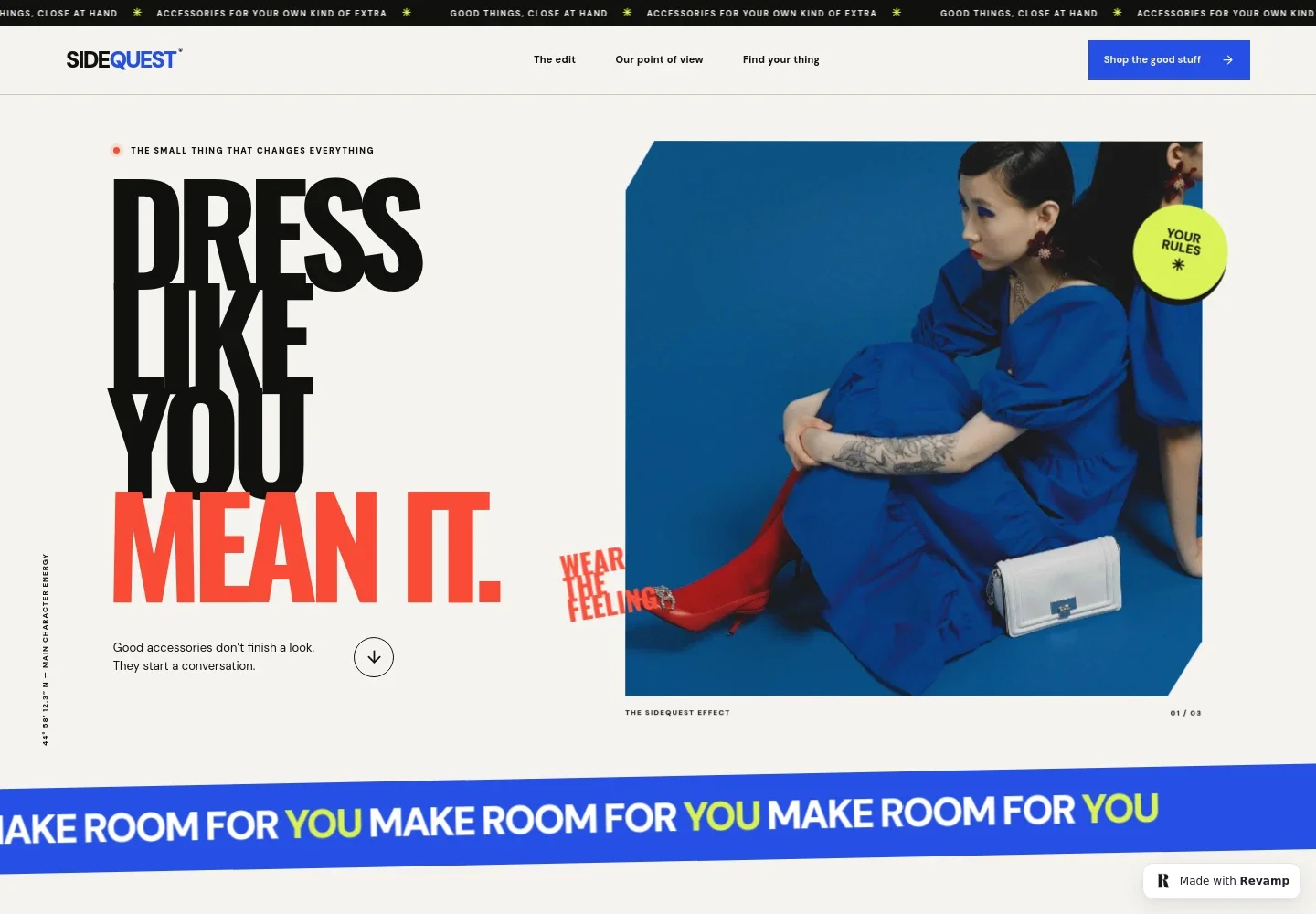
- Campaign hero
- A large lifestyle image, prominent brand statement, and direct link into the collection introduce the store's expressive approach to accessories.
- Brand point of view
- Two short paragraphs describe the store's curated approach to bags, jewelry, eyewear, and personal style, with a link leading visitors toward the featured edit.
- Featured product story
- A product image and editorial copy highlight a red handbag as an example of the store's selection, with a button guiding visitors onward to browse.
- Styling perspective
- A fashion portrait and concise styling message reinforce the brand's focus on self-expression and give the page a second visual pause.
- Brand manifesto
- A prominent statement section distills the store's message about making everyday style personal and links back toward the visitor journey.
- Visit and contact details
- A closing section describes the store as online, provides a contact area, and offers a conversation link. Replace the illustrative contact details with your own.
How to use this template
Open in Revamp
Click Use this template and sign in or create an account. You’ll start with your own copy of the design, ready to personalize.
Bring your content
Replace the sample text, photos, and logo with your own. Share your content, a document, or an existing website, and ask Revamp to adapt the template to your business.
Refine and publish
Ask Revamp to adjust the colors, layout, or sections, or edit directly on the page. Review desktop and mobile, then publish. You can keep making changes after launch.
Put your website to work
Support product discovery and customer follow-up by asking Revamp to add connections to the retail tools your store uses.
-

Manage online orders and products
ShopifyGive shoppers a direct path from product discovery to checkout. Ask Revamp to connect Shopify and add your product catalog and online store links.
-

Keep customer relationships organized
HubSpotSupport repeat business with organized customer records and follow-up. Ask Revamp to connect HubSpot for customer relationship management.
-

Share new arrivals by email
MailchimpKeep shoppers informed about new collections and store news. Ask Revamp to connect Mailchimp for email marketing sign-ups and campaigns.
Frequently asked questions
Is this template free?
Yes. The premium template is free to use when you select Use this template. This applies to the template itself, not hosting or other services.
Can I use my own content?
Yes. Ask Revamp to personalize the page with your brand name, product photos, collection details, store information, and contact details.
Do I need coding skills?
No. Ask Revamp to make content and design changes in plain language, without coding.
Can I change the design?
Yes. Ask Revamp to adjust the colors, typography, imagery, layout, and other design details to suit your store.
Can I keep editing after publishing?
Yes. You can keep asking Revamp to update your content and design after launch.