About this template
Help hungry visitors see what is on the menu, understand your burger-making style, and find the details they need to visit. The design pairs close-up food photography with a bold, editorial layout and clear paths to the menu and restaurant information.
The page introduces a neighborhood burger counter, explains its smash-burger approach, and presents sample burgers, fries, and soft serve in a scannable menu. Ask Revamp to personalize the menu, restaurant story, location, contact information, and visual style for your business.
Who it’s for
Independent burger restaurants, smash-burger counters, casual dining spots, and food businesses that want to present their menu, approach, and visit details.
What’s included
The completed design guides visitors from an appetite-catching burger photo to the restaurant story, cooking approach, sample menu, and visit details. Large headlines, food photography, and direct section links make the page easy to scan on the way to choosing what to eat or finding the restaurant.
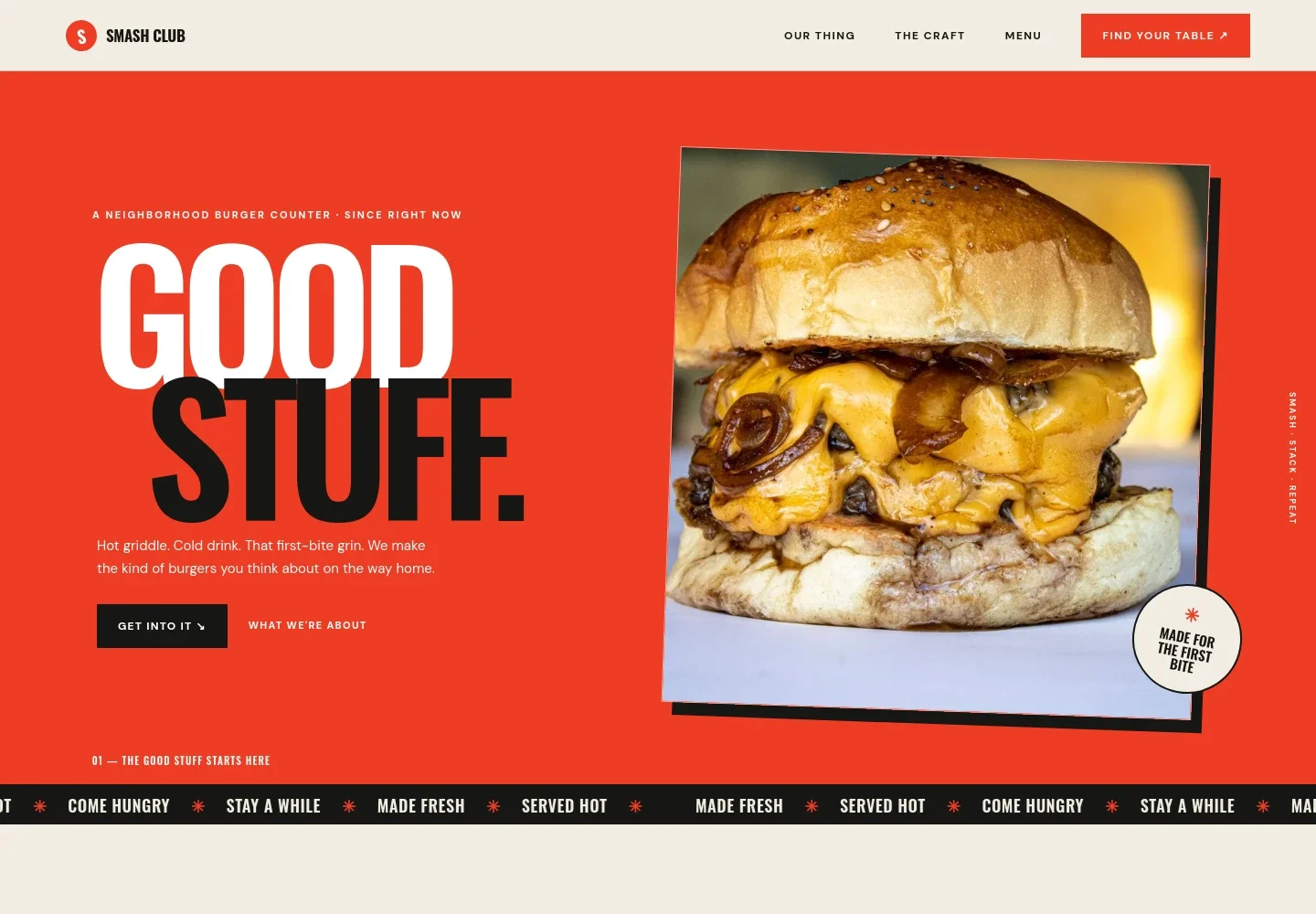
- Hero with burger photography
- A prominent cheeseburger image, short introductory copy, and links to the menu and restaurant story give visitors an immediate sense of the food and where to go next.
- Restaurant story
- A concise introduction explains the neighborhood-joint point of view and highlights details such as a crisp burger crust, scratch-made sauce, and an easy welcome.
- The burger-making approach
- A dedicated section describes the hot-griddle smash, caramelized edges, soft bun, pickles, and in-house sauce, alongside a photo of patties on the grill.
- Sample menu
- A list presents example burgers, a plant-based patty, fries, and soft serve with descriptions and illustrative prices. Replace the sample dishes and prices with your current menu.
- Food and drink feature
- A supporting photo and short passage set the scene for fries, a cold drink, and staying awhile, adding a dining-focused pause between the menu and visit information.
- Visit information
- The closing section shows a sample street address, opening hours, and email contact, with a clear invitation to stop by. Replace the illustrative details with your restaurant's information.
- Navigation and footer
- The main navigation links to the story, cooking approach, menu, and visit section. The footer returns visitors to the top of the page.
How to use this template
Open in Revamp
Click Use this template and sign in or create an account. You’ll start with your own copy of the design, ready to personalize.
Bring your content
Replace the sample text, photos, and logo with your own. Share your content, a document, or an existing website, and ask Revamp to adapt the template to your business.
Refine and publish
Ask Revamp to adjust the colors, layout, or sections, or edit directly on the page. Review desktop and mobile, then publish. You can keep making changes after launch.
Put your website to work
Make it easier for guests to order, find your restaurant, and keep up with menu updates. Ask Revamp to add or connect tools such as these for your restaurant.
-

Accept online orders
ToastGive guests a convenient way to place pickup orders. Ask Revamp to add online ordering with Toast.
-

Reach local diners
Google Business ProfileHelp nearby customers find your restaurant and check key business details. Ask Revamp to connect your Google Business Profile.
-

Share menu and restaurant updates
MailchimpSend occasional updates about new dishes, events, or changes to your hours. Ask Revamp to add an email signup connected to Mailchimp.
Frequently asked questions
Is this burger restaurant template free?
Yes. This premium template is free to use through Use this template. The offer applies to the template itself, not hosting or other services.
Can I use my own restaurant content?
Yes. Ask Revamp to personalize the menu, food photos, restaurant story, address, hours, and contact details with your own content.
Do I need coding skills to customize the template?
No. Ask Revamp to make content or design changes in plain language, without coding.
Can I change the design?
Yes. Ask Revamp to adjust the colors, typography, imagery, layout, or other visual details to suit your restaurant.
Can I keep editing the website after publishing?
Yes. You can keep asking Revamp to update your website after launch, including changes to your menu, hours, photos, and design.