About this template
Help diners quickly understand what your cafeteria serves, how the menu changes, and when to stop by. The Common Table design pairs a bold food photograph with clear menu descriptions and practical visit details.
Its warm, editorial style suits a cafeteria focused on freshly made, seasonal food and a welcoming lunch experience. The page guides visitors from the food and the idea behind it to the hours, location, and contact details.
Who it’s for
Designed for cafeteria owners and food-service teams who want to introduce their lunch offering, show sample menu choices, and share essential information for visiting.
What’s included
The page is arranged around the questions a diner may have: what is the food like, what might be on the menu, and when and where can I visit? Oversized headlines and a prominent food image establish the feel, while concise sections make the menu and visit details easy to scan.
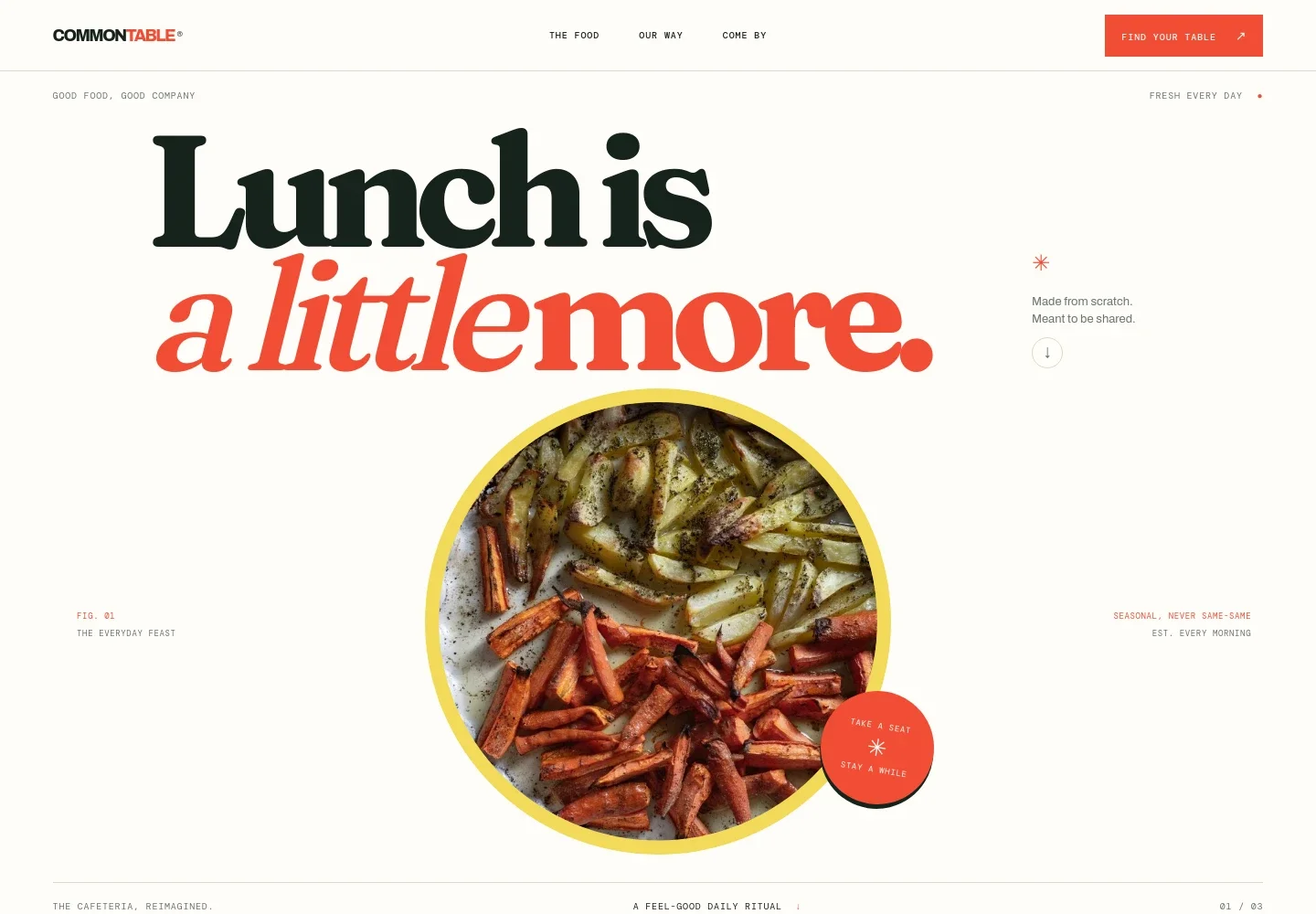
- Food-led hero
- A large meal image, a clear lunch-focused headline, and short copy introduce the cafeteria's everyday food and welcoming approach.
- Our way
- A brief statement about seasonal cooking, generous service, and making space for everyone gives visitors context for the dining experience.
- Menu highlights
- Three sample menu entries describe a market bowl, a sandwich, and a daily special. Short descriptions and labels make the choices easy to browse.
- Visit details
- A dedicated section presents sample weekday lunch hours, a location area, and a contact link so visitors can find key details in one place.
- Navigation and footer
- Navigation links take visitors to the food, the cafeteria's approach, and visit information. The footer repeats the brand and offers a return-to-top link.
How to use this template
Open in Revamp
Click Use this template and sign in or create an account. You’ll start with your own copy of the design, ready to personalize.
Bring your content
Replace the sample text, photos, and logo with your own. Share your content, a document, or an existing website, and ask Revamp to adapt the template to your business.
Refine and publish
Ask Revamp to adjust the colors, layout, or sections, or edit directly on the page. Review desktop and mobile, then publish. You can keep making changes after launch.
Put your website to work
Make it easier for guests to plan a visit or keep up with menu updates. Ask Revamp to add a connection to a tool that fits your cafeteria's needs.
-

Make lunch orders easier
ToastGive guests another way to place orders ahead. Ask Revamp to add online ordering with Toast.
-

Keep regulars informed
MailchimpShare menu news and updates with your customer list. Ask Revamp to connect Mailchimp for email marketing.
Frequently asked questions
Is this template free?
Yes. This premium template is free to use when you select Use this template. Free refers to the template itself.
Can I use my own content?
Yes. Ask Revamp to personalize the page with your cafeteria's name, menu, food photography, hours, location, and contact details.
Do I need coding skills?
No. Ask Revamp to personalize the content and design for you, without coding.
Can I change the design?
Yes. Ask Revamp to adjust the colors, typography, imagery, layout, or other design details to suit your cafeteria.
Can I keep editing after publishing?
Yes. You can keep editing after launch. Ask Revamp to update your menu, visit information, or design as your needs change.