About this template
Help customers quickly understand your fast-food menu and what makes your signature burger distinctive. The design pairs bold food photography with a featured burger description, short menu highlights, and a close-up view of its ingredients.
A story section gives you room to explain your approach to food, while the closing section points visitors toward getting in touch. Ask Revamp to personalize the menu, restaurant story, contact details, and design for your business.
Who it’s for
Fast-food restaurants, burger spots, and quick-service businesses that want to present their menu, food, and restaurant identity in a clear, energetic format.
What’s included
The page moves from a food-focused introduction to menu details, ingredient callouts, and a contact prompt. Its large type, high-contrast layout, and food imagery help visitors scan the offer and focus on the featured items.
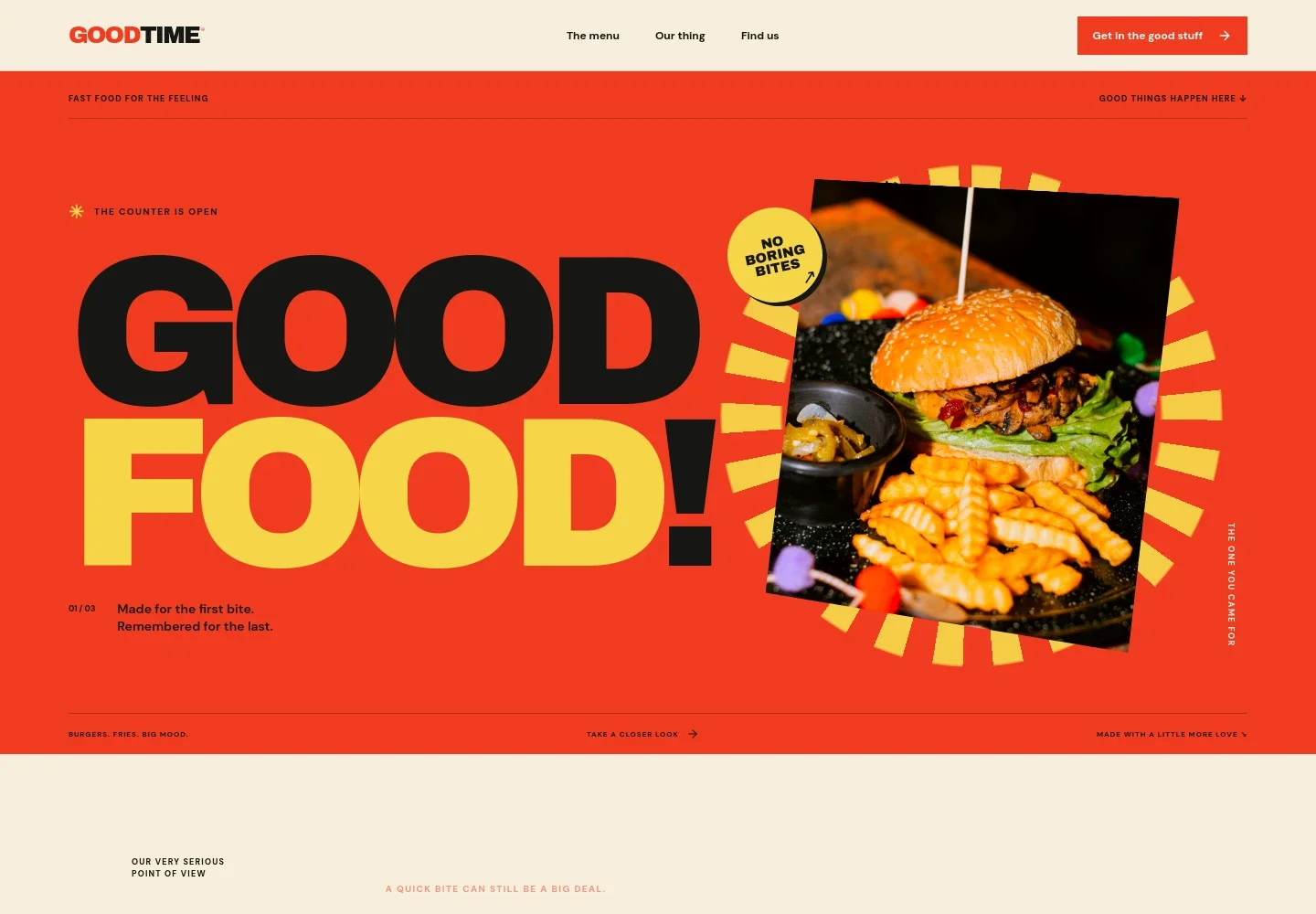
- Food-focused hero
- A prominent burger-and-fries photo, oversized headline, and short caption establish the restaurant's fast-food focus and draw attention to the menu.
- Restaurant story
- A short point-of-view section explains the care behind a quick meal, giving the restaurant space to share its approach in its own words.
- Featured menu item
- A large food image sits beside a detailed description of the Goodtime Classic burger, including its patty, toppings, sauce, and bun.
- Menu highlights
- Compact text callouts introduce fries, shakes, and extras, making additional menu categories easy to spot.
- Burger ingredient details
- Numbered callouts describe the featured burger's smash, melted cheese, and toasted bun alongside a close-up image.
- Contact and location
- A closing prompt invites visitors to say hello, followed by a footer area for a restaurant address and neighborhood details.
How to use this template
Open in Revamp
Click Use this template and sign in or create an account. You’ll start with your own copy of the design, ready to personalize.
Bring your content
Replace the sample text, photos, and logo with your own. Share your content, a document, or an existing website, and ask Revamp to adapt the template to your business.
Refine and publish
Ask Revamp to adjust the colors, layout, or sections, or edit directly on the page. Review desktop and mobile, then publish. You can keep making changes after launch.
Put your website to work
Make it easier for customers to order, find your restaurant, and hear about menu updates. Ask Revamp to add or connect tools that support those tasks.
-

Online ordering
ToastGive customers a direct path to place pickup or delivery orders. Ask Revamp to add online ordering with Toast.
-

Restaurant delivery
DoorDashHelp nearby customers discover your menu and request delivery. Ask Revamp to add a DoorDash ordering option.
-

Local discovery
Google MapsHelp visitors find your address, opening details, and directions. Ask Revamp to add a Google Maps location link.
-

Customer updates
MailchimpGive customers a way to hear about specials and new menu items. Ask Revamp to add an email signup connected to Mailchimp.
Frequently asked questions
Is this template free?
Yes. This premium template is free to use through Use this template. Free refers to the template itself.
Can I use my own content?
Yes. Ask Revamp to personalize the menu, food descriptions, restaurant story, photos, address, and contact details with your content.
Do I need coding skills?
No. Ask Revamp to personalize the content and design for your restaurant without coding.
Can I change the design?
Yes. Ask Revamp to adjust the colors, typography, imagery, and layout to suit your restaurant.
Can I keep editing after publishing?
Yes. You can keep editing after launch. Ask Revamp to update your menu, restaurant details, or design as your business changes.