About this template
Help visitors understand what your flower farm grows, how its harvest changes with the season, and how they can bring flowers home. This design introduces field-grown flowers through vivid farm imagery, an editorial story, and clear paths to browse offerings or get in touch.
The page gives seasonal flowers a central role, with sections for the farm’s growing philosophy, its harvest rhythm, field bunches, table arrangements, and updates from the field. A direct contact prompt gives prospective customers a simple next step.
Who it’s for
Flower farmers, seasonal growers, and small farms sharing field-grown bouquets, flowers for gatherings, or updates about what is blooming.
What’s included
The layout moves from a prominent flower-field image and concise introduction to the farm’s point of view, seasonal offerings, and a clear contact invitation. This helps visitors connect the growing approach with the flowers and ways to get in touch.
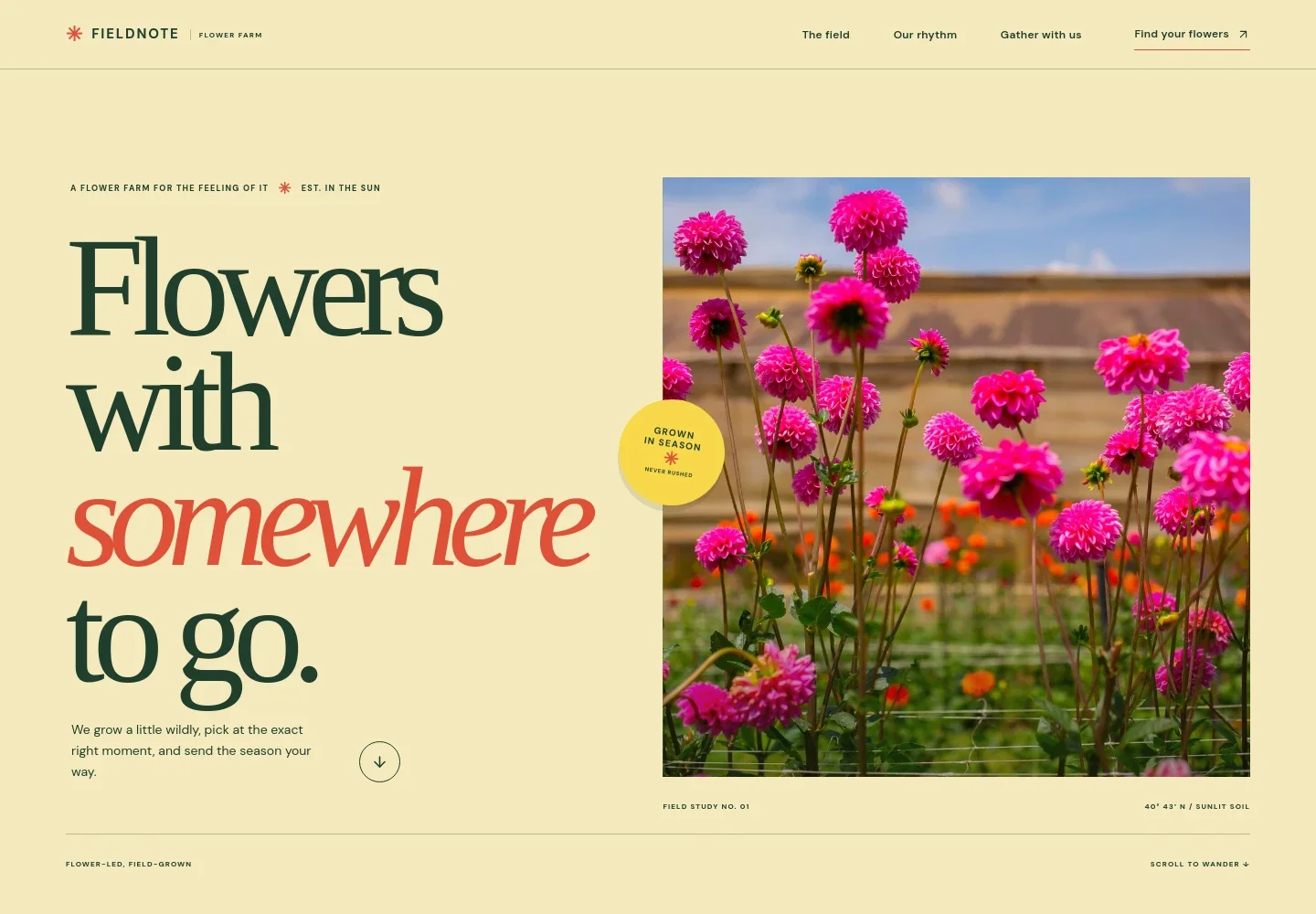
- Hero and farm introduction
- A large image of blooming flowers, a short farm statement, and a link into the page introduce the farm and its seasonal focus.
- Growing philosophy
- A dedicated section explains the template’s field-grown, hand-gathered perspective and presents flowers as seasonal rather than uniform.
- Seasonal rhythm and offerings
- A harvest image and supporting copy introduce how flowers change through the season, alongside three offer examples: field bunches, flowers gathered for a table, and field updates.
- Seasonal flower feature
- A wide floral image and short caption give the harvest a visual focal point and reinforce the loose, seasonal character of the flowers.
- Get in touch
- A closing contact section invites visitors to describe what they are gathering for and provides an email link to start a conversation.
- Footer
- The footer repeats the farm identity and offers a link back to the top of the page.
How to use this template
Open in Revamp
Click Use this template and sign in or create an account. You’ll start with your own copy of the design, ready to personalize.
Bring your content
Replace the sample text, photos, and logo with your own. Share your content, a document, or an existing website, and ask Revamp to adapt the template to your business.
Refine and publish
Ask Revamp to adjust the colors, layout, or sections, or edit directly on the page. Review desktop and mobile, then publish. You can keep making changes after launch.
Put your website to work
Make it easier to share harvest updates, manage customer enquiries, or collect interest in seasonal bunches. Ask Revamp to add or connect the tools that fit your farm’s sales and communications.
-

Collect interest in seasonal flowers
MailchimpGather customer details for harvest announcements or a seasonal flower list. Ask Revamp to add a Mailchimp signup for farm updates.
-

Keep customer enquiries organized
HubSpotTrack enquiries about bouquets, gatherings, and pickup information in one place. Ask Revamp to connect HubSpot for customer relationship management.
-

Coordinate farm activities
Google CalendarKeep pickup days and farm events visible alongside your own schedule. Ask Revamp to add Google Calendar for event scheduling.
Frequently asked questions
Is this flower farm template free?
Yes. The premium template is free to use through Use this template. This applies to the template itself.
Can I use my own farm content?
Yes. Ask Revamp to personalize the text, photographs, contact details, flower offerings, and seasonal information for your farm.
Do I need coding skills?
No. Ask Revamp to personalize the content and design in plain language, without coding.
Can I change the design?
Yes. Ask Revamp to adjust the colors, typography, imagery, layout, or other design details to better suit your farm.
Can I keep editing after publishing?
Yes. You can keep editing your website after launch. Ask Revamp to update content or make design changes as your farm and seasons change.