About this template
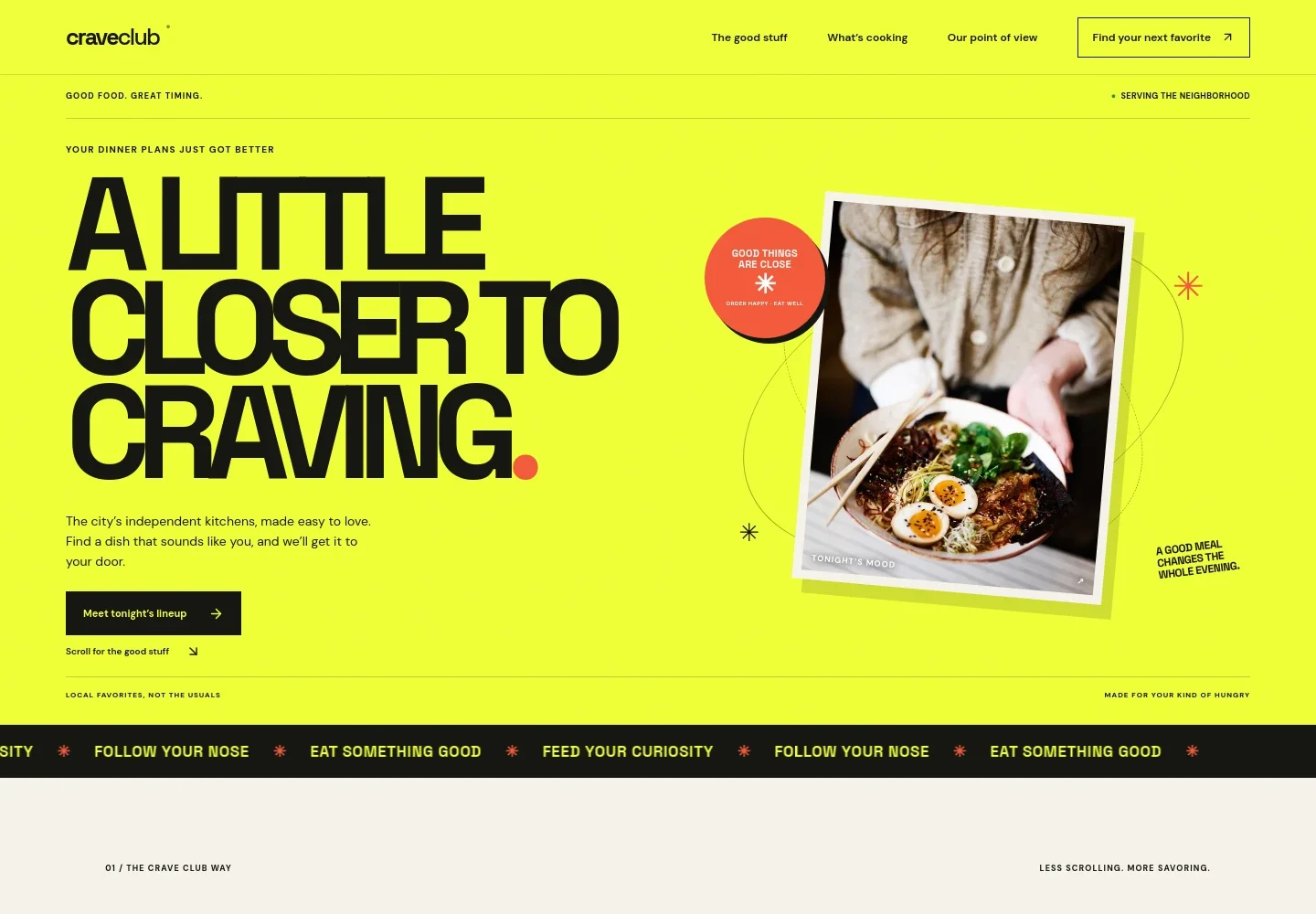
Help diners discover neighborhood kitchens and decide what sounds good. This design introduces a food ordering brand with a prominent dinner-focused welcome, a simple three-part explanation of its approach, and a featured ramen dish.
The page gives independent restaurants a clear place in the story, with dedicated sections about local kitchens, food discovery, and the dining experience. Use the featured dish and direct calls to action to guide visitors toward the menu and the next step.
Who it’s for
Food ordering businesses, local restaurant directories, delivery services, and independent kitchens looking to present their food and help customers find a meal.
What’s included
The page pairs editorial food photography and expressive, high-contrast typography with a clear path from discovering the service to browsing its featured food and local focus.
- Welcome and food discovery
- A large opening section introduces the food ordering brand, sets a neighborhood-focused tone, and directs visitors toward the featured lineup.
- How it works
- Three concise steps describe choosing a craving, finding an independent kitchen, and placing an order with the restaurant.
- Food and mood feature
- A featured ramen dish, food photograph, and descriptive copy give visitors a concrete example of the meals the service highlights.
- Independent kitchens
- A dedicated section explains the brand's emphasis on neighborhood restaurants and gives visitors a reason to discover smaller kitchens.
- Closing call to action
- A final prompt brings the focus back to choosing what sounds good and sends visitors toward the food lineup.
- Contact footer
- The footer includes a contact link, a short brand statement, and a return-to-top link.
How to use this template
Open in Revamp
Click Use this template and sign in or create an account. You’ll start with your own copy of the design, ready to personalize.
Bring your content
Replace the sample text, photos, and logo with your own. Share your content, a document, or an existing website, and ask Revamp to adapt the template to your business.
Refine and publish
Ask Revamp to adjust the colors, layout, or sections, or edit directly on the page. Review desktop and mobile, then publish. You can keep making changes after launch.
Put your website to work
Make it easier to manage restaurant orders, payments, and customer updates. Ask Revamp to add or connect the tools that fit your ordering operation.
-

Manage online orders
ToastBring online orders and restaurant operations into one system. Ask Revamp to connect Toast for restaurant ordering and operations.
-

Accept online payments
StripeGive customers a straightforward way to pay for orders. Ask Revamp to add checkout with Stripe.
-

Send customer updates
MailchimpKeep customers informed with email campaigns and updates. Ask Revamp to connect Mailchimp for customer communications.
Frequently asked questions
Is this food ordering template free?
Yes. The premium template is free to use when you select Use this template. This applies to the template itself.
Can I use my own content?
Yes. Ask Revamp to personalize the page with your restaurant or business name, menu details, food photography, contact information, and other content.
Do I need coding skills?
No coding skills are needed. Ask Revamp to make content or design changes for you.
Can I change the design?
Yes. Ask Revamp to adjust the colors, typography, layout, imagery, and other design details to suit your food business.
Can I keep editing after publishing?
Yes. You can keep editing the site after launch. Ask Revamp to update your content or design as your business changes.