About this template
Help prospective guests understand the resort’s setting, thermal experience, and approach to rest. The page introduces an Icelandic geothermal retreat through landscape photography, clear descriptions of its water and quiet-focused practice, and a direct invitation to begin a stay inquiry.
The layout gives the experience a natural sequence: introduce the place, explain the warm-water and cool-air ritual, show the surrounding landscape, then guide visitors toward starting a conversation about a visit.
Who it’s for
Health resorts, thermal spas, and wellness retreats that want to introduce their setting and guest experience to prospective visitors.
What’s included
The visible design combines large landscape imagery, restrained editorial typography, and concise sections to help visitors picture the retreat and understand what a visit involves.
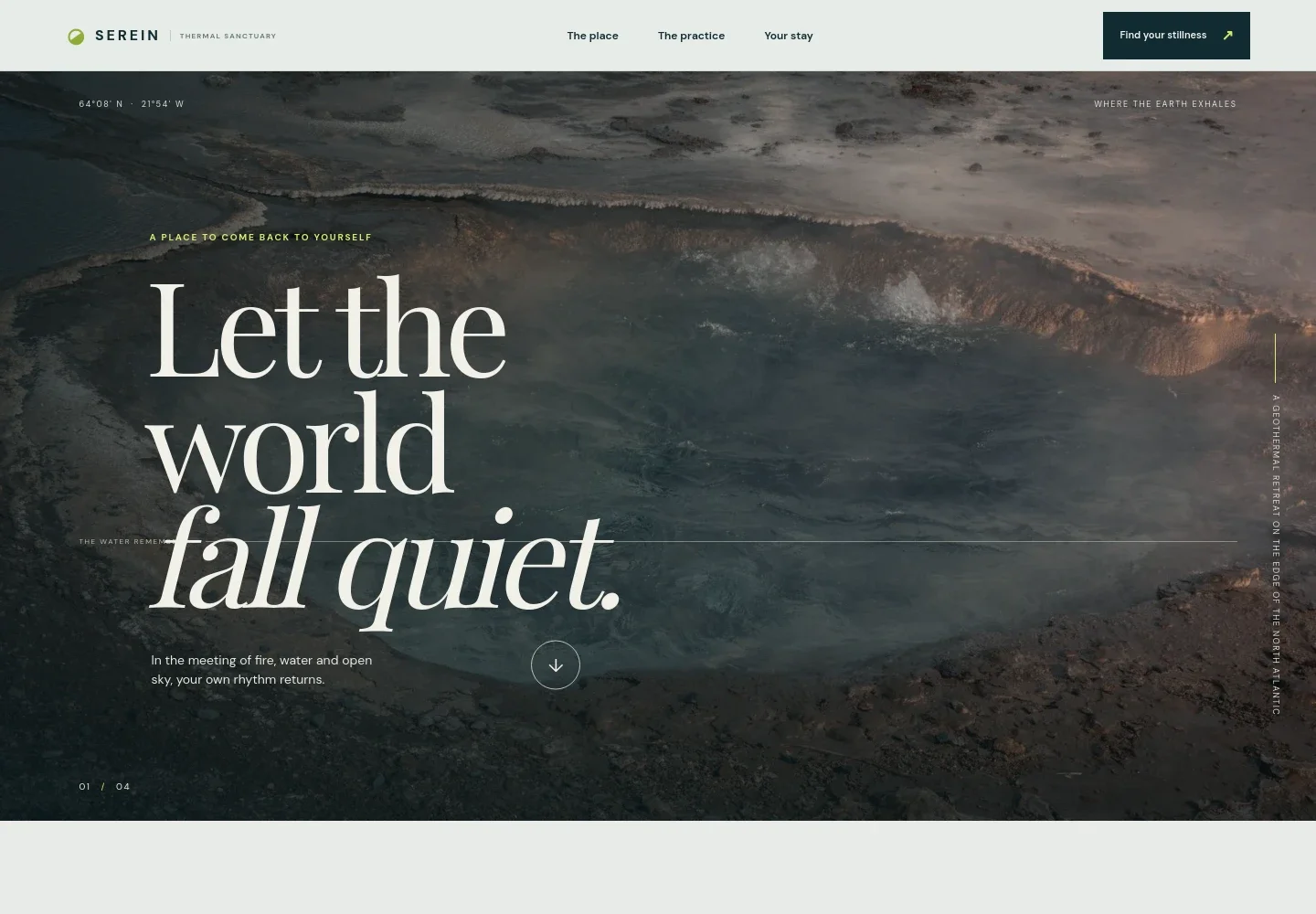
- Immersive hero
- A full-width geothermal landscape image, location coordinates, and concise introductory copy establish the retreat’s setting and invite visitors to discover more.
- The place
- An introduction explains the Icelandic landscape and the contrast between geothermal warmth and cool ocean air, giving guests context for the retreat.
- Thermal water feature
- A prominent pool image and short copy introduce the warm-water, cold-air, and stillness elements of the experience.
- The resort practice
- Three numbered steps describe a simple sequence: arrive in warmth, meet the cold, and make room for quiet. The copy presents it as a flexible practice rather than a timed program.
- Landscape and outdoor setting
- A forest image and accompanying text show that the experience extends beyond the water, with a path through the surrounding greenery.
- Stay inquiry
- The closing section welcomes both shorter visits and longer stays, with a prominent link to begin a conversation. Replace the illustrative contact address with your own.
- Navigation and footer
- Navigation links connect visitors to the place, practice, and stay sections. The footer repeats the resort identity and provides a return-to-top link.
How to use this template
Open in Revamp
Click Use this template and sign in or create an account. You’ll start with your own copy of the design, ready to personalize.
Bring your content
Replace the sample text, photos, and logo with your own. Share your content, a document, or an existing website, and ask Revamp to adapt the template to your business.
Refine and publish
Ask Revamp to adjust the colors, layout, or sections, or edit directly on the page. Review desktop and mobile, then publish. You can keep making changes after launch.
Put your website to work
Give prospective guests a clearer path from inspiration to planning. Ask Revamp to add booking or guest-management tools that fit how your resort handles visits.
-

Support direct reservations
CloudbedsAsk Revamp to add a direct booking path with Cloudbeds so guests can check availability and plan a stay.
-

Manage property reservations
MewsAsk Revamp to connect Mews to support a guest journey from browsing the resort to arranging a stay.
-

Make it easier to arrange a visit
CalendlyAsk Revamp to add consultation or visit booking with Calendly for guests who want to discuss their plans.
Frequently asked questions
Is this template free?
Yes. This premium template is free to use through Use this template. Free refers to the template itself, not hosting or other services.
Can I use my own content?
Yes. Ask Revamp to personalize the page with your resort’s name, images, location, experience details, and contact information.
Do I need coding skills?
No. Ask Revamp to personalize the content and design in plain language, without coding.
Can I change the design?
Yes. Ask Revamp to adjust the layout, colors, imagery, typography, or other design details to suit your resort.
Can I keep editing after publishing?
Yes. You can keep asking Revamp to update your content and design after your site is published.