About this template
Help people understand the clearance services you offer, how you approach a sensitive job, and what happens from the first conversation to the final handover. The design covers full-house and part-house clearances, moving and downsizing, and estate clearances.
The page gives clear space to explain careful sorting, reuse and recycling where appropriate, and how you agree the scope before work begins. A practical service list, step-by-step process, useful FAQs, and a direct contact area make it easier for visitors to decide what to ask.
Who it’s for
House clearance businesses supporting homeowners, families, executors, landlords, or people preparing a property for its next chapter.
What’s included
The design combines a calm, personal introduction with specific service details and a clear explanation of the clearance process. Its room-by-room approach, reuse messaging, and practical FAQs suit a service where trust, clear expectations, and considerate communication matter.
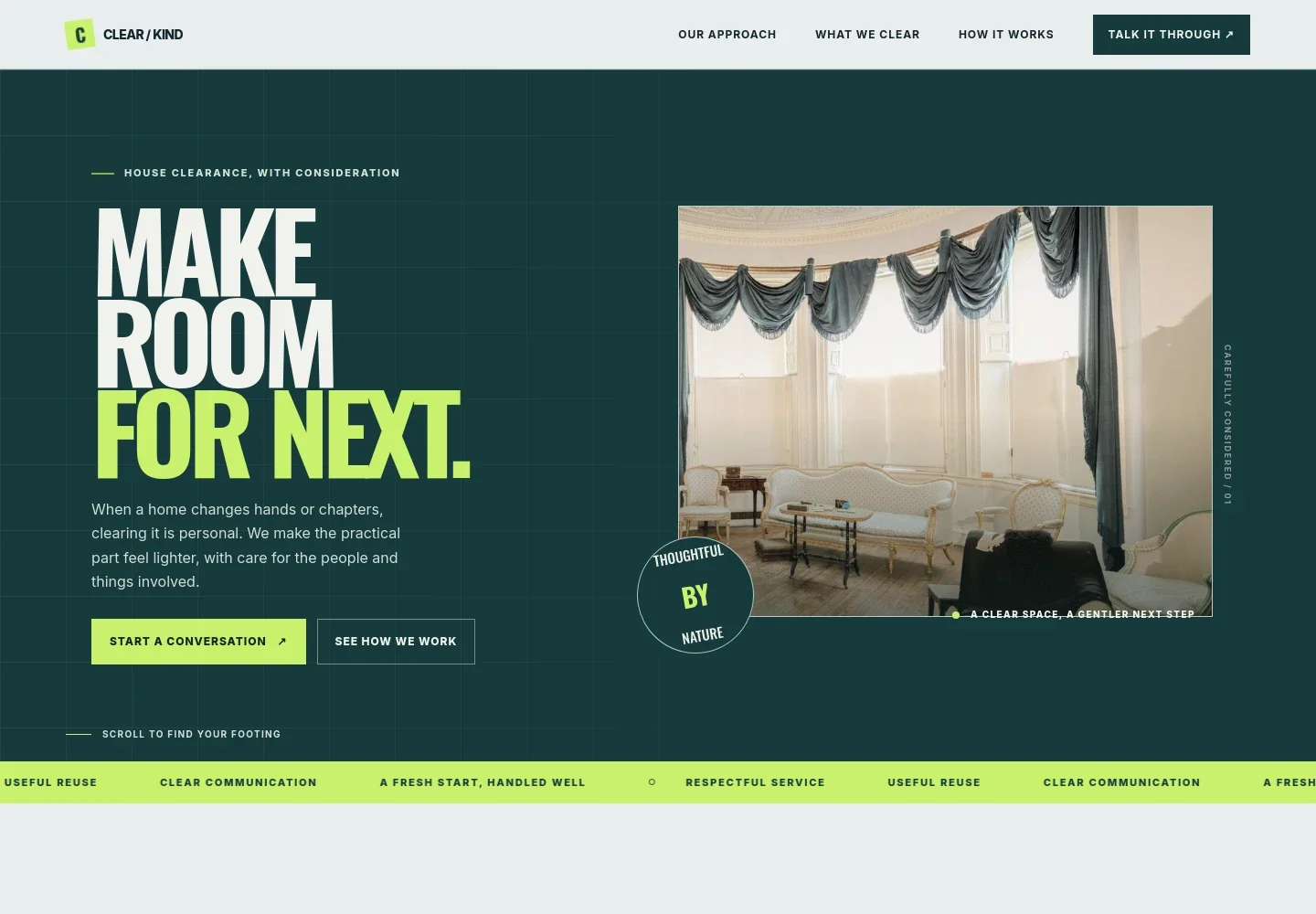
- Hero and contact prompts
- A prominent introduction frames house clearance as a personal transition, with links to start a conversation or read about the approach.
- Approach and service values
- Explains why a clearance can involve personal decisions, and introduces respectful sorting, clear communication, and thoughtful onward routes for suitable items.
- What needs clearing
- Lists full-house clearance, part-house and single-room jobs, moving and downsizing support, and sensitive estate clearances, each with a short explanation.
- How the process works
- Sets out four stages: walk through the property, agree the plan, clear and sort items, then leave the space ready with a tidy sweep and handover.
- House clearance FAQs
- Answers practical questions about being present on the day, clearing part of a property, handling usable items, and how the price is determined.
- Contact and footer navigation
- Closes with an invitation to describe the property and the help needed, an email contact link, and navigation back to the approach and services.
How to use this template
Open in Revamp
Click Use this template and sign in or create an account. You’ll start with your own copy of the design, ready to personalize.
Bring your content
Replace the sample text, photos, and logo with your own. Share your content, a document, or an existing website, and ask Revamp to adapt the template to your business.
Refine and publish
Ask Revamp to adjust the colors, layout, or sections, or edit directly on the page. Review desktop and mobile, then publish. You can keep making changes after launch.
Put your website to work
Make enquiries easier to manage and keep property details organized. Ask Revamp to add or connect tools that fit the way your clearance business handles new requests.
-

Keep enquiry details organized
HubSpotTrack prospective customers, property details, and follow-ups in one place. Ask Revamp to connect HubSpot for managing clearance enquiries.
-

Arrange site visits more easily
CalendlyLet prospective customers request a time to discuss a property or arrange an assessment. Ask Revamp to add consultation booking with Calendly.
-

Coordinate visits around your schedule
Google CalendarKeep appointments and property visits visible alongside your other commitments. Ask Revamp to connect Google Calendar for scheduling.
Frequently asked questions
Is this template free?
Yes. This premium template is free to use when you select Use this template. Free refers to the template itself.
Can I use my own content?
Yes. Ask Revamp to personalize the copy, images, services, contact details, and other content for your business.
Do I need coding skills?
No. Ask Revamp to make content and design changes in plain language, without coding.
Can I change the design?
Yes. Ask Revamp to adjust the layout, colors, typography, imagery, or other design details to suit your business.
Can I keep editing after publishing?
Yes. You can keep making changes after launch. Ask Revamp to update your content or design as your services and business needs change.