About this template
Help prospective clients understand the kinds of protection you discuss, from home and property to life and family, and business coverage. The page presents insurance as a personal conversation, with an emphasis on explaining choices clearly.
A considered editorial layout pairs a strong headline and abstract orbit illustration with concise service rows, a guidance-focused image, and a direct contact invitation. Visitors can move from learning about your approach to reviewing coverage areas and getting in touch.
Who it’s for
Independent insurance agents and brokers who advise individuals, families, homeowners, and business owners, and want a clear website for explaining their approach and starting client conversations.
What’s included
The page guides visitors through your advisory approach, the types of cover you discuss, and a clear next step for contacting you. Its numbered sections and distinct visual treatments make that path easy to follow.
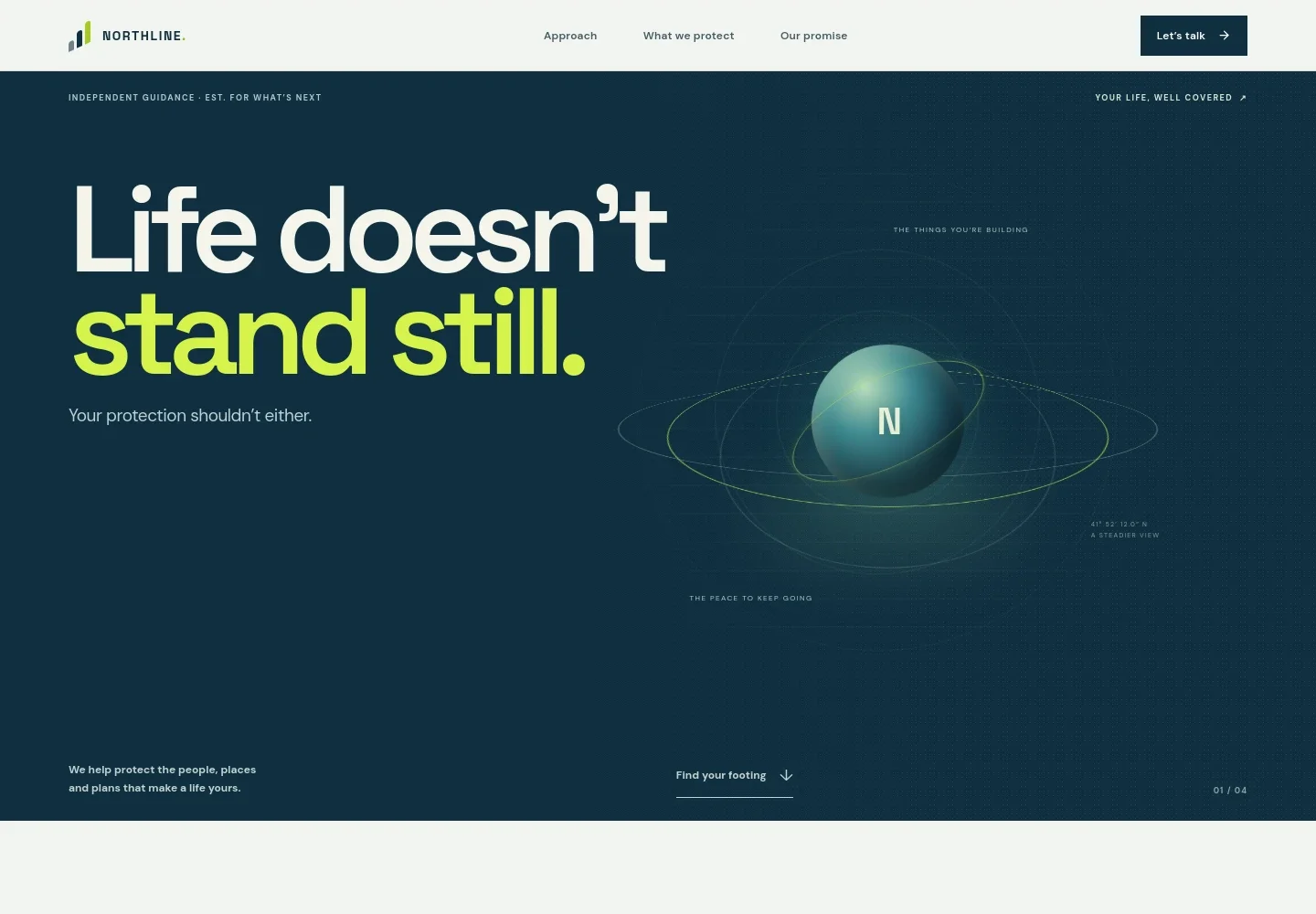
- Hero and navigation
- A prominent life-focused headline and animated orbit-style illustration introduce the idea of protection that keeps pace with changing needs. Navigation links take visitors to your approach, coverage areas, and promise, with a contact call to action.
- Your approach
- A two-column section explains that advice begins with understanding the person, their priorities, and what they are working toward. Supporting copy emphasizes clarity before paperwork and invites visitors to start a conversation.
- Coverage areas
- Three clearly numbered rows introduce home and property, life and family, and business and livelihood protection. Each explains the general topic in plain language and links toward the contact section.
- Your promise
- A family photograph accompanies copy about listening first, explaining insurance without jargon, and staying in conversation as needs evolve. A callout reinforces a considered, no-pressure advisory tone.
- Contact invitation
- A high-contrast closing section encourages visitors to begin with what is on their mind and provides an email contact button. The example address and contact details can be personalized for your business.
- Footer
- The footer repeats the business identity, summarizes the independent guidance positioning, and provides a link back to the top of the page.
How to use this template
Open in Revamp
Click Use this template and sign in or create an account. You’ll start with your own copy of the design, ready to personalize.
Bring your content
Replace the sample text, photos, and logo with your own. Share your content, a document, or an existing website, and ask Revamp to adapt the template to your business.
Refine and publish
Ask Revamp to adjust the colors, layout, or sections, or edit directly on the page. Review desktop and mobile, then publish. You can keep making changes after launch.
Put your website to work
Make it easier to manage inquiries and keep client conversations organized. Ask Revamp to add or connect tools that support your preferred process.
-

Organize prospects and client follow-up
HubSpotKeep contact records and inquiry follow-up in one place. Ask Revamp to connect HubSpot for managing prospective and existing client relationships.
-

Let clients request a meeting time
CalendlyGive visitors a straightforward way to request a consultation around your availability. Ask Revamp to add appointment booking with Calendly.
-

Coordinate meetings with your calendar
Google CalendarKeep consultation scheduling aligned with your calendar. Ask Revamp to connect Google Calendar for meeting coordination.
Frequently asked questions
Is this insurance agent template free?
Yes. This premium template is free to use when you select Use this template. The offer is for the template itself.
Can I use my own business content?
Yes. Ask Revamp to personalize the copy, contact details, coverage descriptions, and images for your business.
Do I need coding skills to personalize it?
No. Ask Revamp to make content and design changes for you, without coding.
Can I change the design?
Yes. Ask Revamp to adjust the layout, colors, typography, imagery, and other design details to suit your business.
Can I keep editing after publishing?
Yes. You can keep asking Revamp to update your site after it launches.