About this template
Help listeners understand your station, what it sounds like, and when to tune in. This internet radio design pairs a prominent listen-live player with a clear program schedule and a studio story.
The dark, editorial layout uses a radio dial, waveform details, and a studio image to give the page a distinct broadcast identity. Schedule rows show program names, times, short descriptions, and hosts, while the station sections introduce its music and listening approach.
Who it’s for
Designed for independent internet radio stations, online broadcasters, and radio collectives that want to introduce their sound, present a schedule, and make listening easy to find.
What’s included
The page guides visitors from the station’s identity to its schedule, programming approach, and contact details, with a listen-live control featured in the opening section.
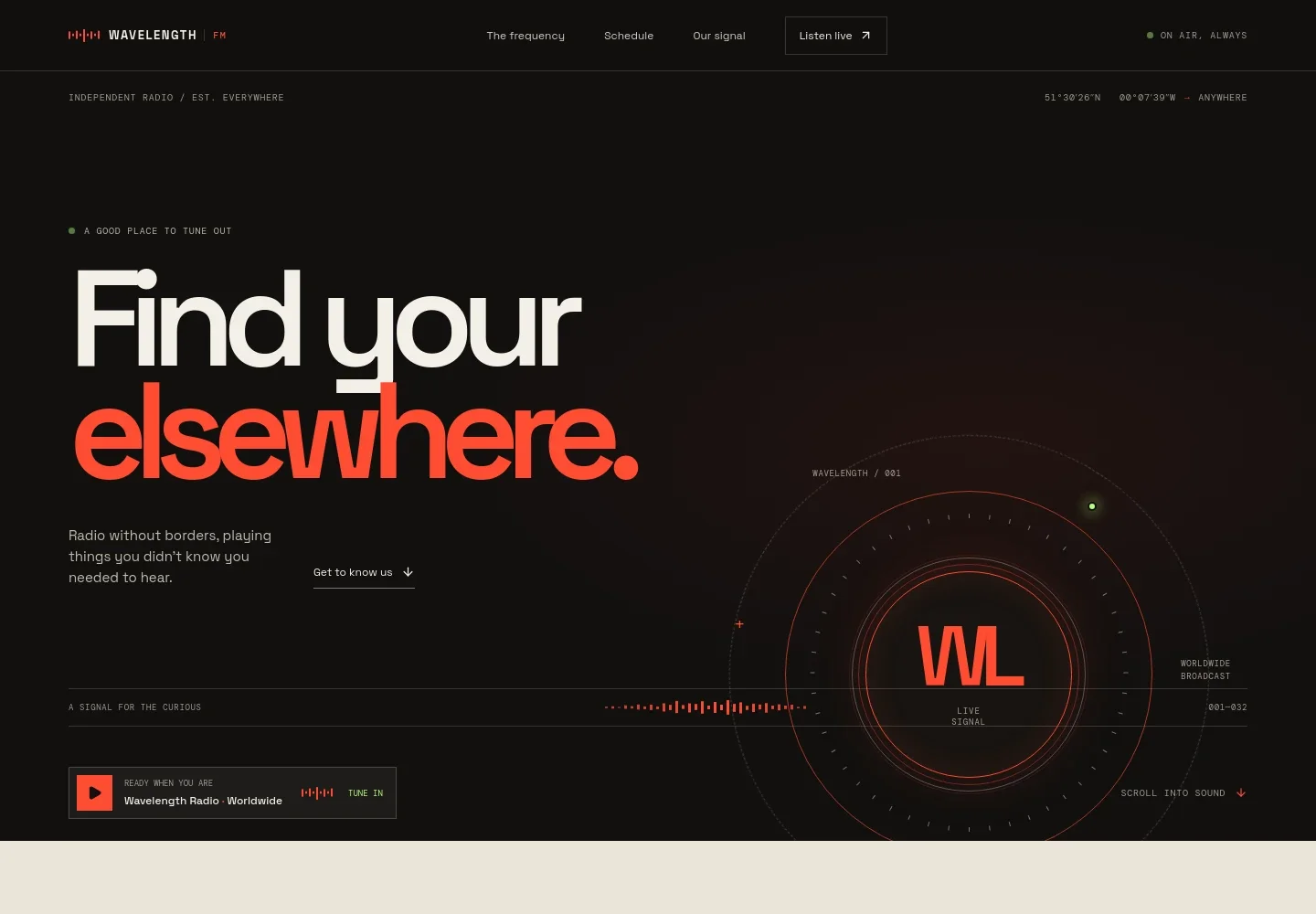
- Station introduction and listen-live player
- A bold headline and short station introduction establish the radio’s character. A prominent play control gives visitors a clear place to start listening, alongside a radio-dial graphic and waveform motif.
- The frequency
- This editorial section explains the station’s independent, selector-led approach and the range of sounds it brings together, helping listeners understand what sets its programming apart.
- Broadcast schedule
- Four program rows display UTC time slots, show names, short descriptions, and host names. Each row links toward the listen-live control, connecting the schedule to listening.
- A note from the studio
- A studio-console image and concise copy introduce the station as a meeting place for music people and listeners. A scrolling text strip gives examples of the sounds featured on air.
- Contact and footer
- The closing area repeats the station identity and provides an email contact link, along with navigation back to the top of the page.
How to use this template
Open in Revamp
Click Use this template and sign in or create an account. You’ll start with your own copy of the design, ready to personalize.
Bring your content
Replace the sample text, photos, and logo with your own. Share your content, a document, or an existing website, and ask Revamp to adapt the template to your business.
Refine and publish
Ask Revamp to adjust the colors, layout, or sections, or edit directly on the page. Review desktop and mobile, then publish. You can keep making changes after launch.
Put your website to work
Make it easier to share programming updates and understand how listeners engage. Ask Revamp to add or connect tools that fit your station’s audience and workflow.
-

Share station news with listeners
MailchimpKeep listeners informed about new shows and station updates. Ask Revamp to connect Mailchimp for email newsletter signups.
-

Understand your audience
Google AnalyticsReview website visits and how listeners find your station. Ask Revamp to connect Google Analytics for audience measurement.
-

Promote upcoming broadcasts
Google CalendarGive listeners a simple way to add special broadcasts to their calendars. Ask Revamp to add event reminders with Google Calendar.
Frequently asked questions
Is this internet radio template free?
Yes. This premium template is free to use when you select Use this template. The offer is for the template itself.
Can I use my own station content?
Yes. Ask Revamp to personalize the page with your station name, show schedule, host details, images, and contact information.
Do I need coding skills to customize it?
No coding skills are needed. Ask Revamp to update the content and design for your station.
Can I change the design?
Yes. Ask Revamp to adjust the colors, typography, layout, and other design details to suit your station.
Can I keep editing after publishing?
Yes. You can keep asking Revamp to update your site after launch as your station, schedule, or content changes.


