About this template
Help prospective clients understand your landscape studio’s approach, see garden design imagery, and find the right next step to discuss their property. The design presents gardens as places shaped by the site, its planting, and the way people use outdoor space.
The page introduces landscape direction, garden design, build and planting, and seasonal stewardship. A dedicated planting feature emphasizes how gardens develop over time, while the contact section invites visitors to share what they are imagining.
Who it’s for
Landscape designers, garden designers, landscaping studios, and professionals offering planting, garden construction, or ongoing garden care.
What’s included
A considered portfolio-style layout pairs garden photography with a clear account of your approach, services, and contact invitation. Its editorial pacing gives visitors room to understand your design point of view before reviewing the work and service details.
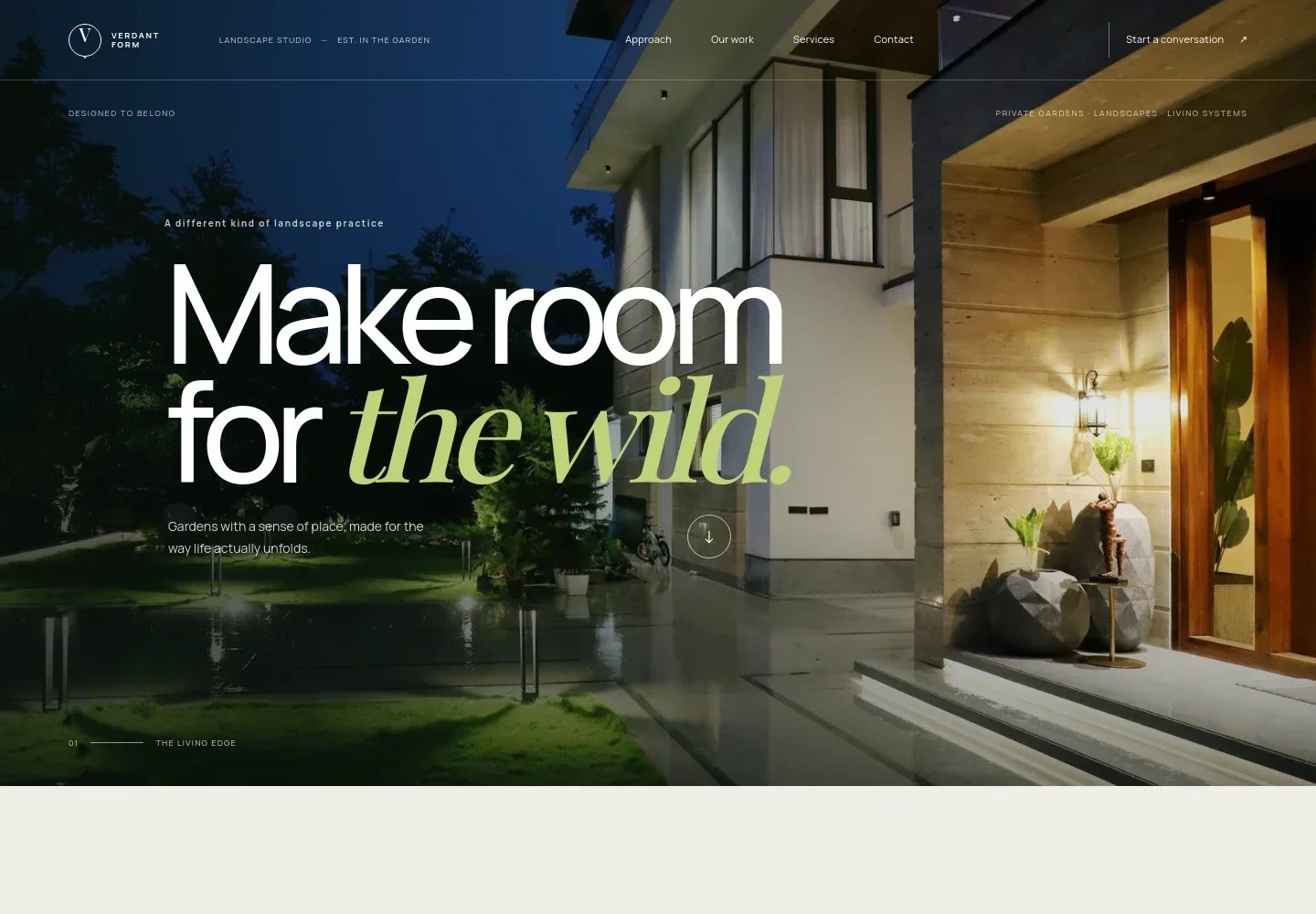
- Landscape studio hero
- A full-width garden image, concise headline, and links to the main page sections introduce the studio and direct visitors toward the approach or contact information.
- Approach and point of view
- Explains how a garden can respond to existing site conditions, including light, land, trees, and views. Supporting copy and a link lead visitors toward the services.
- Garden imagery and work feature
- A large courtyard image and short caption provide a visual example of an outdoor space, with copy about listening to each site and designing for change over time.
- Landscape services
- Four clearly separated service descriptions cover landscape direction, garden design, build and planting, and seasonal stewardship. This structure helps prospective clients identify the kind of work they want to discuss.
- Planting and long-term growth
- Pairs a photograph of ornamental grasses with copy about layered planting, seasonal shifts, and designing for how a garden matures.
- Contact invitation
- A prominent closing section invites visitors to describe what they are imagining or enjoy about being outdoors, with a link to begin a conversation.
- Navigation and footer
- The header links to the approach, work, services, and contact sections. The footer repeats the studio identity and provides a return-to-top link.
How to use this template
Open in Revamp
Click Use this template and sign in or create an account. You’ll start with your own copy of the design, ready to personalize.
Bring your content
Replace the sample text, photos, and logo with your own. Share your content, a document, or an existing website, and ask Revamp to adapt the template to your business.
Refine and publish
Ask Revamp to adjust the colors, layout, or sections, or edit directly on the page. Review desktop and mobile, then publish. You can keep making changes after launch.
Put your website to work
Make it easier to manage enquiries, arrange site visits, and keep project leads organized. Ask Revamp to add or connect tools that suit the way your landscaping business works.
-

Schedule consultations
CalendlyGive prospective clients a convenient way to request a conversation or site visit. Ask Revamp to add consultation booking with Calendly.
-

Organize client enquiries
HubSpotKeep track of prospective projects and follow-up conversations in one place. Ask Revamp to connect HubSpot for landscaping enquiry management.
-

Track leads and project details
Google SheetsKeep enquiry information and project notes organized in a shared spreadsheet. Ask Revamp to connect Google Sheets for lead tracking.
Frequently asked questions
Is this landscaping template free?
Yes. The premium template is free to use when you select Use this template. This applies to the template itself.
Can I use my own landscaping business content?
Yes. Ask Revamp to personalize the copy, garden images, services, business details, and contact information for your landscaping business.
Do I need coding skills to personalize the template?
No. You can ask Revamp to personalize the content and design without coding.
Can I change the design?
Yes. Ask Revamp to adjust the colors, typography, imagery, layout, or other design details to better fit your landscape studio.
Can I keep editing the website after publishing?
Yes. You can continue asking Revamp to update your content and design after your website launches.