About this template
Help travelers see how your luggage storage service fits into their day. The page explains the basic customer journey: choose a nearby location, reserve space, drop off bags, and return when ready.
A city selector, location callouts, and clear links to location information give visitors an intuitive route from discovering the service to finding a place to leave their bags. The design pairs practical details with lively travel imagery and concise copy.
Who it’s for
Luggage storage companies, local bag-drop operators, and travel businesses that want to explain their service and direct visitors to locations.
What’s included
The page is organized around the questions travelers need answered: why to store their bags, how drop-off works, and where to find a location. Its step-by-step layout and location-focused calls to action make the service easy to understand at a glance.
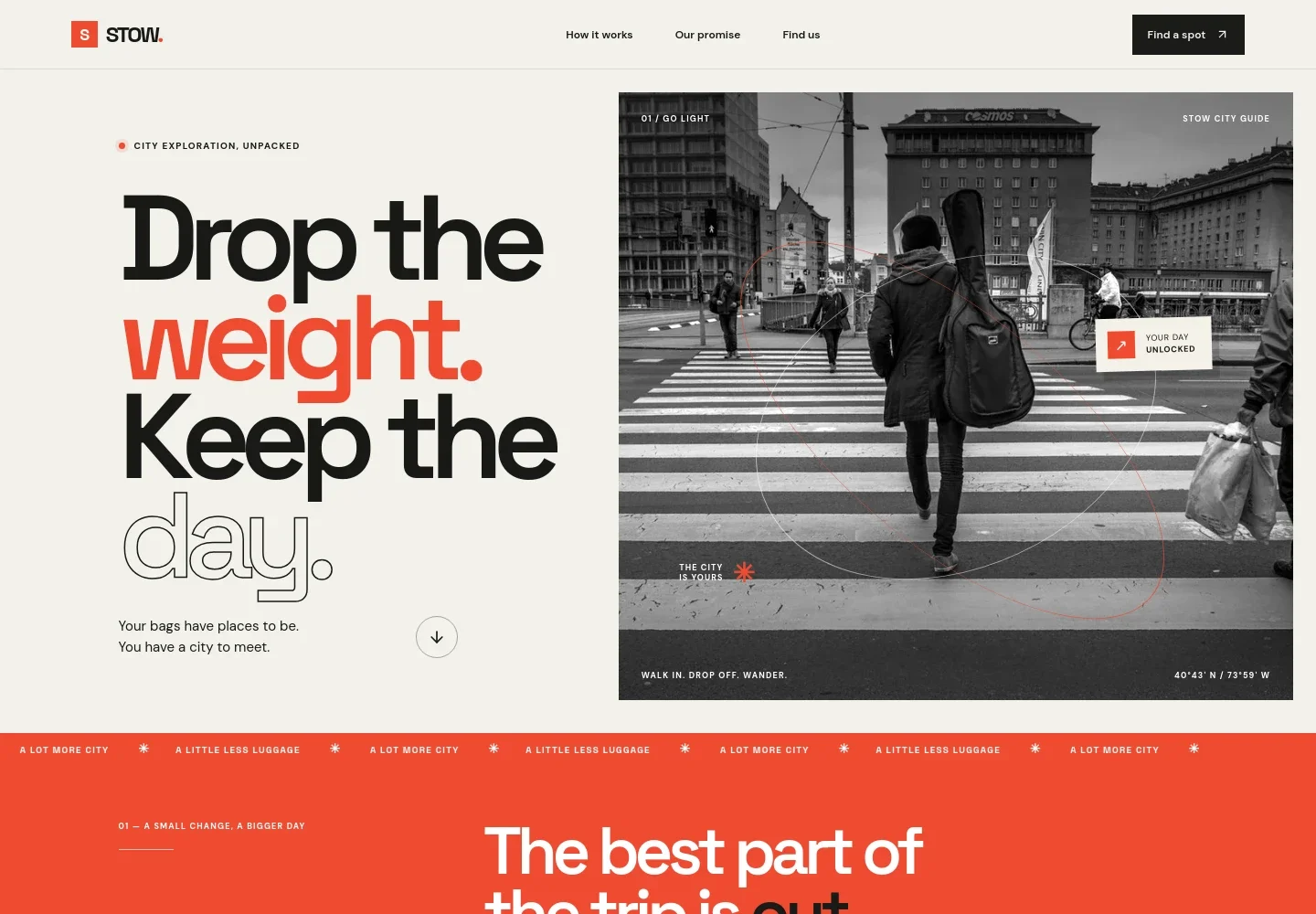
- Hero and service introduction
- A prominent travel-focused headline and city scene introduce the idea of exploring without carrying bags, with a link leading visitors to the service steps.
- Service promise
- A short explanation connects luggage storage with practical travel moments, such as having time before hotel check-in, and frames the benefit of exploring hands-free.
- How it works
- Three numbered steps explain choosing a nearby location, showing a booking and receiving a bag tag, then returning for the bags. A note reminds visitors to check each location's opening hours.
- Travel imagery
- A photograph of a bag in an overhead compartment and a brief travel message provide a visual pause between the service explanation and location information.
- City and location finder
- A city selector presents New York, London, Paris, and Tokyo as illustrative options, followed by a location callout and a link to explore locations. The accompanying note clarifies that availability depends on the service area.
- Contact call to action
- A closing section invites visitors to get in touch by email, with space for a business contact address and a final prompt to make room for the moment.
- Navigation and footer
- The header links to the process, service promise, and location section. The footer repeats the brand, offers a return-to-top link, and includes a short closing line.
How to use this template
Open in Revamp
Click Use this template and sign in or create an account. You’ll start with your own copy of the design, ready to personalize.
Bring your content
Replace the sample text, photos, and logo with your own. Share your content, a document, or an existing website, and ask Revamp to adapt the template to your business.
Refine and publish
Ask Revamp to adjust the colors, layout, or sections, or edit directly on the page. Review desktop and mobile, then publish. You can keep making changes after launch.
Put your website to work
Make it easier to manage reservations, customer questions, and location operations. Ask Revamp to add connections with tools suited to your service.
-

Manage bookings and location operations
MewsKeep reservations and property operations organized across locations. Ask Revamp to add a connection with Mews for your accommodation and hospitality workflows.
-

Organize customer inquiries
HubSpotTrack traveler questions and follow-ups in one customer management system. Ask Revamp to connect HubSpot to support your customer communications.
-

Coordinate staff schedules
Google CalendarKeep shift planning visible for teams covering different storage locations. Ask Revamp to add Google Calendar for staff scheduling.
Frequently asked questions
Is this template free?
Yes. This premium template is free to use when you select Use this template. This applies to the template itself.
Can I use my own content?
Yes. Ask Revamp to personalize the text, locations, contact details, and imagery for your luggage storage business.
Do I need coding skills?
No coding skills are needed. Ask Revamp to make content and design changes in plain language.
Can I change the design?
Yes. Ask Revamp to adjust the colors, typography, images, layout, and other visual details to suit your business.
Can I keep editing after publishing?
Yes. You can keep asking Revamp to update your website after launch as your locations, contact details, or business needs change.