About this template
Help prospective clients understand how your studio turns product ideas into considered mobile experiences. The page opens with a clear point of view, then shows how you approach product design, from identifying friction to shaping a flow and preparing a handoff.
A featured design study, four-step process, and capability list give visitors concrete ways to understand your work. The dark visual system, oversized type, and mobile imagery frame the studio as a focused practice while keeping the service information easy to scan.
The closing contact section invites visitors to start a conversation about what they are building or where they are stuck. Ask Revamp to personalize the studio name, project content, services, imagery, and contact details for your business.
Who it’s for
Independent mobile app designers, product design studios, UX and UI consultants, and digital product teams seeking to explain their approach and attract prospective clients.
What’s included
The page guides visitors from the studio’s design point of view to its work, process, capabilities, and contact invitation. The sequence helps prospective clients understand both what the studio does and how to begin a discussion.
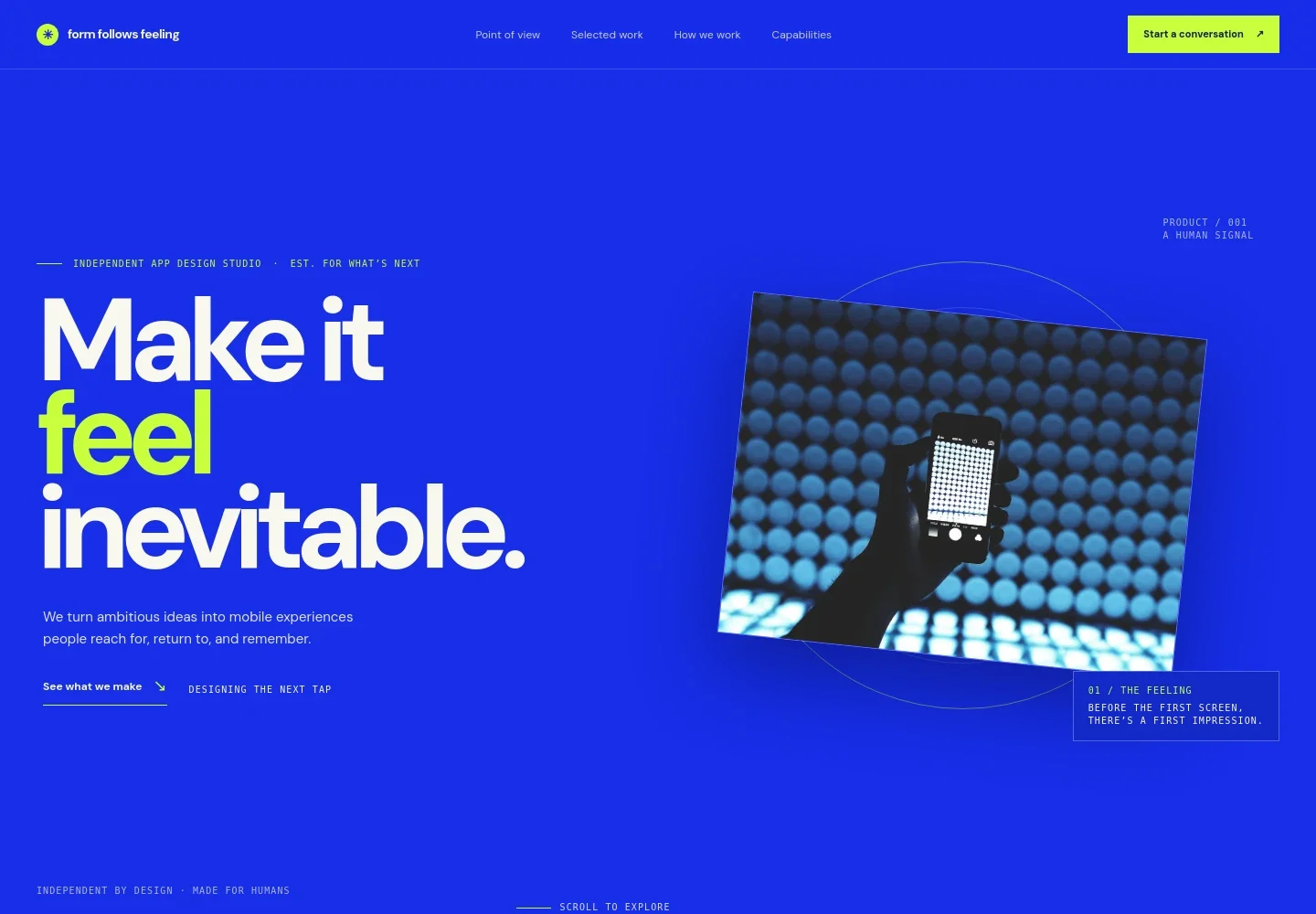
- Hero and studio introduction
- A prominent headline and concise statement introduce the studio’s focus on human mobile experiences. A large phone image and links to selected work and contact make the page’s purpose clear from the start.
- Point of view
- This section explains the studio’s belief that good apps should feel intuitive, pairing a short perspective on product design with a concise statement about clarity.
- Selected work and design study
- A featured design study pairs mobile design imagery with a description of reducing friction and clarifying the path to an essential action. Three additional study themes cover onboarding, everyday tools, and complex services.
- How the studio works
- Four steps describe the process: finding friction, shaping the product story, prototyping the experience, and preparing a handoff. This gives prospective clients a practical overview of how a project can progress.
- Capabilities
- Four service areas cover product direction, experience design, visual systems, and prototyping and handoff, helping visitors see the range of design work the studio can discuss.
- Contact and footer
- A closing prompt invites visitors to discuss an idea or challenge, followed by an email contact link and footer navigation. Replace the illustrative contact details with your own.
How to use this template
Open in Revamp
Click Use this template and sign in or create an account. You’ll start with your own copy of the design, ready to personalize.
Bring your content
Replace the sample text, photos, and logo with your own. Share your content, a document, or an existing website, and ask Revamp to adapt the template to your business.
Refine and publish
Ask Revamp to adjust the colors, layout, or sections, or edit directly on the page. Review desktop and mobile, then publish. You can keep making changes after launch.
Put your website to work
Support client inquiries, project coordination, and studio marketing by asking Revamp to add or connect tools that fit your workflow.
-

Make intro calls easier to schedule
CalendlyGive prospective clients a direct way to find a time for a first conversation. Ask Revamp to add consultation booking with Calendly.
-

Keep leads and client conversations organized
HubSpotTrack inquiries and follow-up details in one place. Ask Revamp to connect your contact flow with HubSpot.
-

Share project updates in a clear timeline
Google CalendarCoordinate meetings around your existing calendar. Ask Revamp to add a Google Calendar connection for scheduling project discussions.
Frequently asked questions
Is this template free?
Yes. This premium template is free to use through Use this template. That applies to the template itself, not hosting or other services.
Can I use my own content?
Yes. Ask Revamp to personalize the studio details, services, design studies, images, and contact information with your own content.
Do I need coding skills?
No coding skills are needed. Ask Revamp to make content and design changes in natural language.
Can I change the design?
Yes. Ask Revamp to adjust the colors, typography, imagery, layout, or other design choices to better suit your studio.
Can I keep editing after publishing?
Yes. You can keep editing your site after launch. Ask Revamp to update your content or design as your studio and work evolve.


