About this template
Introduce your sound, creative practice, and music in one clear place. The design pairs a bold artist-led opening with sections for your musical approach, songwriting and performance work, selected tracks, and a direct way to get in touch.
Built around an independent alt-pop artist, the page uses expressive typography, dark and warm color contrasts, abstract portrait artwork, and a close-up guitar image. The track list and contact area give visitors a practical path from discovering your music to starting a conversation.
Who it’s for
Independent musicians, singer-songwriters, bands, and performers who want to present their sound, share selected releases, explain their creative work, and invite show or collaboration inquiries.
What’s included
The completed design moves from artist introduction to music and contact, helping listeners understand your sound and find a next step without searching through unrelated pages.
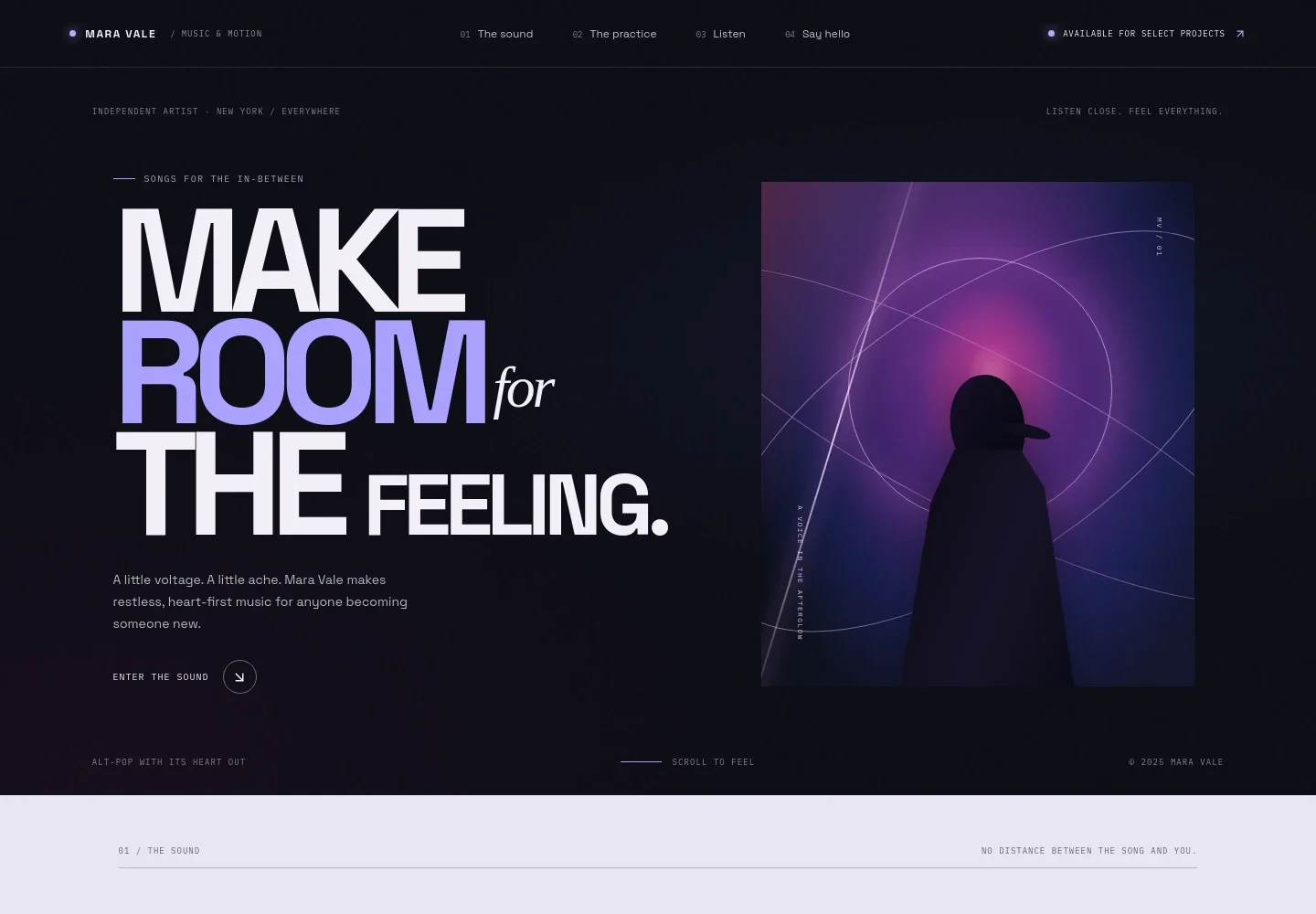
- Artist introduction
- A prominent headline, short artist statement, role and location details, and abstract portrait artwork establish who the musician is and the feeling of the music.
- The sound
- A personal note and concise descriptions of the musical character introduce the artist's approach before visitors reach the listening section.
- The practice
- A guitar image sits beside three descriptions covering collaborative songwriting, intimate live sets, and independent releases, making the artist's work clear to collaborators and prospective bookers.
- Listening pause
- A full-width visual interlude creates a distinct transition between the artist's practice and the track list.
- Selected tracks
- A numbered track list presents three song titles, short listening contexts, and durations. Replace the template's sample titles and destinations with your own releases and listening links.
- Contact
- A direct email call to action invites conversations about shows, songs, or other inquiries. Personalize the illustrative contact details before publishing.
How to use this template
Open in Revamp
Click Use this template and sign in or create an account. You’ll start with your own copy of the design, ready to personalize.
Bring your content
Replace the sample text, photos, and logo with your own. Share your content, a document, or an existing website, and ask Revamp to adapt the template to your business.
Refine and publish
Ask Revamp to adjust the colors, layout, or sections, or edit directly on the page. Review desktop and mobile, then publish. You can keep making changes after launch.
Put your website to work
Make it easier for listeners to hear your releases, follow your music, and keep up with live dates. Ask Revamp to add links or connect the tools that support those next steps.
-

Send listeners to your releases
SpotifyGive visitors a direct route to your music across streaming platforms. Ask Revamp to add a Spotify listening link.
-

Share new music with fans
Apple MusicMake new releases easy to discover and follow on Apple devices. Ask Revamp to add an Apple Music artist link.
-

Promote upcoming shows
BandsintownHelp fans find your performance dates and ticket details. Ask Revamp to add a Bandsintown events link.
-

Keep fans in the loop
MailchimpBuild an email audience for release news and show announcements. Ask Revamp to add a Mailchimp newsletter signup.
Frequently asked questions
Is this musician website template free?
Yes. This premium template is free to use when you select Use this template. The offer applies to the template, not hosting or other services.
Can I use my own music, photos, and artist details?
Yes. Ask Revamp to personalize the page with your artist biography, releases, images, listening links, performance information, and contact details.
Do I need coding skills to personalize the site?
No. Ask Revamp to change your content and design in plain language, without coding.
Can I change the design?
Yes. Ask Revamp to adjust the colors, typography, artwork, layout, or sections to better fit your music and visual identity.
Can I keep editing after publishing?
Yes. You can keep editing after launch. Ask Revamp to update your releases, show details, images, or other page content as your music develops.


