About this template
Help prospective clients understand your press office’s point of view, services, and approach to shaping a story. The page introduces positioning and narrative development, media relations, executive visibility, launches, and reputation counsel.
A clear progression moves from your perspective to your practice, an explanation of how an idea moves into the world, and a personal invitation to start a conversation. Editorial photography and strong typography give the page the feel of a focused communications practice.
Who it’s for
Independent press offices, public relations agencies, communications consultants, and reputation advisers who want to explain their services and invite prospective clients to make contact.
What’s included
The design gives visitors a quick understanding of what your press practice stands for, what it does, and how to begin a conversation. Its service list and story-led sections help prospective clients find the parts of your approach most relevant to their needs.
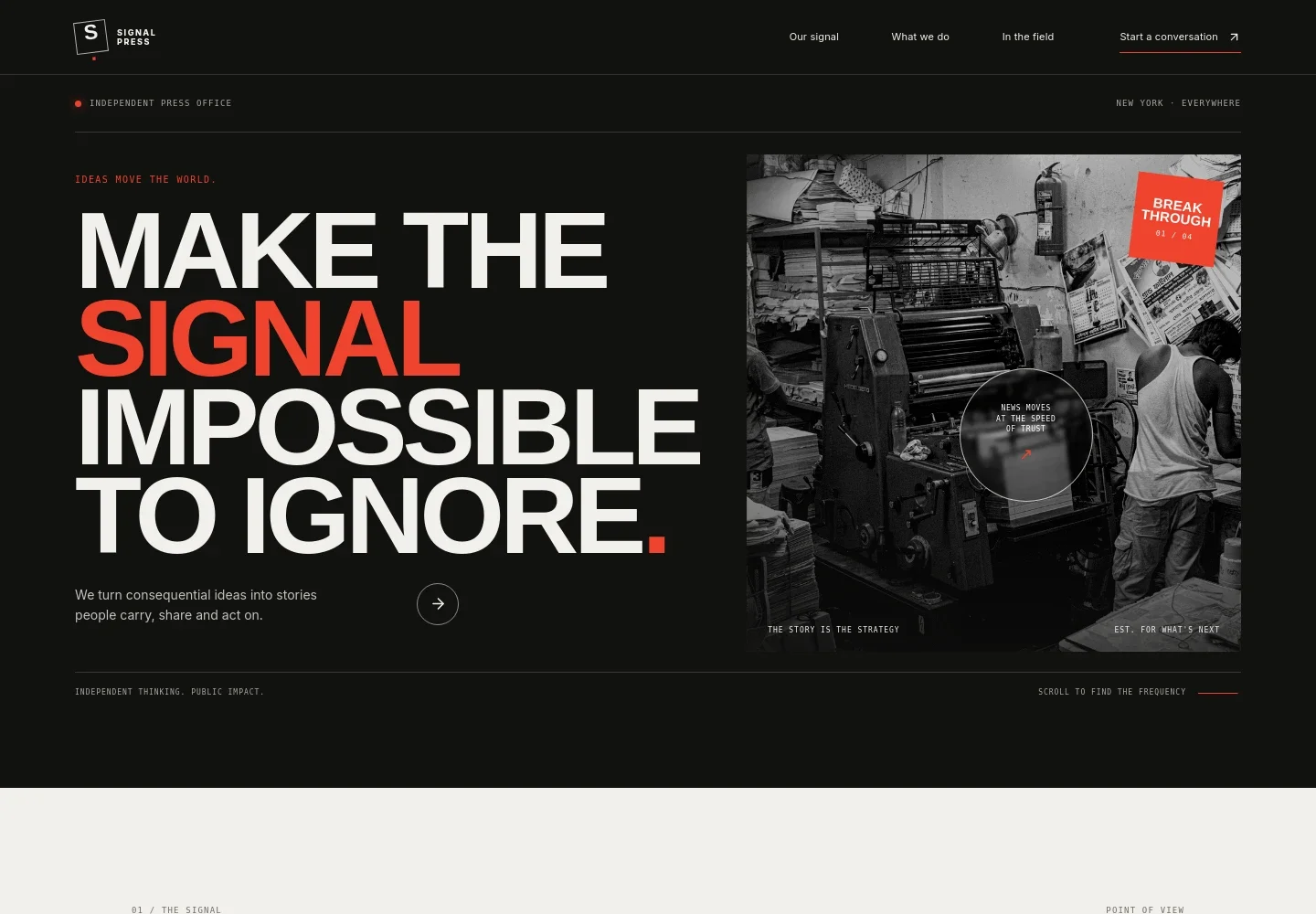
- Hero and navigation
- A prominent headline and concise statement introduce the press office, while navigation points visitors to the point of view, services, field section, and contact information.
- Point of view
- A dedicated section explains the practice’s stance on earning attention and shaping a story, supported by a short editorial statement.
- Press services
- Four service rows describe positioning and narrative development, media relations and executive visibility, launches and newsjacking, and reputation counsel and issues readiness.
- Story process
- A visual sequence presents three stages: finding the human truth, giving it a sharp edge, and putting it in the world.
- In the field
- Journalism-inspired photography and copy emphasize listening, asking questions, and identifying the human stakes behind a story.
- Contact and footer
- A direct invitation to discuss a project leads to an email contact link. The footer repeats the wordmark, offers a return-to-top link, and includes a copyright line.
How to use this template
Open in Revamp
Click Use this template and sign in or create an account. You’ll start with your own copy of the design, ready to personalize.
Bring your content
Replace the sample text, photos, and logo with your own. Share your content, a document, or an existing website, and ask Revamp to adapt the template to your business.
Refine and publish
Ask Revamp to adjust the colors, layout, or sections, or edit directly on the page. Review desktop and mobile, then publish. You can keep making changes after launch.
Put your website to work
Streamline media outreach and manage new business inquiries by asking Revamp to add tools your press office already uses.
-

Organize journalist outreach
Muck RackKeep media contacts, pitches, and follow-ups organized. Ask Revamp to add media relations workflows with Muck Rack.
-

Manage client relationships
HubSpotTrack prospective clients and keep business development conversations in one place. Ask Revamp to connect HubSpot for contact and inquiry management.
-

Schedule introductory calls
CalendlyGive prospective clients a convenient way to book a conversation. Ask Revamp to add consultation scheduling with Calendly.
Frequently asked questions
Is this template free?
Yes. This premium template is free to use when you select Use this template. Free refers to the template itself.
Can I use my own content?
Yes. Ask Revamp to personalize the copy, contact details, services, imagery, and other page content for your press office.
Do I need coding skills?
No. Ask Revamp to personalize the content and design without coding.
Can I change the design?
Yes. Ask Revamp to adjust the layout, colors, typography, imagery, and other design details to fit your practice.
Can I keep editing after publishing?
Yes. You can keep editing the site after launch. Ask Revamp to make updates as your services and communications focus change.