About this template
Help prospective clients understand your customer-first approach to sales. The page introduces a modern sales practice focused on listening, asking thoughtful questions, connecting an offer to what a customer wants, and agreeing on a clear next step.
Use the sections on your point of view, method, and work with sales teams to explain how you support sales leaders and their teams. A closing contact section invites visitors to start a conversation about their sales challenges.
Who it’s for
Independent sales consultants, sales coaches, and professional sales practices that work with sales leaders and teams.
What’s included
The design moves from a clear sales philosophy to a four-part conversation method, then explains the work with teams and invites a direct inquiry. Its emphasis on listening and customer understanding gives visitors a practical sense of your approach before they contact you.
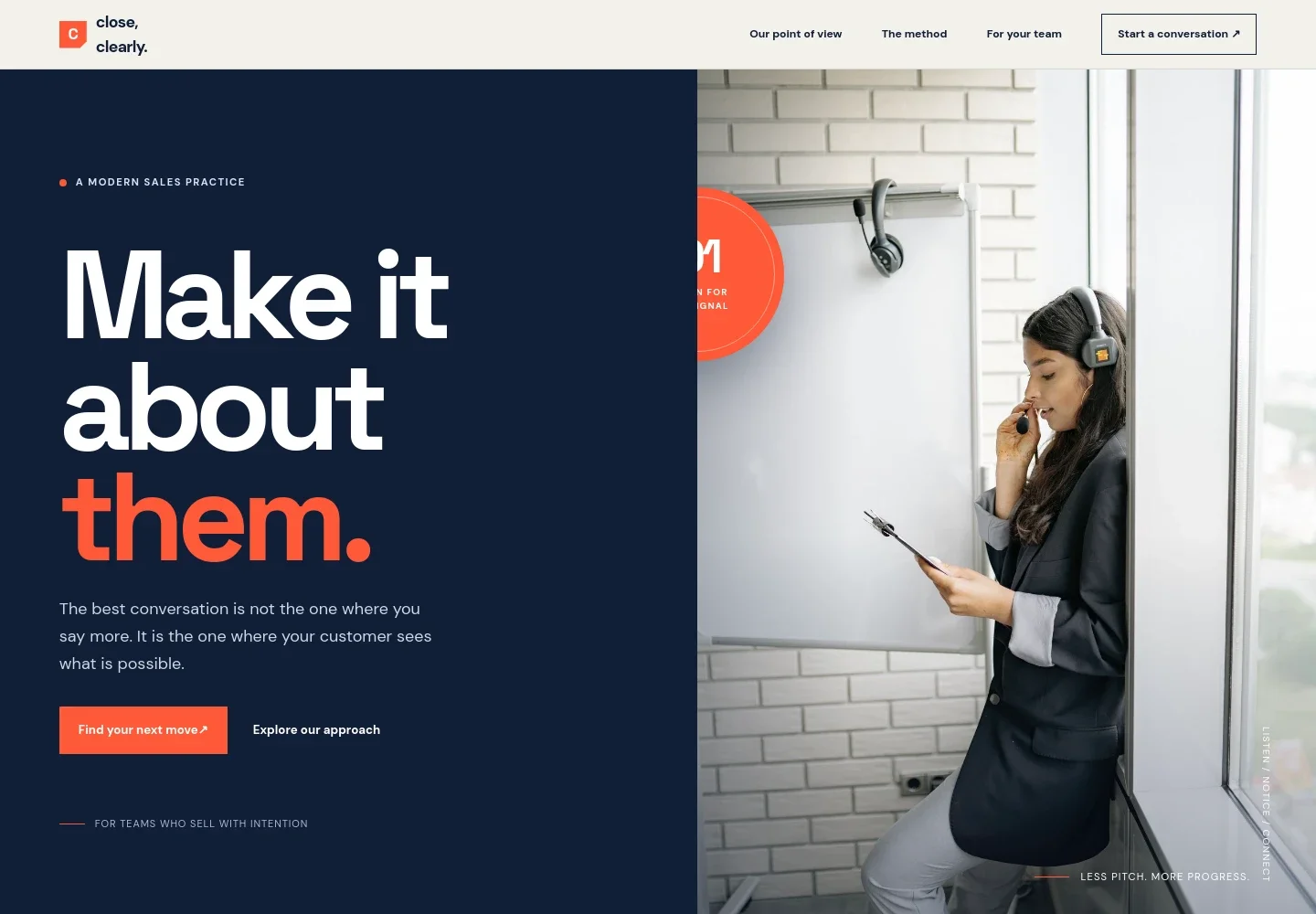
- Hero and navigation
- A prominent headline, brief introduction, and calls to action establish the customer-first sales message. Navigation links visitors to the point of view, method, team work, and contact sections.
- Sales point of view
- Introduces a trust-based approach that favors clear, thoughtful conversations over pressure. Supporting copy explains the emphasis on expertise, confidence, and making space for customers.
- Four-step conversation method
- Presents a sequence for reading the room, finding the signal, making an offer tangible, and agreeing on the next step. Each stage has a short explanation that helps visitors understand the sales practice.
- Work with sales teams
- Explains the focus on helping sales leaders and their teams make customer-first selling a daily habit, from the first conversation through the final decision.
- Beliefs and customer perspective
- A prominent statement and accompanying text explain the design's belief that clarity is generous and pressure is not a strategy.
- Contact invitation
- A closing section invites visitors to describe what their team is working through and provides an email contact area. Ask Revamp to replace the illustrative contact details with your preferred business contact before publishing.
- Footer
- Repeats the business identity, reinforces the focus on earning the next conversation, and links back to the top of the page.
How to use this template
Open in Revamp
Click Use this template and sign in or create an account. You’ll start with your own copy of the design, ready to personalize.
Bring your content
Replace the sample text, photos, and logo with your own. Share your content, a document, or an existing website, and ask Revamp to adapt the template to your business.
Refine and publish
Ask Revamp to adjust the colors, layout, or sections, or edit directly on the page. Review desktop and mobile, then publish. You can keep making changes after launch.
Put your website to work
Make it easier to capture prospects, arrange introductory conversations, and organize follow-up. Ask Revamp to add or connect the sales tools that suit your practice.
-

Organize prospect and client conversations
HubSpotKeep contact details, deal notes, and follow-up activity together. Ask Revamp to connect HubSpot for sales relationship management.
-

Let prospects book a conversation
CalendlyGive prospective clients a straightforward way to choose an available meeting time. Ask Revamp to add consultation booking with Calendly.
-

Coordinate meetings with your calendar
Google CalendarMake it easier to manage availability and keep scheduled conversations organized. Ask Revamp to connect Google Calendar.
Frequently asked questions
Is this template free?
Yes. This premium template is free to use when you select Use this template. The offer covers the template, not hosting or other services.
Can I use my own content?
Yes. Ask Revamp to personalize the text, images, business details, and contact information for your sales practice.
Do I need coding skills?
No. You can ask Revamp to personalize the content and design without coding.
Can I change the design?
Yes. Ask Revamp to adjust the layout, colors, typography, imagery, and other design details to fit your business.
Can I keep editing after publishing?
Yes. You can keep asking Revamp to update your website after launch as your services, messaging, or contact details change.