About this template
Help visitors discover train routes, compare journey options and take the next step toward planning a trip. The design pairs a travel-led introduction with sample European routes and a clear journey enquiry section.
A countryside train-window image, editorial typography and a route-board layout give the page a considered travel feel while keeping practical information easy to scan. The sample routes connect Paris with Amsterdam, London with Edinburgh, and Milan with Zurich.
The page also sets expectations around changing fares, connections and route questions, giving visitors useful context before they get in touch.
Who it’s for
For rail booking services, independent train travel planners and travel businesses that help customers find or arrange train journeys.
What’s included
The completed design guides visitors from the appeal of rail travel to example routes, journey planning and practical travel information.
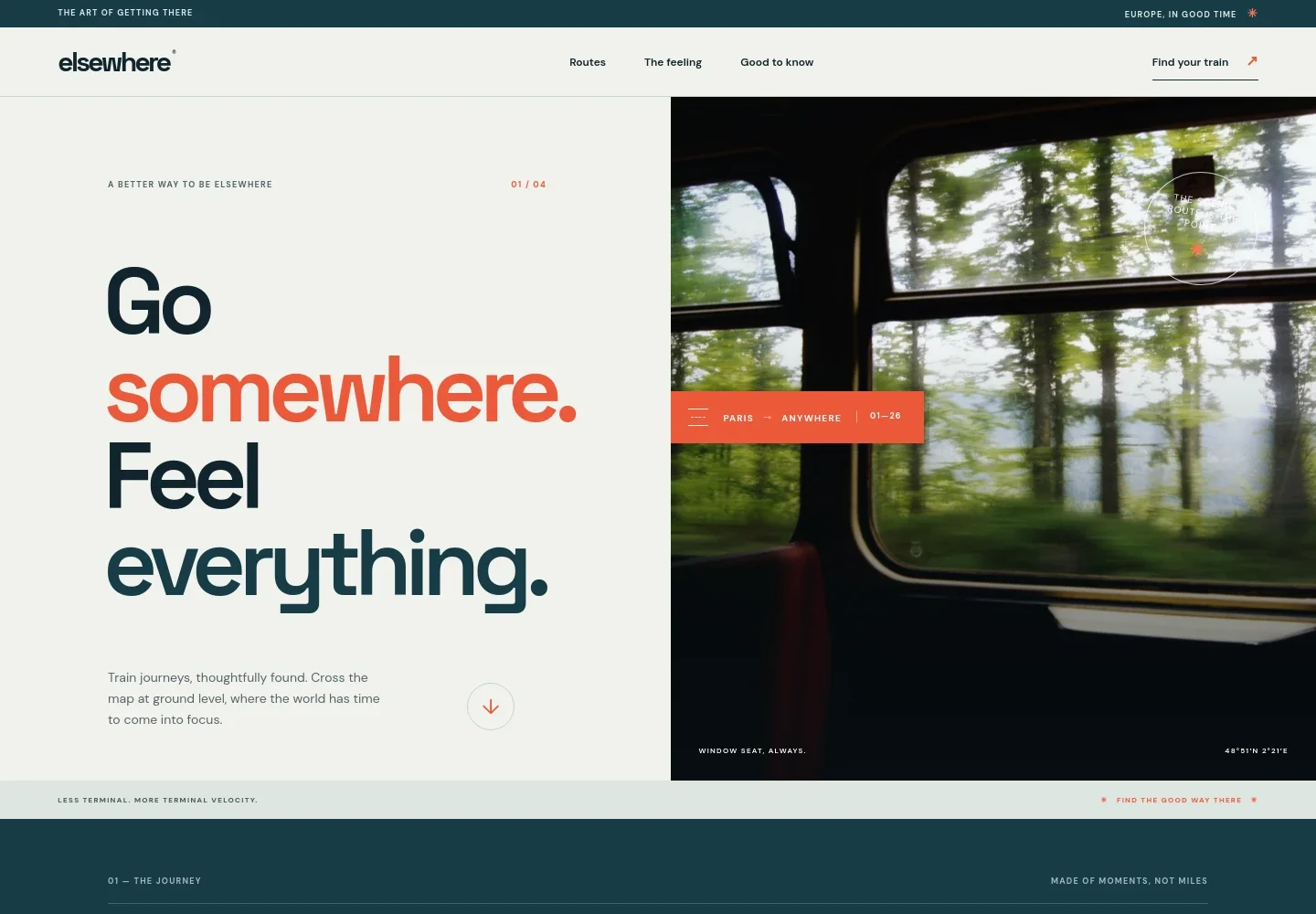
- Travel-led hero
- A prominent countryside view from a train window introduces the travel experience, with a short message and a direct path toward planning a journey.
- Why travel by train
- An editorial statement describes the slower pace of rail travel and the experience of arriving in the heart of a city.
- Example European routes
- A departure-board-style list presents Paris to Amsterdam, London to Edinburgh, and Milan to Zurich with illustrative journey times and short route notes.
- Journey planning enquiry
- A dedicated panel invites visitors to ask about a journey, following an introduction that welcomes visitors who have a destination, date or just an idea.
- Travel information
- A practical guidance section covers fare change and refund rules, connections between trains, and where to ask route questions.
- Footer navigation
- A compact closing area repeats the brand, links back to the beginning and reinforces the train-travel theme.
How to use this template
Open in Revamp
Click Use this template and sign in or create an account. You’ll start with your own copy of the design, ready to personalize.
Bring your content
Replace the sample text, photos, and logo with your own. Share your content, a document, or an existing website, and ask Revamp to adapt the template to your business.
Refine and publish
Ask Revamp to adjust the colors, layout, or sections, or edit directly on the page. Review desktop and mobile, then publish. You can keep making changes after launch.
Put your website to work
Make route enquiries easier to manage and help visitors keep track of trip details. Ask Revamp to add or connect travel tools suited to your booking process.
-

Manage trip details
HubSpotKeep customer itineraries and service conversations organized in one place. Ask Revamp to connect HubSpot for enquiry and customer management.
-

Coordinate travel dates
CalendlyHelp visitors arrange a time to discuss routes or booking questions. Ask Revamp to add consultation scheduling with Calendly.
-

Organize journey enquiries
Google SheetsKeep route requests and travel planning details easy to review. Ask Revamp to connect Google Sheets for enquiry tracking.
Frequently asked questions
Is this train booking template free?
Yes. This premium template is free to use when you select Use this template. Free refers to the template itself, not hosting or other services.
Can I use my own content?
Yes. Ask Revamp to personalize the copy, routes, imagery, contact details and other content for your business.
Do I need coding skills?
No. Ask Revamp to make content and design changes in plain language, without coding.
Can I change the design?
Yes. Ask Revamp to adjust the colors, typography, imagery, layout or other design details to suit your brand.
Can I keep editing after publishing?
Yes. You can keep asking Revamp to update the site after launch as your routes, information or business needs change.