About this template
Help prospective travelers understand your visa guidance, document preparation support, and one-to-one planning sessions. The page sets out a four-step journey, from discussing travel plans to preparing paperwork and clarifying next steps.
A passport-inspired visual, clear service descriptions, practical visa questions, and a direct conversation prompt help visitors see what your service offers and how to begin. The copy frames your role as guidance and preparation support, not as a promise of a visa decision.
Who it’s for
Independent visa advisers, travel visa consultants, and visa preparation services supporting people planning to visit, study, work, or spend time abroad.
What’s included
The layout guides visitors from your visa support approach to specific services, useful answers, and an invitation to start a conversation.
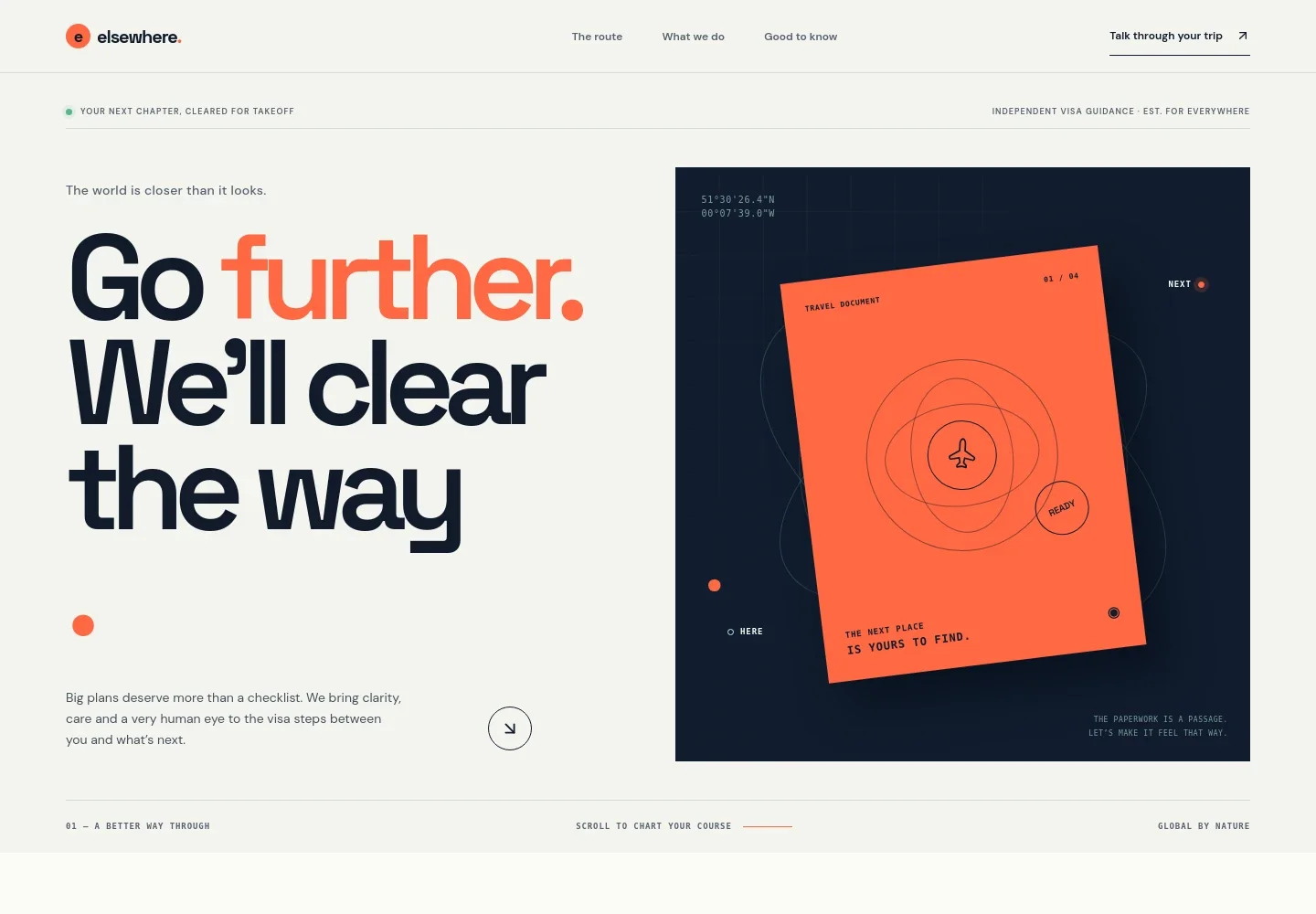
- Visa guidance hero
- A travel document illustration, flight-path details, and concise introductory copy present visa support as a clear step toward a visitor’s travel plans. A prominent link leads toward the contact section.
- Four-step guidance journey
- A numbered sequence covers understanding the traveler’s plans, making sense of relevant rules, preparing documents, and moving forward with a clearer view of the process.
- Services
- Three service entries explain destination visa guidance, document preparation support, and one-to-one planning sessions. An editorial travel photograph adds visual context alongside the list.
- Visa questions and answers
- An FAQ section addresses when to start, visa decision guarantees, application submission, and what to bring to a first conversation. The format gives visitors a place to find practical starting information.
- Contact invitation
- A closing section invites visitors to share their plans and begin a conversation, with an email contact link to personalize for the business.
- Navigation and footer
- The header links to the guidance journey, services, and answers. The footer repeats the brand and includes a return-to-top link.
How to use this template
Open in Revamp
Click Use this template and sign in or create an account. You’ll start with your own copy of the design, ready to personalize.
Bring your content
Replace the sample text, photos, and logo with your own. Share your content, a document, or an existing website, and ask Revamp to adapt the template to your business.
Refine and publish
Ask Revamp to adjust the colors, layout, or sections, or edit directly on the page. Review desktop and mobile, then publish. You can keep making changes after launch.
Put your website to work
Make it easier to organize inquiries and help prospective clients choose a time to talk. Ask Revamp to add connections with tools such as Calendly or HubSpot.
-

Offer convenient consultation scheduling
CalendlyLet prospective clients choose a suitable time for a visa planning conversation. Ask Revamp to add consultation booking with Calendly.
-

Keep prospective client inquiries organized
HubSpotTrack contacts and follow-up conversations in one place. Ask Revamp to connect HubSpot for contact and inquiry management.
-

Coordinate consultation availability
Google CalendarManage planned calls alongside your calendar. Ask Revamp to add Google Calendar scheduling for visa consultations.
Frequently asked questions
Is this template free?
Yes. This premium template is free to use when you select Use this template. The free offer is for the template itself.
Can I use my own content?
Yes. Ask Revamp to personalize the text, images, contact details, and service information for your visa guidance business.
Do I need coding skills?
No coding skills are needed. Ask Revamp to make content and design changes for you.
Can I change the design?
Yes. Ask Revamp to adjust the layout, colors, typography, imagery, and other design details to suit your business.
Can I keep editing after publishing?
Yes. You can keep asking Revamp to update your content and design after your site is published.