About this template
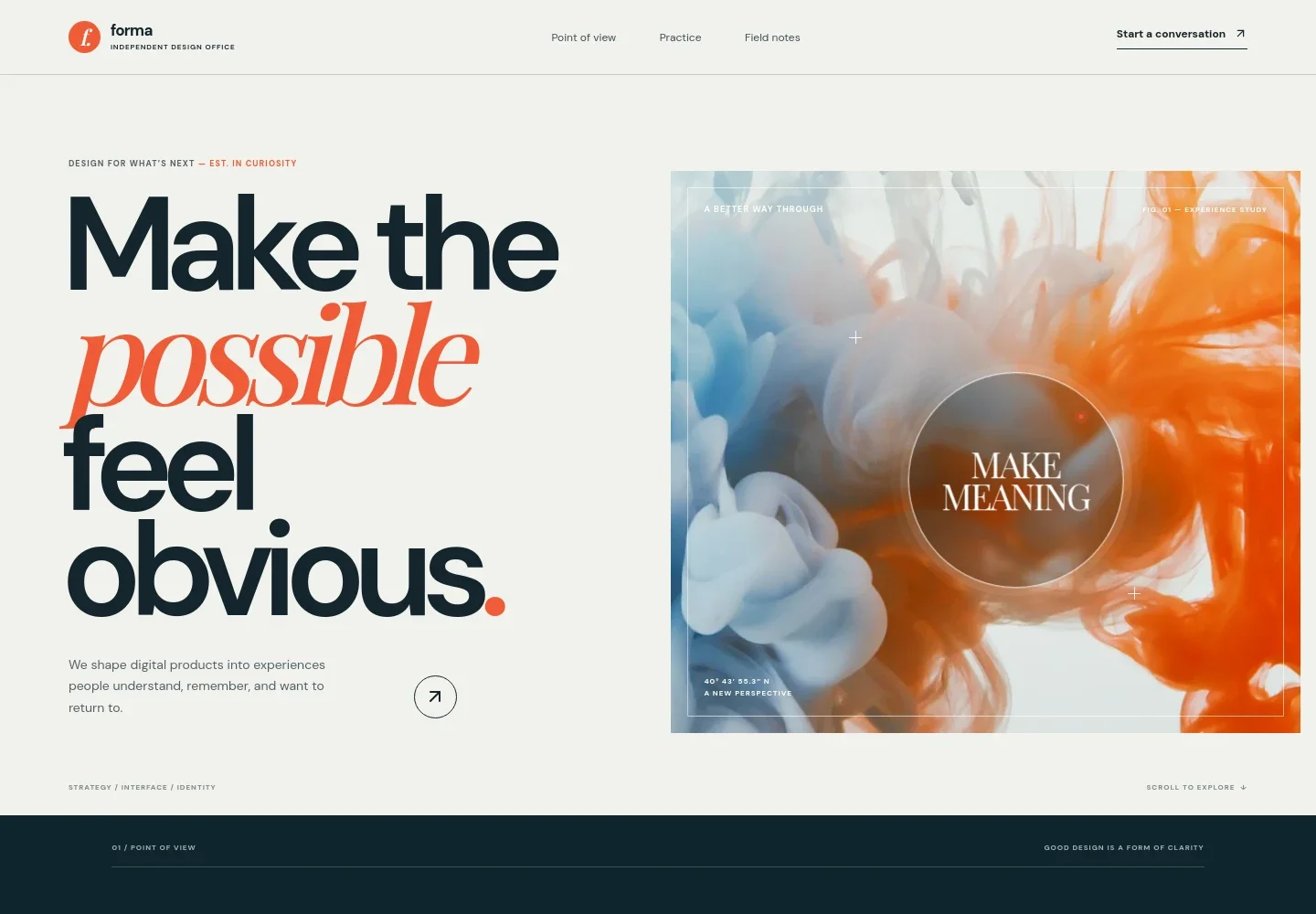
Help prospective clients understand your approach to digital product design, from clarifying product direction to creating interface systems and digital identity. The opening pairs a clear statement of purpose with an abstract visual study, then guides visitors through your point of view, practice, working approach, and contact invitation.
The editorial layout uses numbered section markers, concise service descriptions, and a process-focused image to make the practice easy to scan. Use it to explain what you do and invite a direct conversation about a product or design challenge.
Who it’s for
Independent UI and product designers, interface design consultants, and small design practices seeking to explain their services and start conversations with prospective clients.
What’s included
The page moves from a concise design proposition into your point of view, three clearly explained service areas, a process-led field note, and a direct contact invitation. Its editorial typography, numbered sections, and restrained visual studies help visitors follow the story without losing sight of what you offer.
- Hero and visual study
- Introduce your design practice with a prominent statement, supporting copy about digital product experiences, and an abstract visual study labeled as an experience study.
- Point of view
- Explain a design perspective centered on clarity and human experiences, with supporting copy and a link directing visitors to the practice section.
- The practice
- Describe three service areas in a numbered list: product direction, interface systems, and digital identity. Each has a short explanation to help clients see the scope of the work.
- Field notes
- Pair a photograph of interface-planning materials with copy about listening, asking useful questions, and keeping the full experience in view.
- Contact invitation
- Close with an invitation to share a design question and a prominent email contact link, giving interested visitors a clear next step.
- Footer
- Repeat the studio wordmark and provide a back-to-top link alongside copyright and illustrative-contact notes.
How to use this template
Open in Revamp
Click Use this template and sign in or create an account. You’ll start with your own copy of the design, ready to personalize.
Bring your content
Replace the sample text, photos, and logo with your own. Share your content, a document, or an existing website, and ask Revamp to adapt the template to your business.
Refine and publish
Ask Revamp to adjust the colors, layout, or sections, or edit directly on the page. Review desktop and mobile, then publish. You can keep making changes after launch.
Put your website to work
Make it easier to turn interest into a project conversation. Ask Revamp to add a scheduling or client-management tool that suits your design practice.
-

Book introductory calls
CalendlyGive prospective clients a straightforward way to choose a time for an initial conversation. Ask Revamp to add consultation booking with Calendly.
-

Organize prospective client conversations
HubSpotKeep inquiry details and follow-ups organized as new opportunities come in. Ask Revamp to connect your contact flow with HubSpot.
Frequently asked questions
Is this template free?
Yes. This premium template is free to use through Use this template. Free refers to the template itself, not hosting or other services.
Can I use my own content?
Yes. Ask Revamp to personalize the copy, images, service descriptions, and contact details with content that reflects your design practice.
Do I need coding skills?
No coding skills are needed. Ask Revamp to personalize the content and design in plain language.
Can I change the design?
Yes. Ask Revamp to adjust the visual style, layout, colors, typography, or sections to better fit your work and brand.
Can I keep editing after publishing?
Yes. You can keep editing after launch. Ask Revamp to update your content or design as your services and portfolio evolve.