About this template
Show visitors how a video platform brings creators and viewers together. LOOP’s landing page presents a clear point of view, then describes a simple journey from making a video to finding people who connect with it.
The design pairs a film-strip hero with sections about the platform’s purpose, how sharing and discovery work, and the communities that form around shared interests. A focused closing invitation gives interested visitors a next step.
Who it’s for
Designed for video-sharing platforms, creator communities, and early-stage products that want to explain their approach to video, introduce a community, and invite visitors to learn more or get in touch.
What’s included
A story-led landing page that helps visitors understand the platform’s perspective, how people participate, and where to express interest.
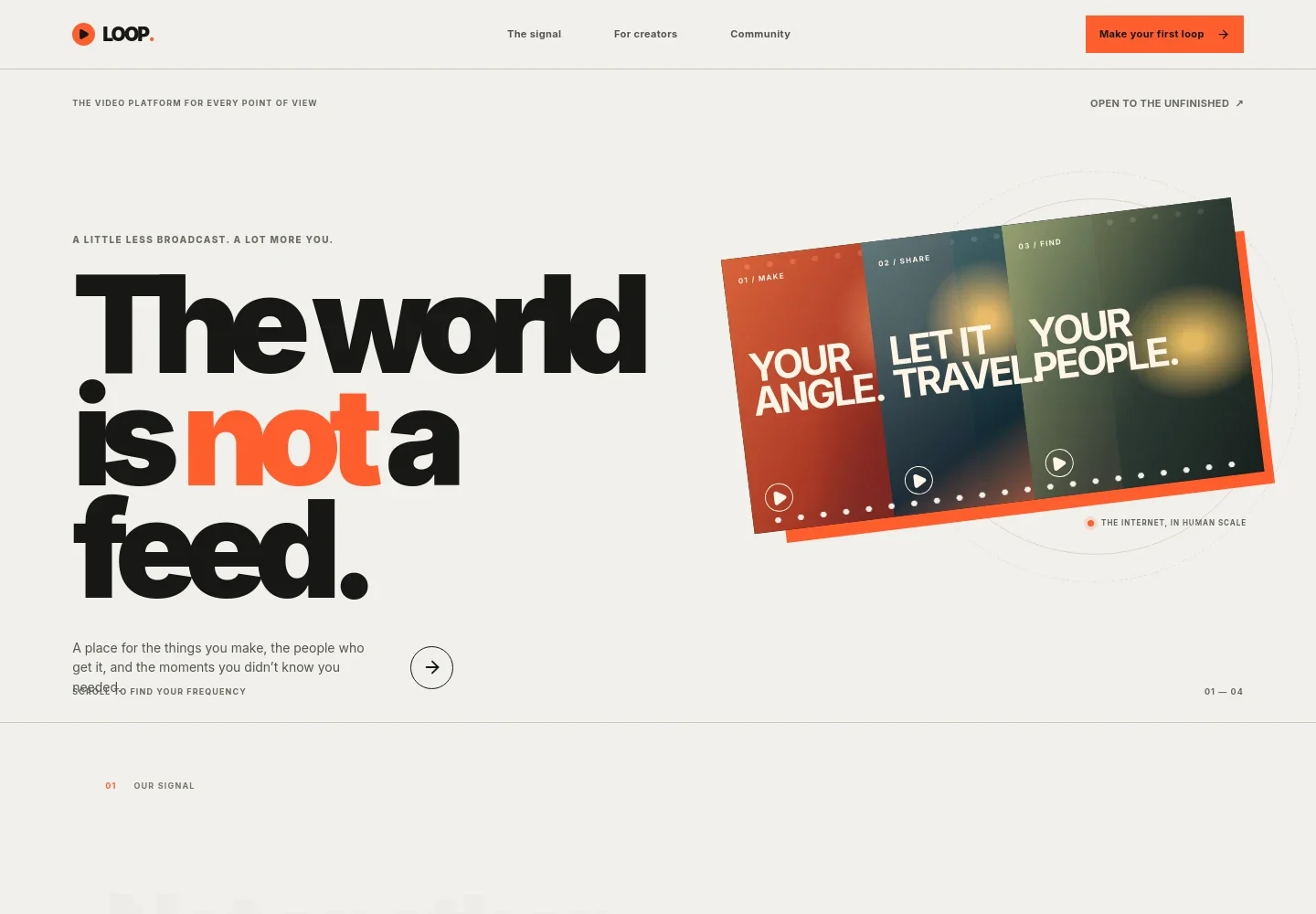
- Hero and navigation
- A LOOP wordmark, links to the platform story and community sections, and a prominent call to action frame the offer. The headline and film-strip graphic establish a video-first identity and introduce the ideas of making, sharing, and finding people.
- Platform point of view
- A manifesto-style section explains the platform’s emphasis on honest voices, curiosity, and discovery. Its prominent statement and supporting copy give visitors context before describing the experience.
- How it moves
- Three numbered steps describe making a video, finding creators and interests, and continuing the conversation through video replies or threads. This layout makes the participation story easy to follow.
- Community
- A large audience photo sits beside copy about finding people with shared interests. The section makes community central to the platform story and directs visitors toward the closing invitation.
- Join invitation
- A closing message invites interested visitors to get in touch by email. Supporting copy describes the kinds of people the platform is for, giving the call to action a clear context.
- Footer
- The footer repeats the LOOP identity, a short video-focused line, a return-to-top link, and a copyright note.
How to use this template
Open in Revamp
Click Use this template and sign in or create an account. You’ll start with your own copy of the design, ready to personalize.
Bring your content
Replace the sample text, photos, and logo with your own. Share your content, a document, or an existing website, and ask Revamp to adapt the template to your business.
Refine and publish
Ask Revamp to adjust the colors, layout, or sections, or edit directly on the page. Review desktop and mobile, then publish. You can keep making changes after launch.
Put your website to work
Give a video community practical ways to understand its audience, share product updates, and manage plans. Ask Revamp to add connections to tools such as:
-

Understand audience behavior
Google AnalyticsTrack visits and engagement to learn how people discover the platform. Ask Revamp to add Google Analytics.
-

Keep interested visitors informed
MailchimpShare launch news and platform updates with subscribers. Ask Revamp to add Mailchimp signup and campaign tools.
-

Manage paid memberships
StripeOffer recurring plans and handle subscription billing. Ask Revamp to add Stripe billing.
Frequently asked questions
Is this video sharing website template free?
Yes. The premium template is free to use when you select Use this template. This applies to the template itself, not hosting or other services.
Can I use my own content?
Yes. Ask Revamp to personalize the page with your platform name, product details, images, community language, and calls to action.
Do I need coding skills?
No coding skills are needed. Ask Revamp to make content and design changes for you.
Can I change the design?
Yes. Ask Revamp to adjust the visual style, layout, colors, or sections to better suit your video platform.
Can I keep editing after publishing?
Yes. You can continue asking Revamp to update your site after launch as your platform and community evolve.


