About this template
Help prospective clients understand how your virtual assistant support can give them more room for focused work. The design introduces your approach, outlines executive support, operations, and client care, then invites visitors to start a conversation.
A prominent hero, concise service rows, and a dedicated contact section give busy business owners a clear path from understanding your offer to getting in touch. Warm imagery and restrained editorial styling suit a personal, relationship-led service.
Who it’s for
Independent virtual assistants, executive assistants, and virtual support practices serving founders, business owners, and independent professionals.
What’s included
The page pairs an approachable introduction with a clear explanation of your support areas and a direct invitation to discuss what a client needs.
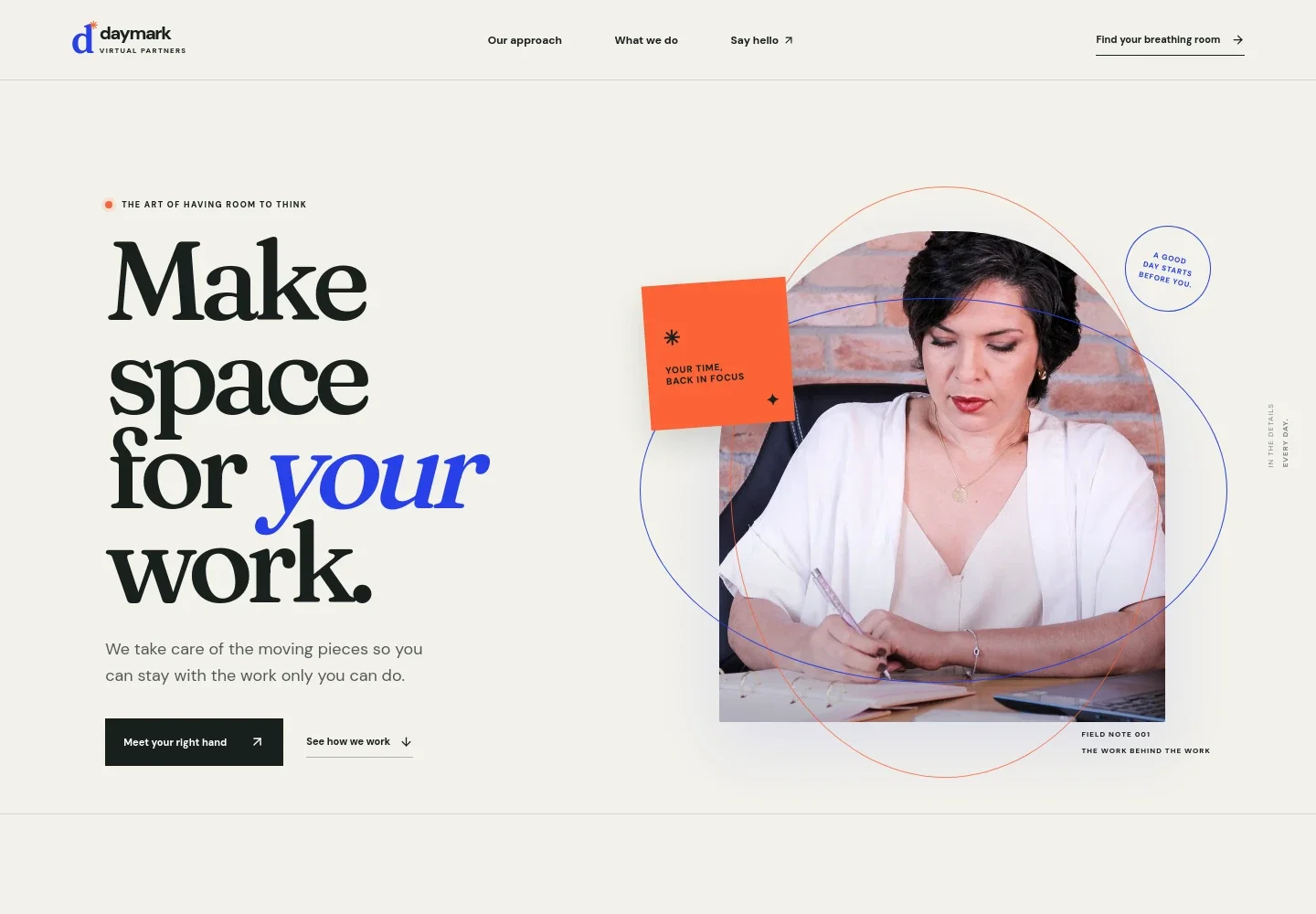
- Hero and primary contact links
- A headline about making room for important work, supporting copy, and links that guide visitors to your approach or contact section.
- Approach and working philosophy
- A section explains the value of attentive support, emphasizing anticipation, simpler logistics, and returning attention to clients' priorities.
- Visual story
- A full-width image with overlaid copy reinforces the theme of a calmer working rhythm and leads visitors toward a conversation.
- Services
- Three service rows describe executive rhythm, operations support, and client experience, with examples such as calendar, travel, inbox, systems, research, and follow-up.
- Closing contact invitation
- A final section invites visitors to share what is taking their attention and start a conversation by email. The displayed contact address is illustrative and should be personalized.
How to use this template
Open in Revamp
Click Use this template and sign in or create an account. You’ll start with your own copy of the design, ready to personalize.
Bring your content
Replace the sample text, photos, and logo with your own. Share your content, a document, or an existing website, and ask Revamp to adapt the template to your business.
Refine and publish
Ask Revamp to adjust the colors, layout, or sections, or edit directly on the page. Review desktop and mobile, then publish. You can keep making changes after launch.
Put your website to work
Scheduling and client-management tools can help organize inquiries, consultations, and ongoing work. Ask Revamp to add or connect the tools that fit your practice.
-

Make consultation scheduling easier
CalendlyGive prospective clients a simple way to request a time. Ask Revamp to add consultation booking with Calendly.
-

Keep client relationships organized
HubSpotTrack prospective and current client conversations in one place. Ask Revamp to connect HubSpot for contact management.
-

Manage meeting availability alongside your calendar
Google CalendarHelp visitors find a consultation time that works with your schedule. Ask Revamp to add booking with Google Calendar.
Frequently asked questions
Is this template free?
Yes. This premium template is free to use when you select Use this template. Free refers to the template itself.
Can I use my own content?
Yes. Ask Revamp to personalize the text, images, services, and contact details with your own business content.
Do I need coding skills?
No coding skills are needed. Ask Revamp to make changes to your content and design in plain language.
Can I change the design?
Yes. Ask Revamp to adjust the colors, typography, imagery, layout, or other design details to suit your virtual assistant business.
Can I keep editing after publishing?
Yes. You can keep editing your site after launch. Ask Revamp to update your content or design as your services change.