About this template
Help visitors understand what your VPS service offers, how they can configure a server, and what kinds of projects it can support. The page introduces virtual CPUs, RAM, NVMe storage, Linux choices, root access, SSH, and a public IP without relying on made-up pricing or preset plan tiers.
A dark, editorial layout pairs concise infrastructure explanations with a network illustration, a guided three-step overview, practical use cases, and a configuration panel. Visitors can move from learning about the platform to reviewing server specifications and making an enquiry.
Who it’s for
VPS hosting providers, infrastructure businesses, and independent server hosts presenting configurable virtual machines to developers, technical teams, and businesses choosing a server for an application or project.
What’s included
The page is organized to help prospective customers understand the service before considering a configuration. It explains the platform, shows how a customer might approach setup, and closes with server specifications and a contact prompt.
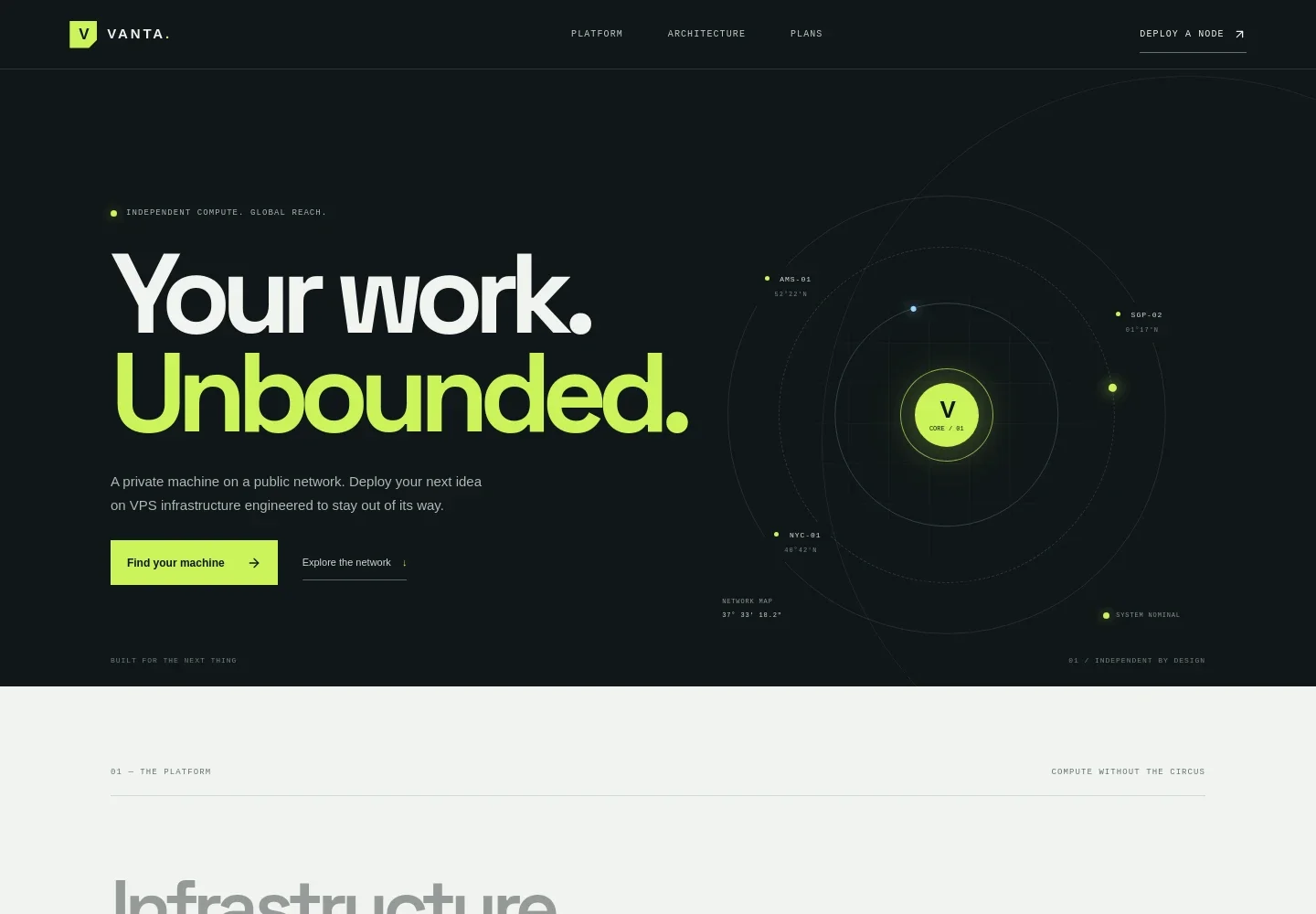
- Hero and network illustration
- A focused headline and introduction position the offer as independent VPS infrastructure. An animated orbit-style visual labels Amsterdam, Singapore, and New York locations, giving the opening section a clear network theme.
- Platform overview
- Explains the offer as a virtual machine with a choice of Linux and room to configure the environment. Three principles cover root access, clear resource specifications, and a direct deployment workflow with console access and practical controls.
- Configuration journey
- A three-step story outlines choosing vCPU, memory, and NVMe capacity, selecting a Linux distribution and connecting over SSH, then putting the machine to work.
- Use cases
- Separate rows show how visitors might use a VPS to run their own software stack, host an application with a public IP, or practice Linux administration and test deployments.
- VPS configuration panel
- A single configuration panel explains that visitors can choose processing, RAM, storage, and operating system for their workload. It presents the resource categories without listing invented prices or fixed plan tiers, and includes a prompt to discuss a configuration.
- Closing call to action and footer
- A final invitation points visitors back to the configuration section. The footer provides space for the company identity, contact details, and a return-to-top link.
How to use this template
Open in Revamp
Click Use this template and sign in or create an account. You’ll start with your own copy of the design, ready to personalize.
Bring your content
Replace the sample text, photos, and logo with your own. Share your content, a document, or an existing website, and ask Revamp to adapt the template to your business.
Refine and publish
Ask Revamp to adjust the colors, layout, or sections, or edit directly on the page. Review desktop and mobile, then publish. You can keep making changes after launch.
Put your website to work
Help customers compare server options, handle enquiries, and manage recurring billing. Ask Revamp to add or connect tools that fit your hosting business.
-

Manage hosting subscriptions
StripeSupport recurring payments for server plans. Ask Revamp to connect Stripe for subscription billing.
-

Track sales enquiries
HubSpotKeep prospective customer conversations organized from first contact onward. Ask Revamp to connect HubSpot for enquiry and customer relationship management.
-

Coordinate sales follow-ups
Google CalendarKeep consultation and sales follow-up times visible to your team. Ask Revamp to connect Google Calendar for scheduling.
Frequently asked questions
Is this template free?
Yes. This premium template is free to use when you select Use this template. The template is free; hosting and other services may have separate costs.
Can I use my own content?
Yes. Ask Revamp to personalize the page with your company name, VPS offering, resource details, contact information, and other content.
Do I need coding skills?
No coding skills are needed. Ask Revamp to personalize the content and design for your hosting business.
Can I change the design?
Yes. Ask Revamp to adjust the colors, typography, layout, and visual details to suit your brand and the information you want to present.
Can I keep editing after publishing?
Yes. You can continue editing after launch. Ask Revamp to update your content or design as your hosting offer changes.


