About this template
Help brides understand your approach to finding a wedding dress, from the first fitting to the final details. This design presents a calm, personal alternative to a high-pressure appointment, with space to explain your collection and what visitors can expect.
Editorial bridal photography, considered typography and generous layouts give the collection and fitting experience room to take focus. Clear navigation leads visitors from your point of view to appointment information and an enquiry.
Who it’s for
Bridal salons, wedding dress boutiques and independent bridal ateliers that want to introduce their fitting experience, present their collection and invite prospective brides to make an appointment.
What’s included
The page guides visitors through the salon’s perspective, collection and appointment experience, then gives them a direct way to enquire.
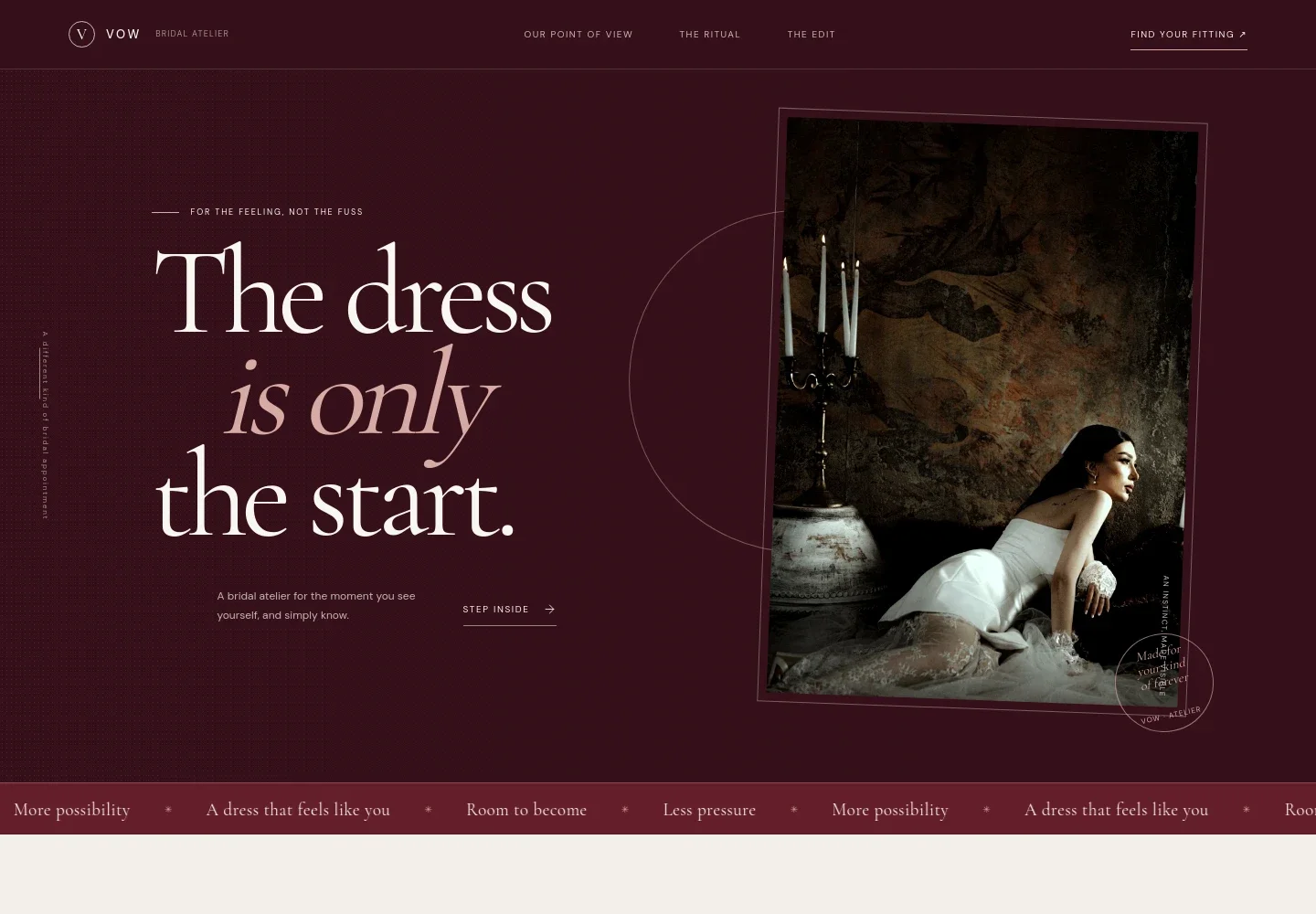
- Bridal atelier introduction
- A prominent headline, bridal portrait and short introduction establish the salon’s personal approach, with a link inviting visitors to learn about the fitting experience.
- Salon point of view
- A dedicated story section explains the aim of making dress shopping feel more personal and less pressured.
- Editorial image feature
- A large bridal portrait sits between the ideas of looking and knowing, reinforcing the focus on finding a dress that feels right to the bride.
- Collection and appointment stages
- The collection section introduces a considered edit and describes three stages: the first fitting, a second look and final details.
- Your appointment
- Visitors learn they can bring supportive guests, receive guidance without pressure to decide that day, and follow a simple three-step outline of the appointment.
- Appointment enquiry
- A closing invitation encourages visitors to start a conversation and enquire about an appointment.
- Contact footer
- The footer provides an email contact and identifies the contact details as illustrative.
How to use this template
Open in Revamp
Click Use this template and sign in or create an account. You’ll start with your own copy of the design, ready to personalize.
Bring your content
Replace the sample text, photos, and logo with your own. Share your content, a document, or an existing website, and ask Revamp to adapt the template to your business.
Refine and publish
Ask Revamp to adjust the colors, layout, or sections, or edit directly on the page. Review desktop and mobile, then publish. You can keep making changes after launch.
Put your website to work
Make it easier to manage fitting enquiries and appointment requests. Ask Revamp to add or connect tools that suit the way your salon works.
-

Simplify appointment requests
CalendlyGive brides a convenient way to request a fitting time. Ask Revamp to add appointment booking with Calendly.
-

Keep fitting dates organized
Google CalendarCoordinate appointment availability with your calendar. Ask Revamp to connect Google Calendar for bridal fitting scheduling.
-

Manage appointment enquiries
HubSpotKeep prospective-customer details and follow-ups organized. Ask Revamp to add HubSpot for bridal enquiry management.
Frequently asked questions
Is this template free?
Yes. The premium template is free to use when you select Use this template. This applies to the template itself, not hosting or other services.
Can I use my own content?
Yes. Ask Revamp to personalize the text, bridal photography, collection details, appointment information and contact details for your salon.
Do I need coding skills?
No coding skills are needed. Ask Revamp to personalize the content and design in plain language.
Can I change the design?
Yes. Ask Revamp to change the colors, typography, layout, imagery or other design details to suit your bridal salon.
Can I keep editing after publishing?
Yes. You can keep editing after launch. Ask Revamp to update your content or design as your salon and collection change.