About this template
Help prospective clients see the kinds of business photography you make, from brand and campaign imagery to portraits and team stories. Large editorial-style images and direct, concise copy put the visual work and its purpose at the center.
The page also explains a creative approach and lays out a four-part process, from finding the idea and planning the shoot to making images and putting them to work. A clear contact section invites businesses to start a conversation about their photography needs.
Who it’s for
Business photographers, commercial photography studios, and image-makers who serve brands, campaigns, and workplace teams.
What’s included
The design pairs prominent photography with clear explanations of services, creative approach, process, and a direct contact invitation. Its sections help business clients understand what the studio photographs and how a project takes shape.
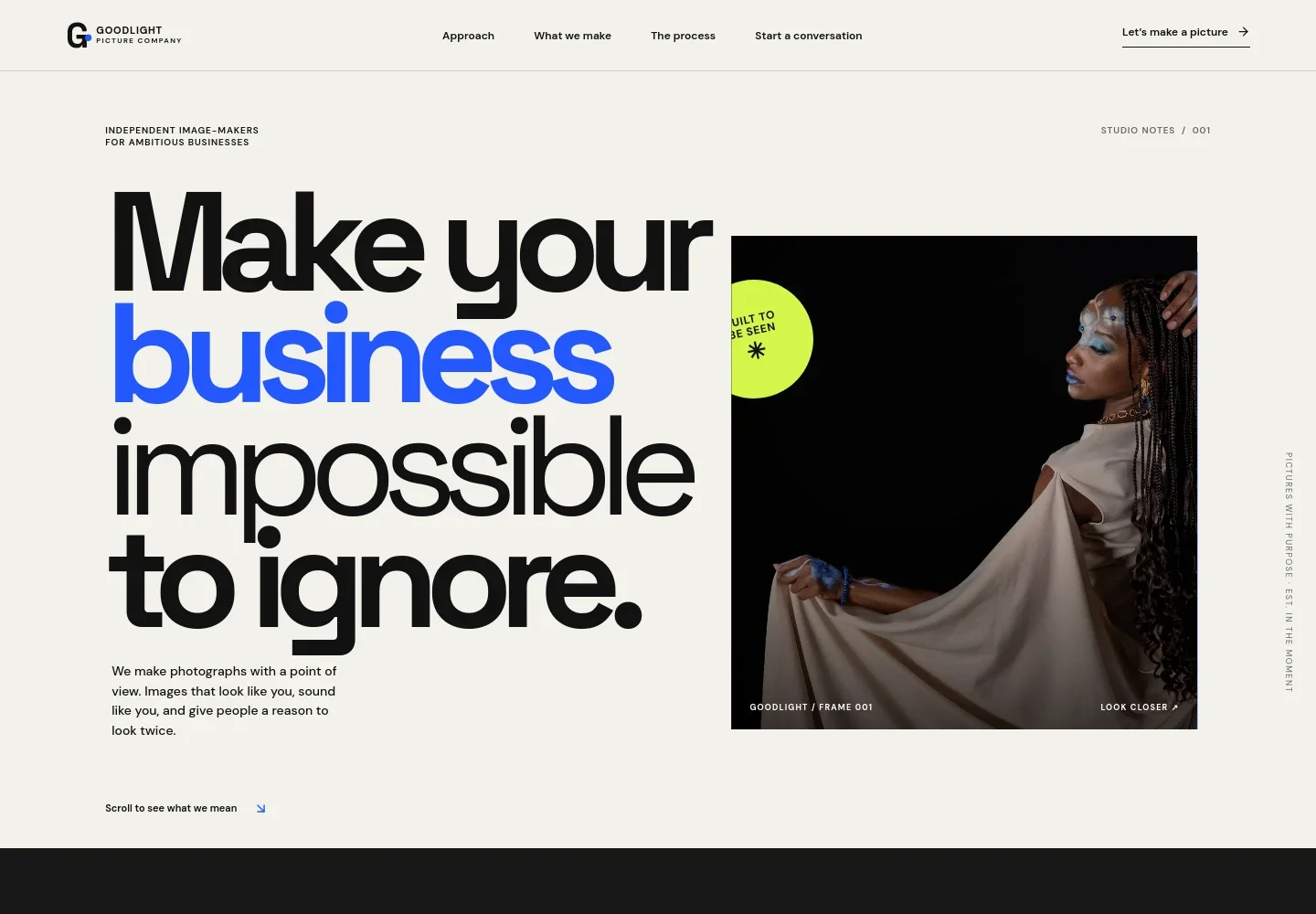
- Photography-led hero
- A large editorial portrait, short point-of-view statement, and visible contact link introduce the studio and its approach to business photography.
- Creative approach
- This section explains the value of purposeful imagery and focuses on the people, places, and details that make a business distinctive.
- Brand and campaign photography
- A featured image and service description present campaigns, launch imagery, and brand libraries, with examples of where clients might use the images.
- People and culture photography
- Copy and a team image introduce portraits and workplace stories, showing businesses the human side of the photography offer.
- Visual story interlude
- A short, graphic section connects the studio's focus on finding the human story in a business with the images it creates.
- Four-step process
- The process list covers shaping the idea, planning locations and shots, making the images, and preparing a collection for intended channels.
- Contact invitation and footer
- A prominent closing message prompts prospective clients to start a conversation, followed by studio branding and a return-to-top link.
How to use this template
Open in Revamp
Click Use this template and sign in or create an account. You’ll start with your own copy of the design, ready to personalize.
Bring your content
Replace the sample text, photos, and logo with your own. Share your content, a document, or an existing website, and ask Revamp to adapt the template to your business.
Refine and publish
Ask Revamp to adjust the colors, layout, or sections, or edit directly on the page. Review desktop and mobile, then publish. You can keep making changes after launch.
Put your website to work
Make it easier to manage inquiries, schedule shoots, and keep client details organized. Ask Revamp to add a connection to a tool that suits your studio's workflow.
-

Schedule consultations
CalendlyLet prospective clients choose a time to discuss a shoot. Ask Revamp to add consultation booking with Calendly.
-

Organize photography projects
Studio NinjaKeep client communication, project details, and delivery tasks together. Ask Revamp to connect Studio Ninja for photography studio management.
-

Track client inquiries
HubSpotManage incoming business leads and follow-ups in one place. Ask Revamp to connect HubSpot CRM for contact management.
Frequently asked questions
Is this template free?
Yes. This premium template is free to use when you select Use this template. This applies to the template itself, not hosting or other services.
Can I use my own content?
Yes. Ask Revamp to personalize the page with your photography, studio name, service descriptions, process, and contact details.
Do I need coding skills?
No. You can ask Revamp to personalize your content and design without coding.
Can I change the design?
Yes. Ask Revamp to adjust the layout, colors, typography, imagery, and other design details to suit your photography business.
Can I keep editing after publishing?
Yes. You can keep asking Revamp to update your content and design after your site launches.


