About this template
Help students, graduates, job seekers, and employers understand what your career fair is about and how they can take part. The design presents the event as a place for direct conversations between attendees and hiring teams.
A bold headline and event photography introduce the experience, followed by sections explaining the fair’s purpose, what visitors can expect, and two clear starting points: exploring opportunities or bringing a team.
Who it’s for
Career fair organizers, universities, colleges, workforce programs, and employers hosting events for students, graduates, or job seekers.
What’s included
The page is structured to orient both sides of a career fair. Visitors can grasp the event’s conversational approach, picture the in-person experience, and choose a path suited to attendees or participating teams.
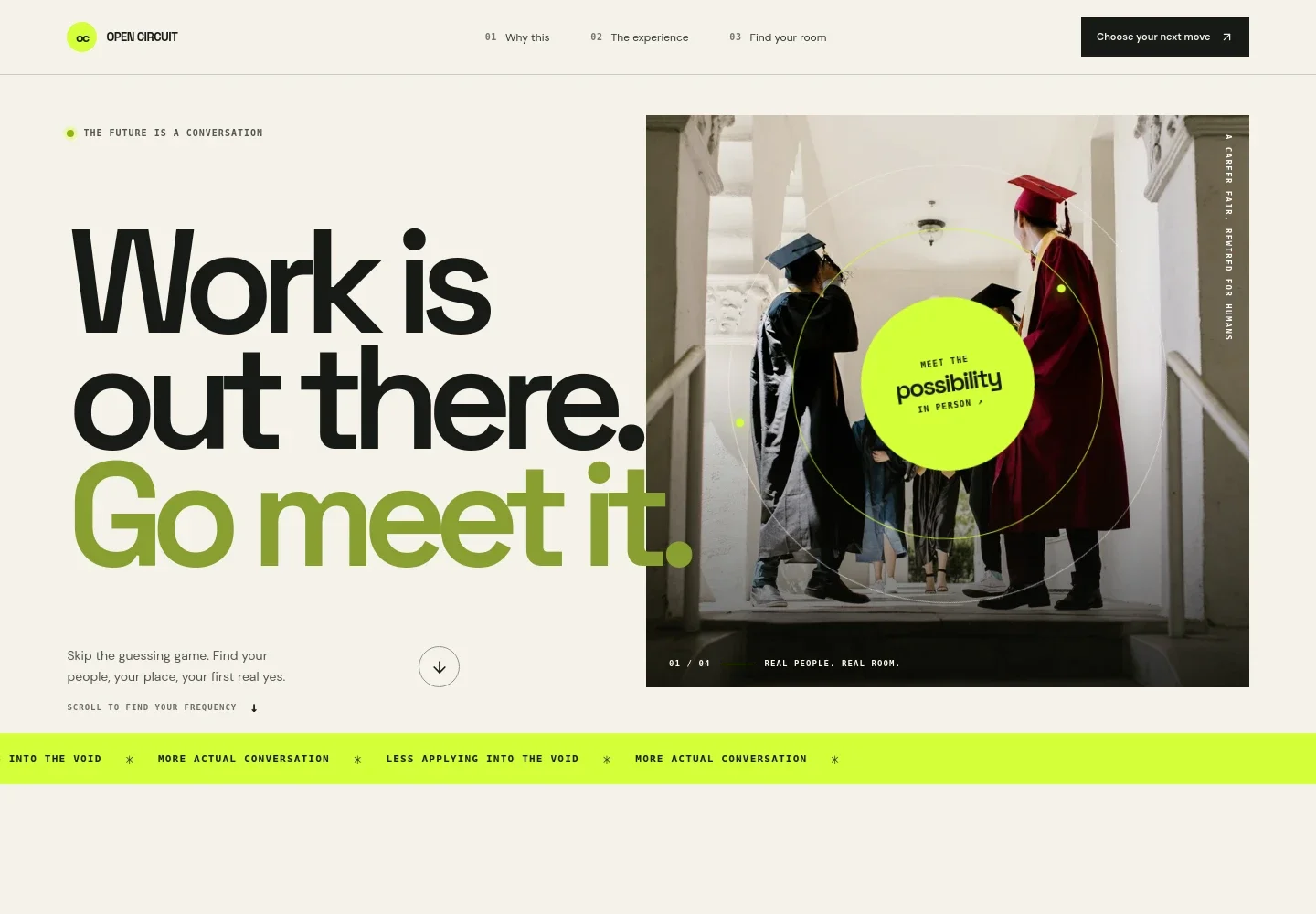
- Hero and event introduction
- A prominent career-focused headline, short supporting copy, and a large photo of graduates introduce the fair and direct visitors into the page.
- Event themes ticker
- A moving text band contrasts online job searching with in-person conversation, reinforcing the event’s central idea.
- Why attend
- This section explains the fair as a more direct way to meet thoughtful teams, with a link that guides visitors to the experience details.
- What the experience feels like
- Copy and a photo of two people exchanging a card show the approachable, conversation-led atmosphere, including a sample question attendees might ask.
- Find your starting point
- Two audience paths distinguish people exploring career options from teams looking to meet candidates, making it easier for each group to identify its next step.
- Closing call to action and footer
- A closing prompt returns visitors to the audience paths, alongside the event identity and a back-to-top link.
How to use this template
Open in Revamp
Click Use this template and sign in or create an account. You’ll start with your own copy of the design, ready to personalize.
Bring your content
Replace the sample text, photos, and logo with your own. Share your content, a document, or an existing website, and ask Revamp to adapt the template to your business.
Refine and publish
Ask Revamp to adjust the colors, layout, or sections, or edit directly on the page. Review desktop and mobile, then publish. You can keep making changes after launch.
Put your website to work
Make it easier to manage event inquiries, share attendee updates, or coordinate employer outreach. Ask Revamp to request additions such as these tools.
-

Simplify event inquiries
CalendlyGive prospective attendees or employers a convenient way to choose a time for a conversation. Ask Revamp to add appointment booking with Calendly.
-

Organize employer outreach
HubSpotKeep employer contacts and follow-up activity in one place. Ask Revamp to connect HubSpot for managing recruiting-partner relationships.
-

Keep attendees informed
MailchimpShare event reminders and updates with an email audience. Ask Revamp to connect Mailchimp for event communications.
Frequently asked questions
Is this career fair template free?
Yes. This premium template is free to use when you select Use this template. Free refers to the template itself.
Can I use my own event content?
Yes. Ask Revamp to personalize the page with your event name, dates, venue, audience details, participating organizations, and other content you provide.
Do I need coding skills?
No. You can ask Revamp to personalize the content and design without coding.
Can I change the design?
Yes. Ask Revamp to adjust the colors, imagery, layout, or other design details to suit your event.
Can I keep editing after publishing?
Yes. You can keep making changes after your site is published. Ask Revamp to update event information or refine the page as your plans develop.