About this template
Help students quickly understand what your technical fest offers, from hands-on build labs and robotics challenges to talks, live demos, and chances to meet collaborators. The page gives the event a clear identity and guides visitors from its purpose to the ways they can take part.
A dark, editorial layout pairs student project photography with bold headlines, numbered navigation, and distinct sections for building, competing, and exchanging ideas. A dedicated closing section points visitors toward the campus team for sign-up and programme information.
Who it’s for
Designed for colleges, universities, student societies, and campus teams promoting technical festivals, hackathons, maker events, and interdisciplinary innovation gatherings.
What’s included
The page moves from the festival’s central idea to activities, event atmosphere, and a clear next step for interested students.
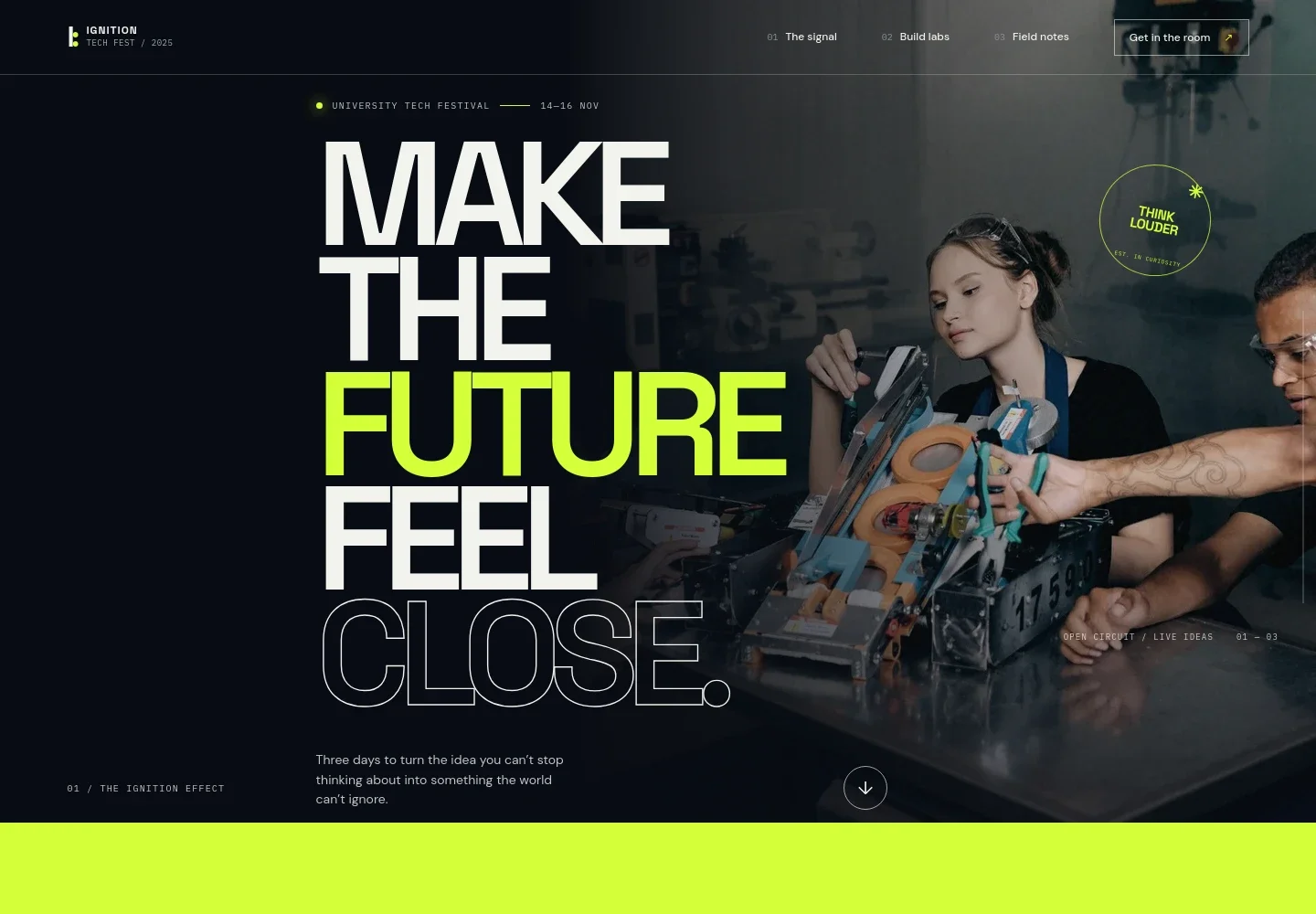
- Festival introduction
- A prominent event headline, dates, and student collaboration image set the scene and establish the festival’s identity.
- Why the festival gathers
- A short manifesto explains the hands-on, collaborative spirit of the event and leads visitors toward its activities.
- Build labs and activities
- A featured maker-session area and separate cards introduce prototyping, hack sprints, robotics challenges, design problems, short talks, and live demos.
- Festival atmosphere
- A large event image and concise copy convey the social side of the gathering, including meeting new collaborators.
- Participation and contact
- The closing section directs visitors to ask their campus team about sign-ups and the full programme.
How to use this template
Open in Revamp
Click Use this template and sign in or create an account. You’ll start with your own copy of the design, ready to personalize.
Bring your content
Replace the sample text, photos, and logo with your own. Share your content, a document, or an existing website, and ask Revamp to adapt the template to your business.
Refine and publish
Ask Revamp to adjust the colors, layout, or sections, or edit directly on the page. Review desktop and mobile, then publish. You can keep making changes after launch.
Put your website to work
Make it easier to coordinate event details and keep students informed. Ask Revamp to add or connect tools that suit your campus event process.
-

Collect attendee registrations
Google SheetsAsk Revamp to add an event registration form connected to Google Sheets, so your team can organize responses in a shared spreadsheet.
-

Coordinate event dates
Google CalendarAsk Revamp to connect Google Calendar so students can add festival dates and scheduled activities to their calendars.
-

Send festival updates
MailchimpAsk Revamp to connect Mailchimp to collect email sign-ups and share programme announcements with interested students.
Frequently asked questions
Is this template free?
Yes. This premium template is free to use when you select Use this template. The offer is for the template itself.
Can I use my own content?
Yes. Ask Revamp to personalize the page with your festival name, dates, activities, images, contact details, and other event information.
Do I need coding skills?
No. Ask Revamp to personalize the content and design in plain language, without coding.
Can I change the design?
Yes. Ask Revamp to adjust the colors, typography, imagery, layout, and other design details to fit your campus festival.
Can I keep editing after publishing?
Yes. You can keep asking Revamp to update the site after launch as event dates, programme details, and contact information change.