About this template
Help dental professionals understand your laboratory’s approach to restorative work, from material choices and clinical context to careful finishing. The design introduces an independent dental lab through a focused hero, clear service descriptions, and a direct invitation to discuss a case.
Dedicated sections explain the lab’s point of view, material considerations, restorative capabilities, and the role of craft alongside digital workflows. Dental crowns, bridges, veneers, implant restorations, and case collaboration are presented as specific areas of work.
Who it’s for
Dental laboratories, restorative studios, and dental technicians looking to introduce their services to clinicians and make it straightforward to start a case conversation.
What’s included
A design-led presentation helps clinicians quickly see what the lab makes, how it thinks about restorative work, and how to get in touch. Editorial typography, specimen and craft imagery, and clearly separated sections give the technical subject a considered, approachable feel.
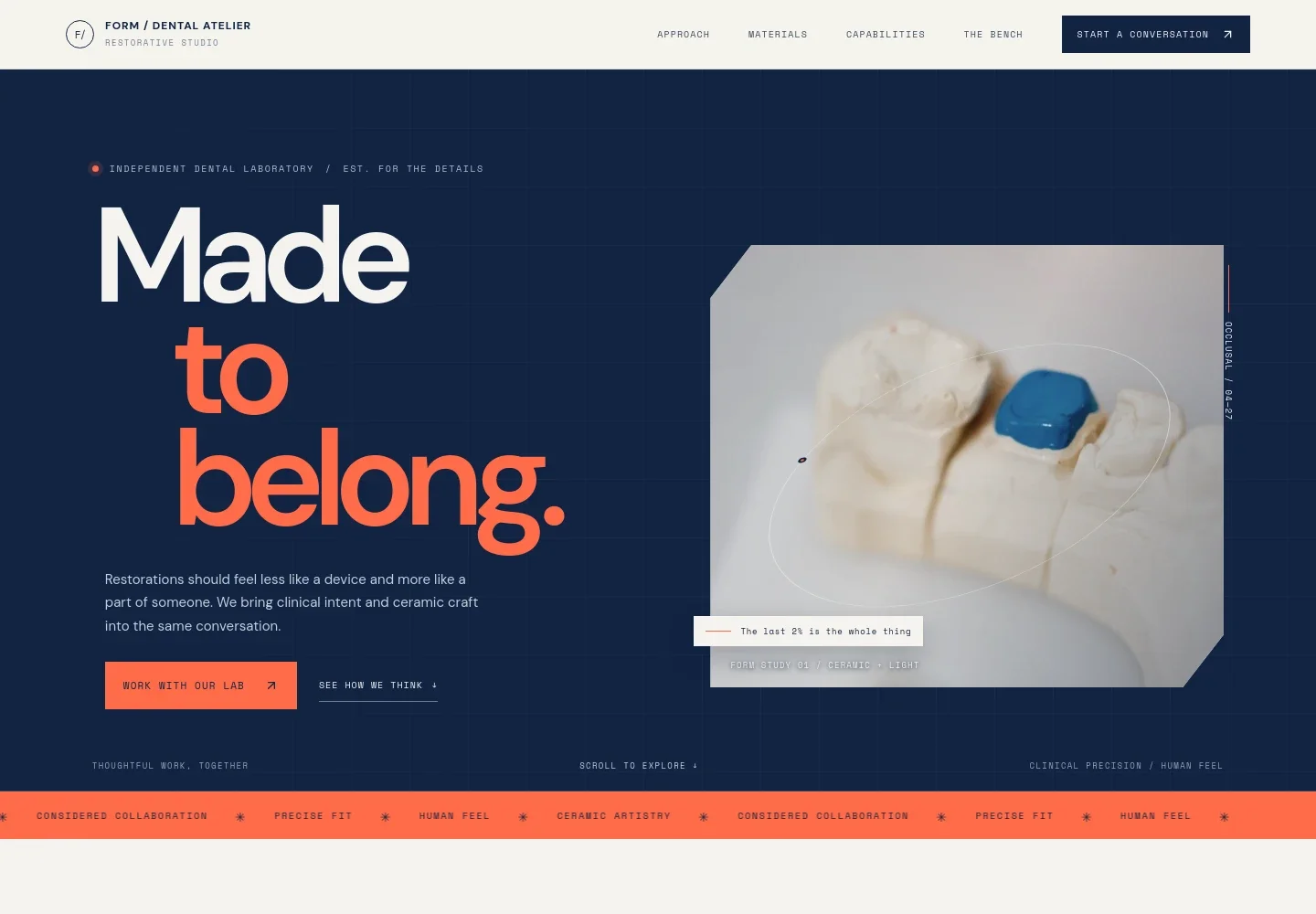
- Hero and primary navigation
- Introduces the lab’s restorative focus and its emphasis on clinical intent and ceramic craft. Navigation links lead to the approach, materials, capabilities, bench, and contact sections, with a prominent invitation to work with the lab.
- Approach
- Explains how restorative work relates to the patient’s character, the clinician’s plan, and natural anatomy, helping visitors understand the lab’s point of view.
- Materials
- Shows how shade, translucency, and surface character are considered in context with the clinical brief and surrounding dentition. A shade-study image supports the discussion.
- Capabilities
- Lists fixed restorations, including ceramic crowns, bridges, and veneers; implant restorations; and case collaboration around planning and material selection.
- The bench
- Describes the relationship between digital workflows and hands-on refinement, with points on communication, material decisions, and finishing. A craft image gives this section a visual focus.
- Begin a case
- Invites clinicians to share the clinical context, preferences, and details that matter, and presents email and phone contact links that can be personalized for the lab.
- Footer
- Repeats the dental atelier identity and provides a back-to-top link, giving visitors a clear end point and a way to return to the page navigation.
How to use this template
Open in Revamp
Click Use this template and sign in or create an account. You’ll start with your own copy of the design, ready to personalize.
Bring your content
Replace the sample text, photos, and logo with your own. Share your content, a document, or an existing website, and ask Revamp to adapt the template to your business.
Refine and publish
Ask Revamp to adjust the colors, layout, or sections, or edit directly on the page. Review desktop and mobile, then publish. You can keep making changes after launch.
Put your website to work
Case-management and communication tools can help organize prescriptions and keep clinician conversations in one place. Ask Revamp to add a tool that fits your lab’s working needs.
-

Organize case communication
HubSpotKeep clinician messages, follow-ups, and case-related conversations organized. Ask Revamp to add a customer relationship workflow with HubSpot.
-

Coordinate case discussions
CalendlyMake it easier to arrange conversations with clinicians about planning and material choices. Ask Revamp to add consultation scheduling with Calendly.
Frequently asked questions
Is this dental lab website template free?
Yes. The premium template is free to use when you select Use this template. This refers to the template itself, not hosting or other services.
Can I use my own content?
Yes. Ask Revamp to personalize the text, images, lab details, contact information, and service descriptions with your own content.
Do I need coding skills?
No coding skills are needed. Ask Revamp to make content and design changes in plain language.
Can I change the design?
Yes. Ask Revamp to adjust the colors, typography, imagery, layout, or other design details to suit your dental laboratory.
Can I keep editing after publishing?
Yes. You can keep editing after launch. Ask Revamp to update your content or design as your laboratory and services evolve.


