About this template
Show prospective clients your photographic point of view, selected work, and approach to making images. The design pairs a bold editorial introduction with a featured portrait study, a clear outline of the creative process, and a direct invitation to start a conversation.
Designed for independent photographers and image-making studios, the page gives equal attention to the finished work and the thinking behind it. Its dark, high-contrast presentation and vivid portrait imagery put visual work first, while the project details and process steps help visitors understand how a collaboration can take shape.
Who it’s for
Independent photographers, portrait and editorial photographers, creative image-making studios, and photographers seeking brand, artist, or commercial commissions.
What’s included
The page guides visitors from a strong visual introduction to a featured photography study, an explanation of the working approach, and a contact invitation.
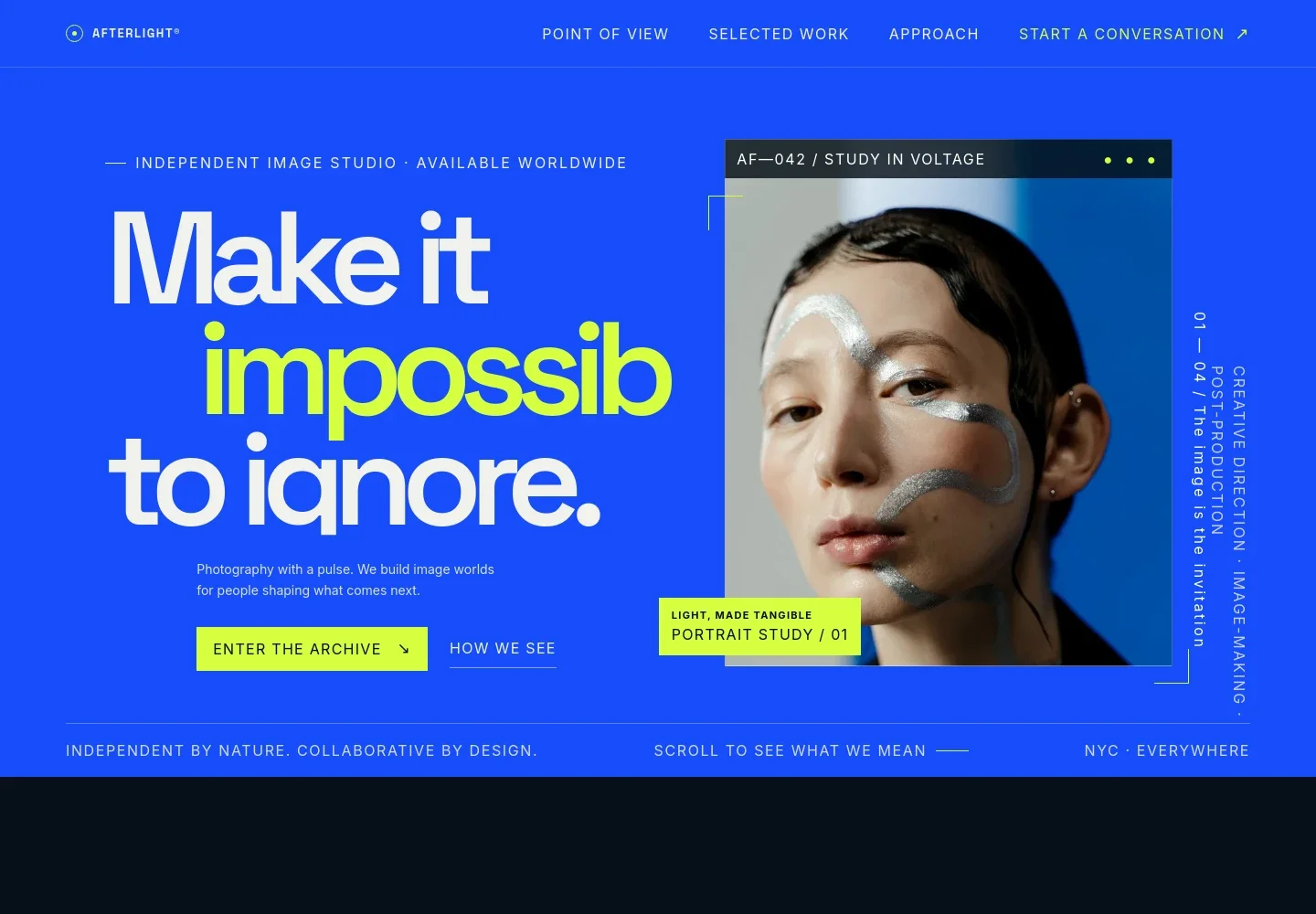
- Photography-focused hero
- A prominent headline and portrait image introduce the studio’s visual sensibility. Links lead visitors to the work and approach sections, while small captions add context to the featured image.
- Point of view
- A concise statement explains the studio’s belief in images that make an impression, followed by copy about working with brands, artists, and teams.
- Selected work
- A featured portrait study combines a large image with a project description and details covering portraiture, art direction, image style, and the intended subject.
- How we work
- Four numbered stages describe the creative approach, from finding the central idea and building an image world through the shoot and final delivery.
- Contact invitation
- A closing prompt invites visitors to share what they are building and what they want the images to achieve, with an email link and a footer.
How to use this template
Open in Revamp
Click Use this template and sign in or create an account. You’ll start with your own copy of the design, ready to personalize.
Bring your content
Replace the sample text, photos, and logo with your own. Share your content, a document, or an existing website, and ask Revamp to adapt the template to your business.
Refine and publish
Ask Revamp to adjust the colors, layout, or sections, or edit directly on the page. Review desktop and mobile, then publish. You can keep making changes after launch.
Put your website to work
Make it easier to handle photography inquiries, schedule conversations, and keep prospective clients organized. Ask Revamp to add or connect tools suited to your studio’s workflow.
-

Schedule client conversations
CalendlyGive prospective clients a simple way to choose a time for an introductory call. Ask Revamp to add consultation booking with Calendly.
-

Organize client inquiries
HubSpotKeep inquiry details and follow-up in one place as potential projects develop. Ask Revamp to connect HubSpot for contact management.
-

Coordinate shoot dates
Google CalendarKeep planned shoots and client meetings visible on a shared calendar. Ask Revamp to add Google Calendar scheduling.
Frequently asked questions
Is this template free?
Yes. This premium template is free to use when you select Use this template. The offer applies to the template itself, not hosting or other services.
Can I use my own content?
Yes. Ask Revamp to personalize the page with your photography, studio details, services, project descriptions, and contact information.
Do I need coding skills?
No. Ask Revamp to make content and design changes in plain language, without coding.
Can I change the design?
Yes. Ask Revamp to adjust the visual style, layout, colors, typography, or other design details to suit your photography business.
Can I keep editing after publishing?
Yes. You can keep asking Revamp to update your site after launch as your work, services, and business information change.


