About this template
Help people facing separation understand the legal support you offer and where to begin. The page presents divorce and separation, parenting arrangements, property and finances, and agreements as distinct areas of help.
A measured editorial layout pairs direct explanations with clear next steps. Visitors can read about your approach, find answers to common first-meeting questions, and reach out by phone or email.
Who it’s for
Designed for divorce lawyers, family law practices, and attorneys who want to explain their services clearly to people considering separation or divorce.
What’s included
The page guides prospective clients from an introductory message through your approach and practice areas to practical questions and contact details. Its calm visual style and clearly organized content suit a sensitive legal subject.
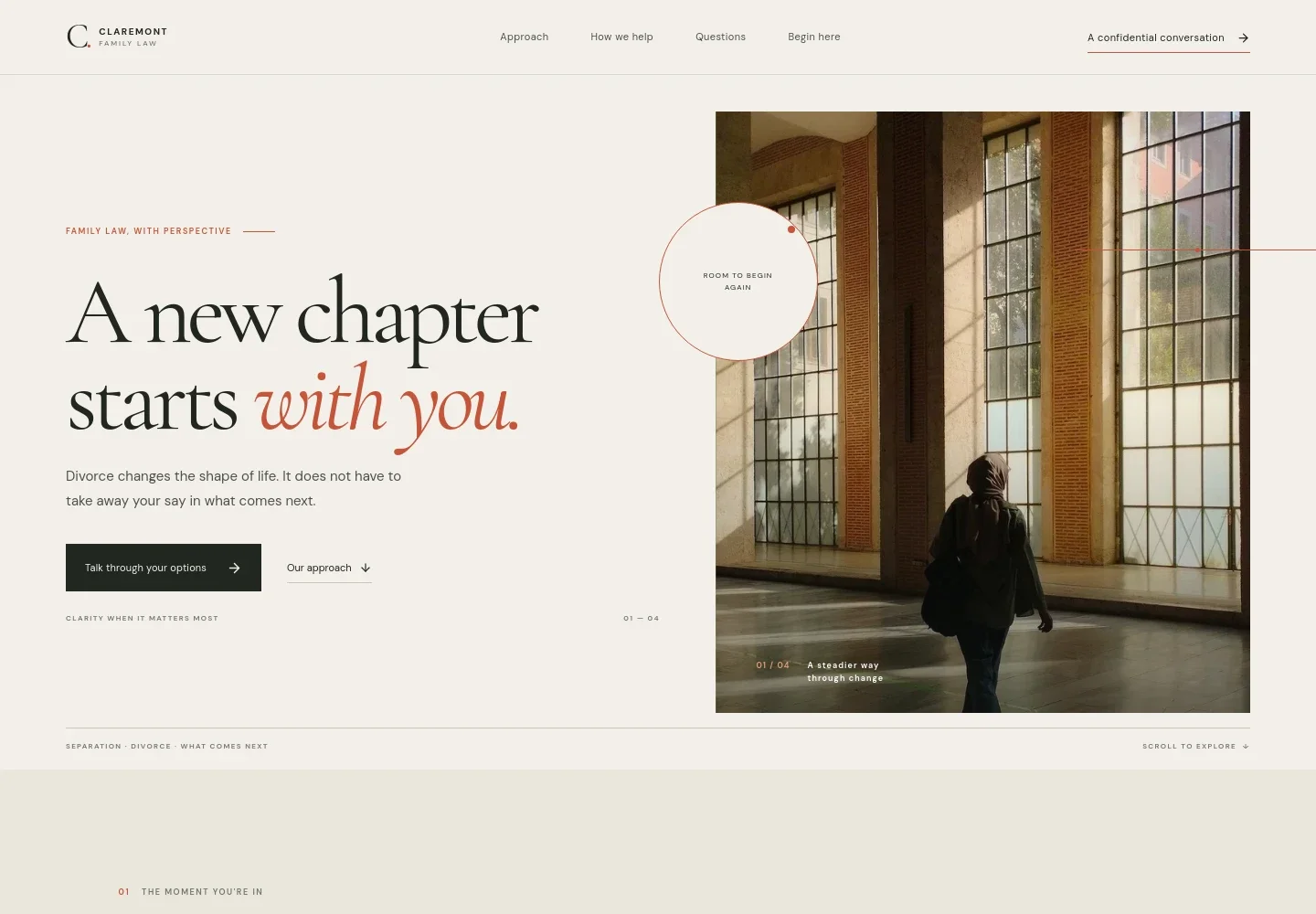
- Introductory hero
- Opens with a supportive message about having a say in what comes next, a prominent invitation to discuss options, and a portrait image.
- Approach and principles
- Explains how the practice listens, clarifies choices, and supports clients as they move forward. This gives visitors a sense of the firm's client-centered approach before they contact you.
- Point of view
- A focused statement emphasizes fair, workable solutions, helping set a thoughtful tone for discussions about family and financial decisions.
- Practice areas
- Lists divorce and separation, parenting arrangements, property and finances, and agreements and next steps, each with a short explanation and a route to contact.
- Path-forward image and invitation
- A full-width image and concise message create a visual pause before the questions section, with another invitation to find a next step.
- Common questions
- Answers questions about decision timing, resolving matters without court, and what to bring to a first meeting. This helps prospective clients know what to expect before getting in touch.
- Contact and footer
- Closes with a direct invitation to begin, illustrative phone and email details, and a footer identifying the page as a template and not legal advice.
How to use this template
Open in Revamp
Click Use this template and sign in or create an account. You’ll start with your own copy of the design, ready to personalize.
Bring your content
Replace the sample text, photos, and logo with your own. Share your content, a document, or an existing website, and ask Revamp to adapt the template to your business.
Refine and publish
Ask Revamp to adjust the colors, layout, or sections, or edit directly on the page. Review desktop and mobile, then publish. You can keep making changes after launch.
Put your website to work
Make it easier to manage enquiries and consultations. Ask Revamp to add or connect tools that fit your firm's preferred intake and scheduling process.
-

Make consultation scheduling easier
CalendlyAsk Revamp to add consultation booking with Calendly so prospective clients can request a suitable meeting time.
-

Keep client enquiries organized
Clio GrowAsk Revamp to connect Clio Grow to support prospective-client intake and follow-up in your firm's client management workflow.
-

Coordinate consultations with your calendar
Google CalendarAsk Revamp to connect Google Calendar to help coordinate consultation availability with your existing schedule.
Frequently asked questions
Is this template free?
Yes. This premium template is free to use through Use this template. Free refers to the template itself.
Can I use my own content?
Yes. Ask Revamp to personalize the page with your firm's name, practice details, contact information, and other content.
Do I need coding skills?
No. You can ask Revamp to personalize the content and design without coding.
Can I change the design?
Yes. Ask Revamp to adjust the layout, colors, imagery, and other design details to suit your practice.
Can I keep editing after publishing?
Yes. You can keep asking Revamp to make updates to your site after it launches.