About this template
Help visitors understand your floral style, the flowers and services you offer, and the kinds of occasions you design for. The page presents a season-led approach, with garden-inspired arrangements for everyday moments and custom work for gatherings.
Expressive floral photography, editorial typography, and clear sections for your approach, flowers, celebrations, and contact make it easy for prospective clients to find their way from inspiration to an inquiry.
Who it’s for
Independent florists, floral designers, flower shops, and studios creating bouquets, custom arrangements, wedding flowers, or event installations.
What’s included
The design pairs large floral imagery with concise descriptions and distinct service groupings, so visitors can quickly see your creative approach and whether your work suits their occasion.
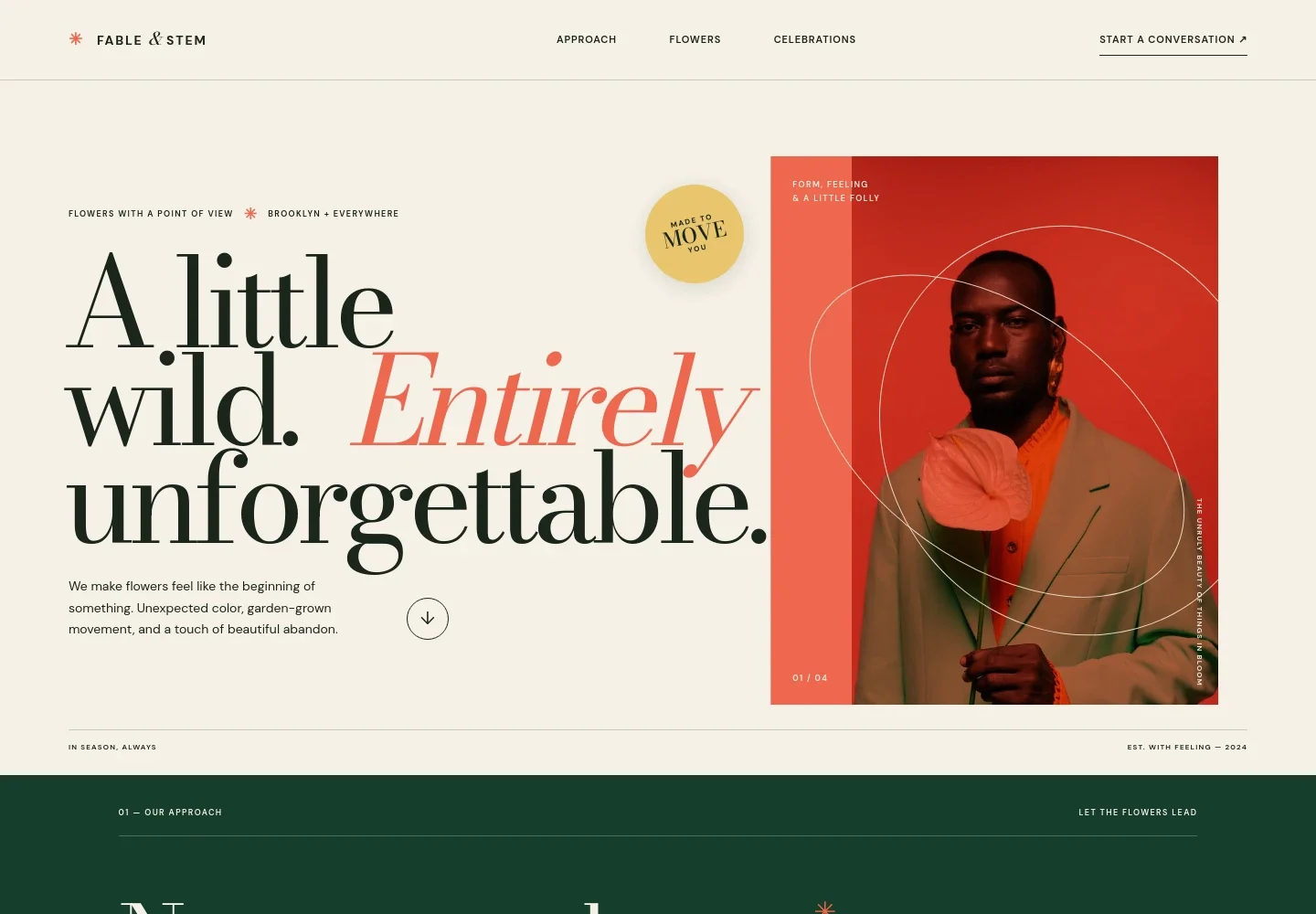
- Hero and introduction
- A prominent floral portrait, a short statement of style, and a Brooklyn and elsewhere location line introduce the studio. The opening call to action points visitors toward the contact section.
- Our approach
- A short editorial statement describes an instinctive, nature-led design approach, helping visitors understand the sensibility behind the work.
- The flowers
- Seasonal imagery and copy introduce the use of flowers available in the moment. A concise list distinguishes garden-led bouquets, statement arrangements, and flowers for everyday occasions.
- Design philosophy
- A brief, visually prominent manifesto gives the page a pause between flower offerings and event services, reinforcing the studio's creative point of view.
- Celebrations
- This section introduces floral design for weddings and vows, dinner parties, brand moments, and other occasions, with a link inviting visitors to discuss a gathering.
- Contact
- A direct invitation to start a conversation and an email link give prospective clients a clear next step. Replace the illustrative contact details with your own.
- Footer
- The closing area repeats the studio identity, links back to the top, and includes a copyright line.
How to use this template
Open in Revamp
Click Use this template and sign in or create an account. You’ll start with your own copy of the design, ready to personalize.
Bring your content
Replace the sample text, photos, and logo with your own. Share your content, a document, or an existing website, and ask Revamp to adapt the template to your business.
Refine and publish
Ask Revamp to adjust the colors, layout, or sections, or edit directly on the page. Review desktop and mobile, then publish. You can keep making changes after launch.
Put your website to work
Make it easier to manage inquiries, consultations, and follow-up. Ask Revamp to add connections with tools that suit how your floral business works.
-

Capture event inquiries
HoneyBookKeep prospective wedding and event clients organized from first contact. Ask Revamp to connect HoneyBook for inquiry and client management.
-

Schedule consultations
CalendlyLet customers request a time to discuss their flowers. Ask Revamp to add consultation booking with Calendly.
-

Manage customer relationships
HubSpotKeep customer conversations and follow-ups organized as your business grows. Ask Revamp to connect HubSpot for contact management.
Frequently asked questions
Is this template free?
Yes. The premium template is free to use when you select Use this template. This applies to the template itself.
Can I use my own content?
Yes. Ask Revamp to personalize the text, images, services, business details, and contact information with your own content.
Do I need coding skills?
No. Ask Revamp to make changes to your content or design in plain language, without coding.
Can I change the design?
Yes. Ask Revamp to adjust the colors, typography, imagery, layout, or other visual details to suit your floral business.
Can I keep editing after publishing?
Yes. You can keep editing your website after launch. Ask Revamp to update the content or design as your services and business change.