About this template
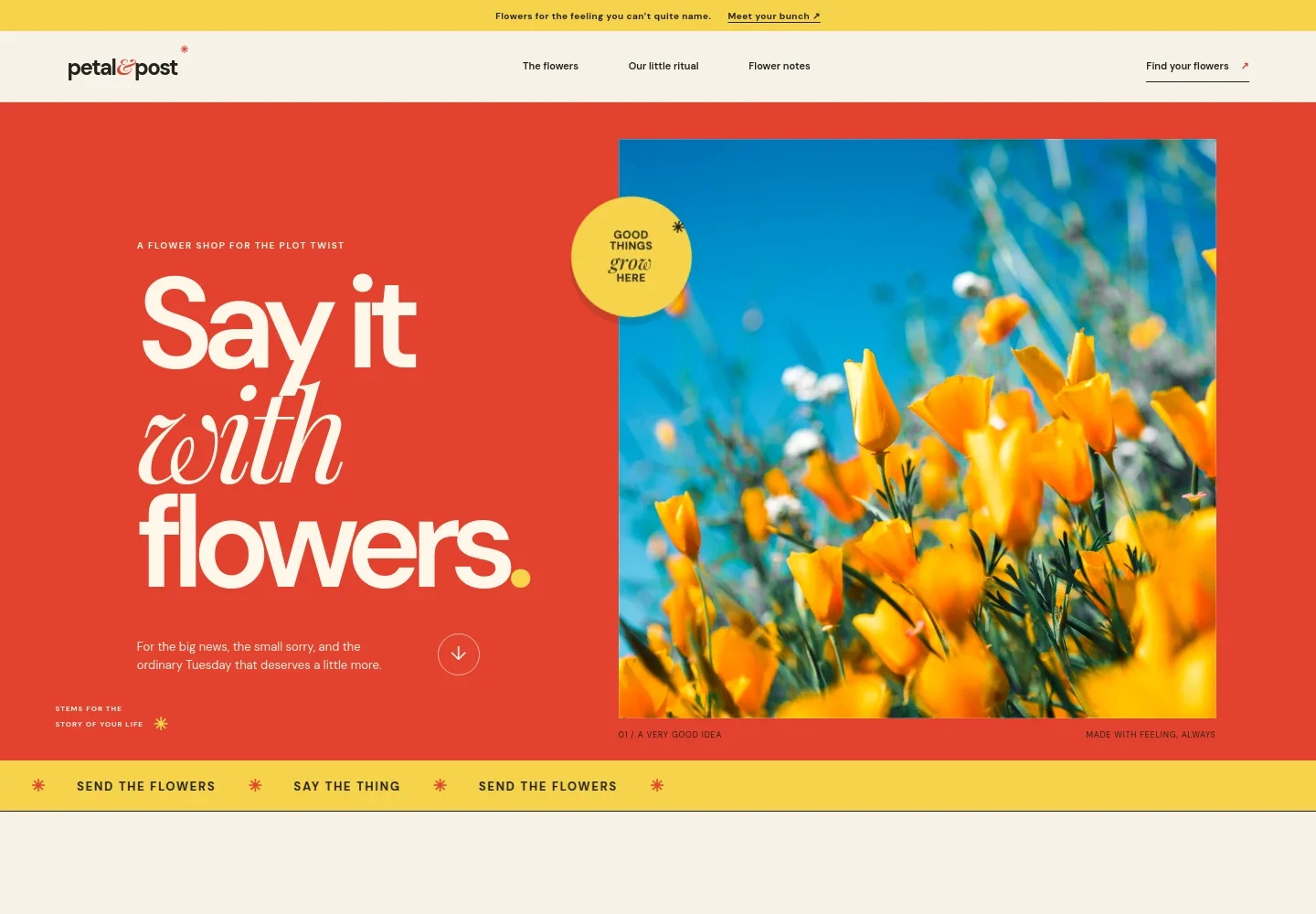
Help shoppers browse seasonal bouquets by name, mood, and price. This flower shop design pairs vivid floral photography with concise product descriptions and a clear invitation to find a bunch.
The page also gives visitors a sense of the shop’s approach to gifting, followed by practical flower-care notes. Replace the example shop name, bouquet details, imagery, prices, and contact information with your own.
Who it’s for
For independent florists, online flower shops, and floral businesses presenting bouquets and flower-care information to shoppers.
What’s included
The layout moves from a prominent floral hero to a three-item bouquet selection, then adds brand storytelling and care guidance. This gives shoppers both a quick way to see the products and useful context for choosing and enjoying flowers.
- Announcement bar and navigation
- A short shop message and links to the flowers, brand story, and flower notes keep the main paths easy to find.
- Floral hero
- A large bouquet image, expressive headline, and short gifting message introduce the shop and direct visitors toward the flower selection.
- Bouquet selection
- Three featured arrangements appear with names, short descriptions, images, and example prices, giving shoppers a clear starting point for browsing.
- Shop note
- A brief note beneath the bouquets highlights seasonal stems and links to more information about the shop.
- Brand story
- A text-and-image section frames flowers as a way to mark everyday moments and gives the shop space to express its gifting point of view.
- Flower care notes
- Three numbered tips cover trimming stems, choosing a suitable place for a bouquet, and refreshing its water.
- Closing contact section
- A prominent final invitation leads visitors to contact the shop by email, followed by a compact footer with the shop name and return-to-top link.
How to use this template
Open in Revamp
Click Use this template and sign in or create an account. You’ll start with your own copy of the design, ready to personalize.
Bring your content
Replace the sample text, photos, and logo with your own. Share your content, a document, or an existing website, and ask Revamp to adapt the template to your business.
Refine and publish
Ask Revamp to adjust the colors, layout, or sections, or edit directly on the page. Review desktop and mobile, then publish. You can keep making changes after launch.
Put your website to work
Help shoppers place orders, coordinate deliveries, and hear about new seasonal arrangements. Ask Revamp to add or connect tools such as these to suit your flower business.
-

Take online payments
ShopifyMake it easier for customers to pay for bouquets online. Ask Revamp to add checkout with Shopify.
-

Coordinate delivery dates
CalendlyLet customers choose a delivery time for gifts and special occasions. Ask Revamp to add delivery scheduling with Calendly.
-

Share seasonal updates
MailchimpKeep customers informed about new stems and upcoming seasonal collections. Ask Revamp to connect email marketing with Mailchimp.
Frequently asked questions
Is this template free?
Yes. The premium template is free to use when you select Use this template. This applies to the template itself.
Can I use my own content?
Yes. Ask Revamp to personalize the shop name, bouquet listings, descriptions, prices, images, care advice, and contact details with your content.
Do I need coding skills?
No. Ask Revamp to personalize the content and design for you, without coding.
Can I change the design?
Yes. Ask Revamp to adjust the colors, typography, imagery, layout, or other design details to better suit your flower business.
Can I keep editing after publishing?
Yes. You can keep editing after launch. Ask Revamp to update your bouquets, seasonal information, imagery, or design as your business changes.