About this template
Help hungry visitors quickly see what your food business serves and what makes its menu appealing. This bold, image-led design pairs a featured chicken sandwich with a concise menu lineup, food photography, and a clear story about how dishes are prepared.
The page gives visitors a natural path from the menu to your approach and a final call to action. Its energetic typography, warm colors, and close-up food images suit a casual restaurant, takeaway, or neighborhood food brand.
Who it’s for
For independent food sellers, burger and sandwich shops, casual restaurants, and takeaway businesses that want a distinctive way to present their menu and food.
What’s included
The visible design organizes the story around the food: introduce the offer, show signature menu items, explain the preparation approach, and guide visitors toward the next step.
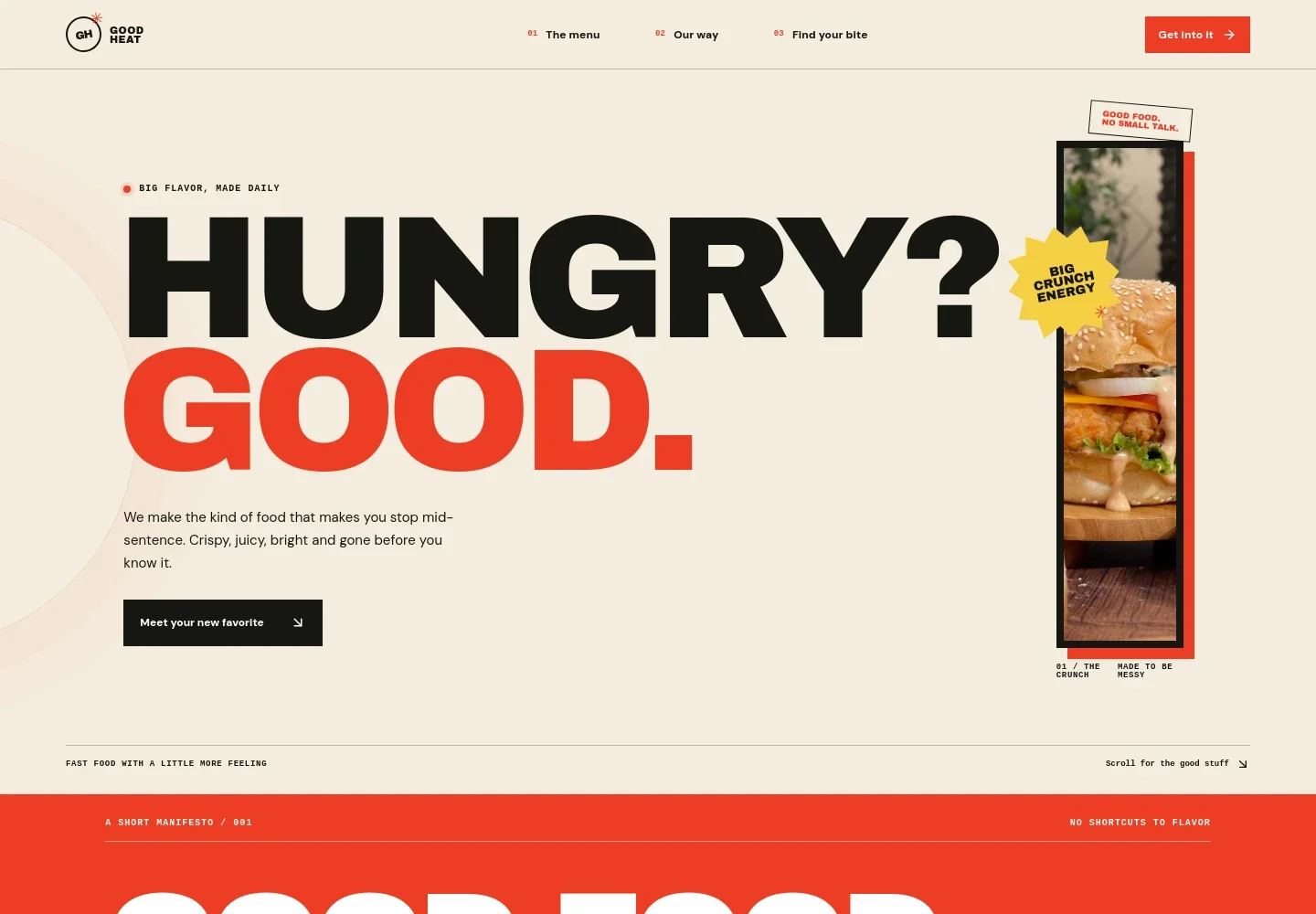
- Food-focused hero
- A large headline, featured crispy chicken sandwich image, and short introduction make the food offer immediately clear, with a prominent link leading visitors to the menu.
- Brand manifesto
- A bold statement and short supporting copy communicate the casual, flavor-first personality of the business.
- Menu lineup
- A food image sits alongside three example menu items, each with a name and brief description, giving visitors a quick sense of the dishes on offer.
- Kitchen and preparation story
- Kitchen photography and concise copy describe a made-fresh approach, helping explain how the food is prepared.
- Closing call to action and footer
- A final appetite-focused message leads into a footer with illustrative contact details and a hello link. Replace these details with your own before publishing.
How to use this template
Open in Revamp
Click Use this template and sign in or create an account. You’ll start with your own copy of the design, ready to personalize.
Bring your content
Replace the sample text, photos, and logo with your own. Share your content, a document, or an existing website, and ask Revamp to adapt the template to your business.
Refine and publish
Ask Revamp to adjust the colors, layout, or sections, or edit directly on the page. Review desktop and mobile, then publish. You can keep making changes after launch.
Put your website to work
Make it easier for customers to order, pay, and hear about new menu items. Ask Revamp to add or connect tools that fit the way your food business sells.
-

Take online orders
ToastGive customers a convenient way to place pickup or delivery orders. Ask Revamp to add online ordering with Toast.
-

Accept online payments
StripeOffer a familiar way to pay for online orders. Ask Revamp to add checkout with Stripe.
-

Reach returning customers
MailchimpShare menu updates and promotions with your customer list. Ask Revamp to add email marketing with Mailchimp.
Frequently asked questions
Is this template free?
Yes. This premium template is free to use when you select Use this template. The offer applies to the template, not hosting or other services.
Can I use my own content?
Yes. Ask Revamp to personalize the page with your business name, menu items, food photography, brand details, and contact information.
Do I need coding skills?
No. Ask Revamp to personalize the content and design for your food business without coding.
Can I change the design?
Yes. Ask Revamp to adjust the colors, typography, images, layout, or other design details to suit your brand.
Can I keep editing after publishing?
Yes. You can continue editing after launch. Ask Revamp to update your menu, copy, images, or design as your business changes.