About this template
Help customers see what is cooking, understand your weekly menu, and learn how your meal kits fit into their routine. The design pairs seasonal food photography with clear descriptions of recipes, ingredients, and the steps from choosing a box to serving dinner.
A kitchen-note section shares the brand’s approach to everyday meals, followed by a featured weekly recipe and a three-step explanation of choosing recipes, receiving ingredients, and cooking at home. A direct menu call to action gives visitors a clear next step.
Who it’s for
Meal kit companies, recipe box brands, and food delivery businesses introducing their menu and explaining how their service works to prospective customers.
What’s included
The page moves from the appeal of a relaxed dinner to a sample seasonal dish and a simple explanation of the meal-kit experience, helping visitors understand the offer before they choose a box.
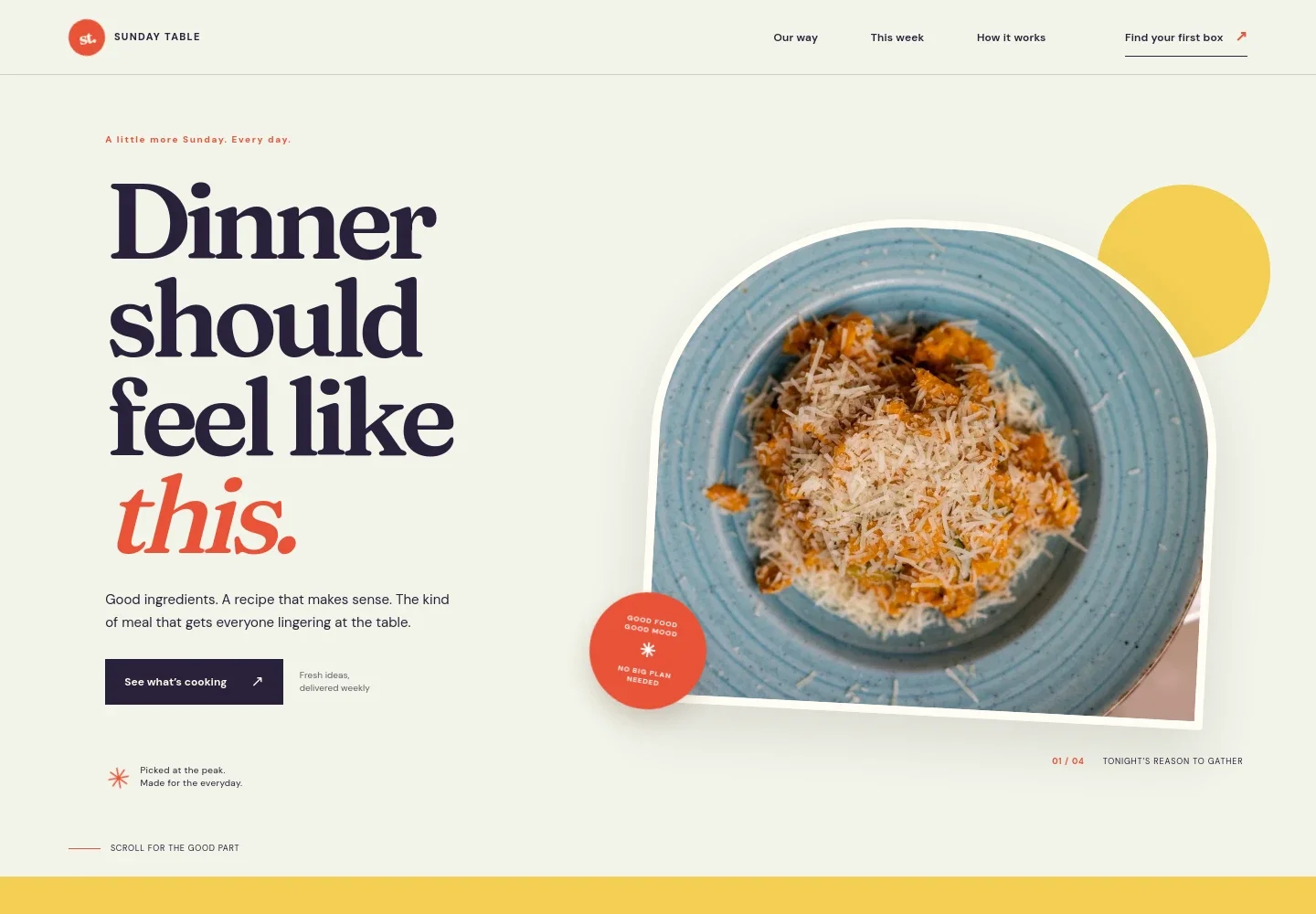
- Food-focused hero
- A prominent meal photograph, concise dinner-focused headline, and menu links introduce the brand and guide visitors toward the weekly offering.
- Kitchen note
- A short brand statement describes the emphasis on seasonal produce, familiar recipes, and flexible cooking, giving visitors context for the food and service.
- Weekly menu feature
- A featured seasonal bowl appears with a food image, preparation-time label, recipe description, and serving cues. The section frames the menu as a changing weekly selection.
- How it works
- Three concise steps explain selecting recipes and servings, receiving ingredients, and preparing the meal. The section helps customers picture the process before deciding to order.
- Closing menu call to action
- A final invitation and menu link bring visitors back to the food offer, followed by a footer with brand text, contact email, and a back-to-top link.
How to use this template
Open in Revamp
Click Use this template and sign in or create an account. You’ll start with your own copy of the design, ready to personalize.
Bring your content
Replace the sample text, photos, and logo with your own. Share your content, a document, or an existing website, and ask Revamp to adapt the template to your business.
Refine and publish
Ask Revamp to adjust the colors, layout, or sections, or edit directly on the page. Review desktop and mobile, then publish. You can keep making changes after launch.
Put your website to work
Meal-kit businesses can use ordering, subscription, and customer communication tools to manage recurring orders and keep customers informed. Ask Revamp to add or connect the tools that suit your operation.
-

Manage recurring orders
StripeSupport subscription billing and recurring meal-kit payments. Ask Revamp to add a Stripe checkout for subscription orders.
-

Organize customer and order follow-up
HubSpotKeep customer records and marketing follow-up organized in one CRM. Ask Revamp to connect HubSpot for customer communications.
-

Send menu and delivery updates
MailchimpShare weekly menu announcements and customer updates by email. Ask Revamp to connect Mailchimp for email campaigns.
Frequently asked questions
Is this template free?
Yes. This premium template is free to use when you select Use this template. The free offer applies to the template itself.
Can I use my own content?
Yes. Ask Revamp to personalize the copy, food photography, menu details, contact information, and calls to action for your meal-kit business.
Do I need coding skills?
No coding is needed. Ask Revamp to make content and design changes in natural language.
Can I change the design?
Yes. Ask Revamp to adjust the colors, typography, imagery, layout, and other design details to fit your brand.
Can I keep editing after publishing?
Yes. You can keep asking Revamp to update your content and design after launch.