About this template
Help musicians see what your shop carries, understand your approach to choosing an instrument, and find a reason to visit. The design pairs an editorial instrument-floor feature with a clear look at setup services and store visit details.
Warm, dark photography and large, direct headings give the page the feel of a music shop rather than a product directory. Visitors can browse instrument categories, learn about trying gear in person, and contact the store.
Who it’s for
Independent musical instrument retailers, guitar shops, music stores, and instrument repair businesses that want to introduce their selection, explain setup services, and encourage customers to visit.
What’s included
The page guides visitors from the store’s point of view to instruments, setup services, and practical visit information. Its editorial photography and spacious sections make the shop’s in-person experience central.
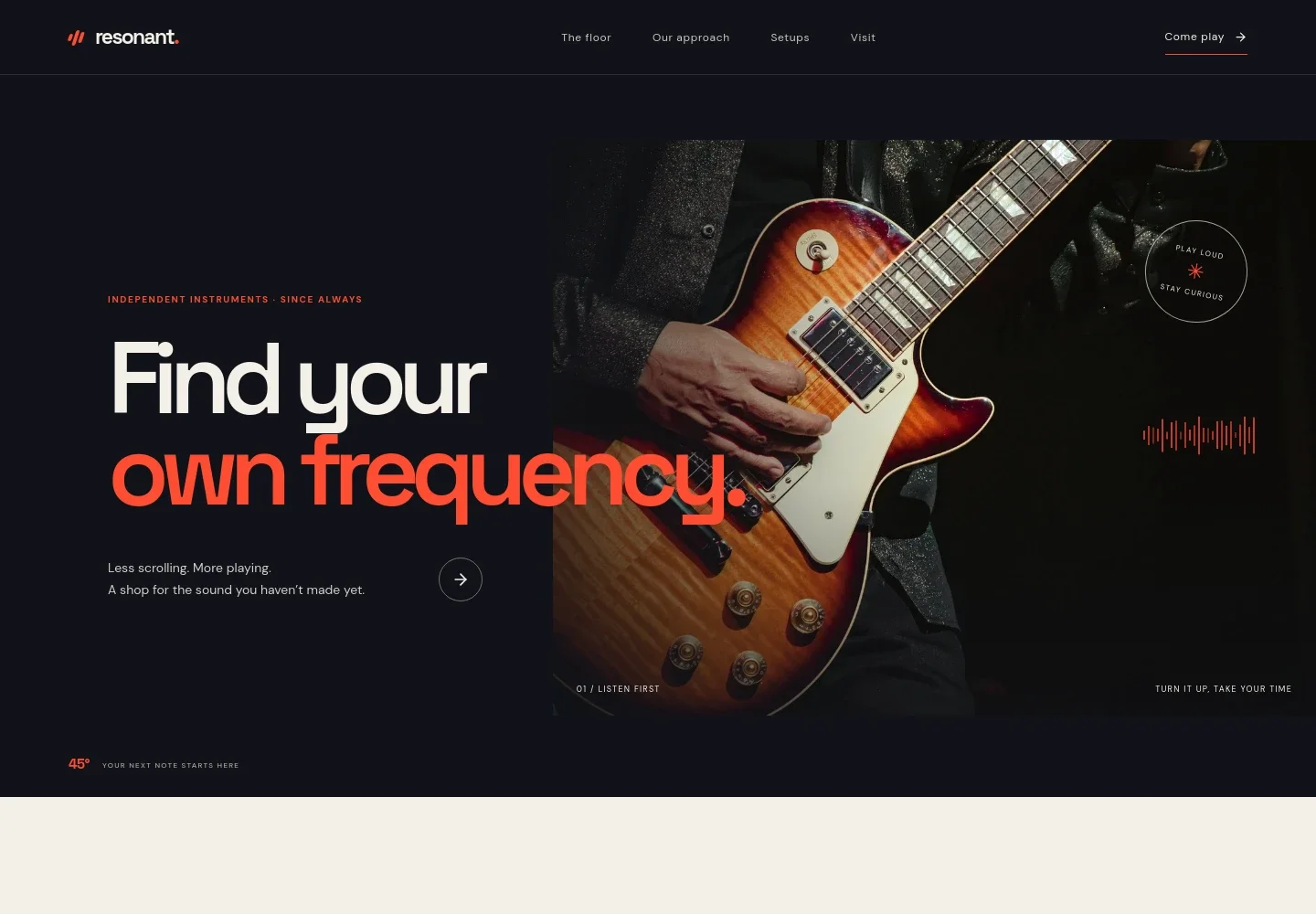
- Store introduction
- A prominent headline and dramatic guitar image establish the shop’s musician-first approach, with a link leading visitors toward the instrument selection.
- Our approach
- A short statement about keeping the floor open and offering honest advice introduces the store’s perspective and links to visit information.
- Instrument floor
- An editorial image and inviting copy introduce electric and acoustic guitars, keys, basses, amps, and other gear. A category strip names guitars, keys, drums, brass and woodwind, and recording.
- Try instruments in person
- A focused section encourages visitors to pick up an instrument and listen for themselves, making the hands-on store experience easy to understand.
- Setups and bench services
- A workshop image accompanies details about instrument setup, string changes, and getting a second opinion, with a link to ask about a setup.
- Visit and contact
- A final invitation to come play is paired with an email contact link, address and opening-hours fields. The preview marks its address and hours as illustrative, so replace them with your store’s details.
How to use this template
Open in Revamp
Click Use this template and sign in or create an account. You’ll start with your own copy of the design, ready to personalize.
Bring your content
Replace the sample text, photos, and logo with your own. Share your content, a document, or an existing website, and ask Revamp to adapt the template to your business.
Refine and publish
Ask Revamp to adjust the colors, layout, or sections, or edit directly on the page. Review desktop and mobile, then publish. You can keep making changes after launch.
Put your website to work
Make it easier to answer product questions, keep track of instruments and accessories, and manage in-store sales. Ask Revamp to add connections suited to how your shop operates.
-

Track products and stock
ShopifyKeep product listings and inventory organized across sales channels. Ask Revamp to connect Shopify for your instrument and accessory catalog.
-

Manage in-store sales
SquareBring checkout and stock tracking together for retail sales. Ask Revamp to connect Square for your music shop.
-

Help customers choose a time to visit
CalendlyLet customers request a time to discuss an instrument or setup. Ask Revamp to add consultation booking with Calendly.
Frequently asked questions
Is this musical instrument store template free?
Yes. This premium template is free to use through Use this template. Free refers to the template itself.
Can I use my own store content?
Yes. Ask Revamp to personalize the page with your shop name, instruments, services, photos, contact details, and opening hours.
Do I need coding skills to personalize it?
No. Ask Revamp to make changes to the content and design in plain language, without coding.
Can I change the design?
Yes. Ask Revamp to adjust the colors, typography, imagery, layout, and sections to suit your music shop.
Can I keep editing after publishing?
Yes. You can keep asking Revamp to update your site after it launches.