About this template
This photojournalism template helps visitors understand your point of view, see a featured field story, and learn how to commission your work. Its editorial layout pairs a large documentary image with a short introduction, story context, and clear links to your services and contact details.
Use the selected field notes area to present a photo essay with its subject and setting, then explain your approach through the point-of-view section. A dedicated services list makes editorial assignments, long-form visual stories, campaigns, and picture research easy to scan.
Who it’s for
Independent photojournalists, documentary photographers, visual journalism collectives, and editorial studios seeking commissions from publications or organizations.
What’s included
The design moves from a striking field image to the ideas, stories, and services behind the work, giving editors and potential collaborators a clear path from discovery to contact.
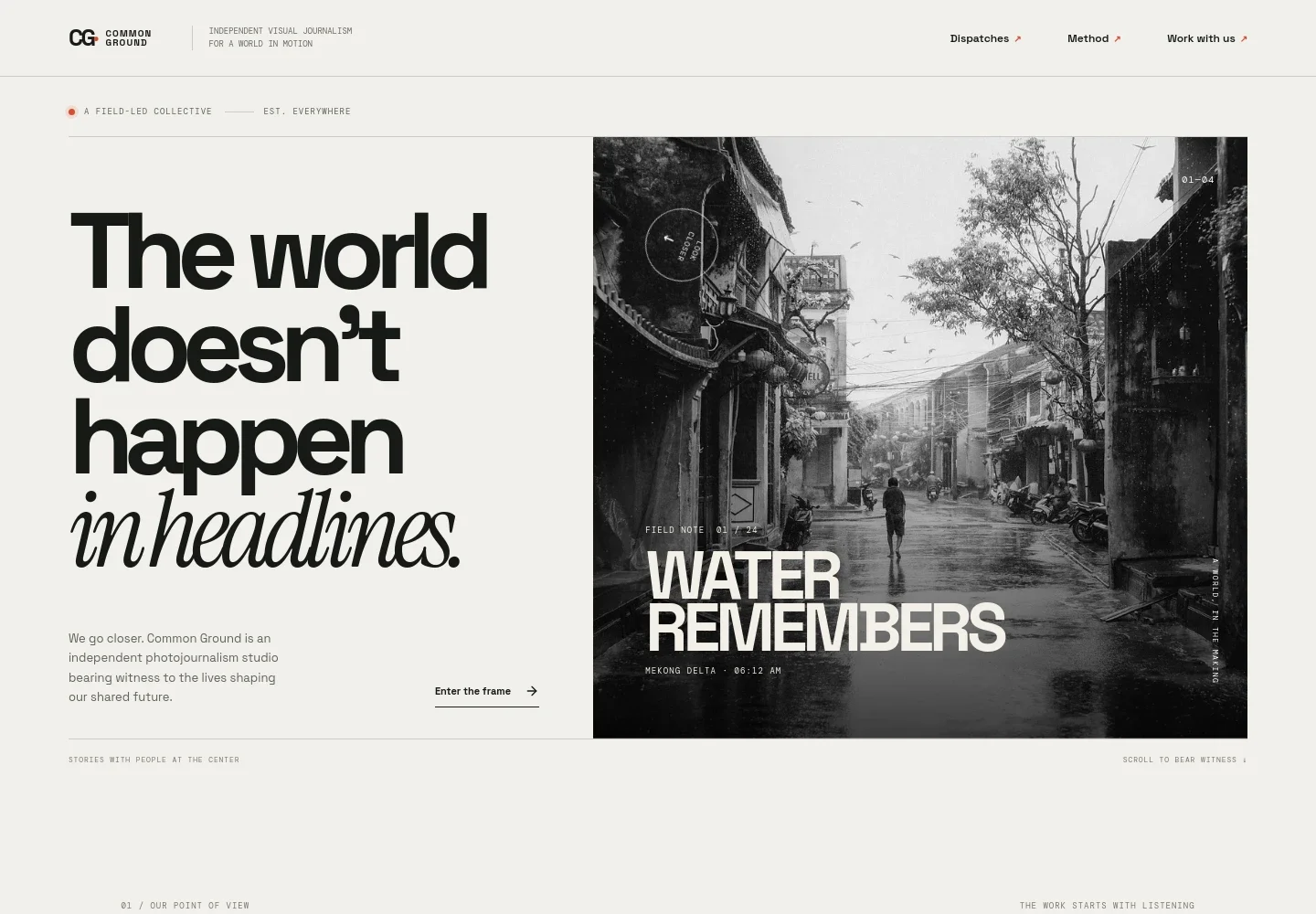
- Editorial navigation
- A compact header links visitors to Dispatches, Method, and Work with us, making the portfolio’s main areas easy to reach.
- Featured field image
- A large documentary-style photograph sits beside an introduction to the studio, with a field-note stamp and location details that establish an editorial tone.
- Point of view
- This section describes a people-centered approach to visual journalism, giving visitors context for the stories and images that follow.
- Selected field note
- A featured story pairs an image with a title, subject description, and climate and belonging label. The caption layout helps visitors understand the story’s focus before they inquire.
- Services
- A numbered list outlines editorial assignments, long-form visual stories, campaigns, and picture research and direction, with a concise description of each.
- Start a conversation
- A closing contact prompt invites prospective clients to share what they are working on, followed by an email address in the footer.
How to use this template
Open in Revamp
Click Use this template and sign in or create an account. You’ll start with your own copy of the design, ready to personalize.
Bring your content
Replace the sample text, photos, and logo with your own. Share your content, a document, or an existing website, and ask Revamp to adapt the template to your business.
Refine and publish
Ask Revamp to adjust the colors, layout, or sections, or edit directly on the page. Review desktop and mobile, then publish. You can keep making changes after launch.
Put your website to work
Support editorial inquiries and project planning by asking Revamp to add tools for booking conversations, managing client relationships, or sharing updates.
-

Book consultation calls
CalendlyMake it easier for editors and organizations to arrange an introductory conversation. Ask Revamp to add consultation booking with Calendly.
-

Organize commission inquiries
HubSpotKeep track of prospective assignments and follow-ups in one place. Ask Revamp to connect HubSpot for managing editorial and client inquiries.
-

Share studio updates
MailchimpGive interested editors a way to receive new story announcements and dispatches. Ask Revamp to add a Mailchimp newsletter signup.
Frequently asked questions
Is this template free?
Yes. This premium template is free to use when you select Use this template. The offer applies to the template itself.
Can I use my own content?
Yes. Ask Revamp to personalize the text, photographs, story details, services, and contact information for your photojournalism practice.
Do I need coding skills?
No. Ask Revamp to personalize the content and design without coding.
Can I change the design?
Yes. Ask Revamp to adjust the visual style, layout, colors, or typography to better fit your studio and its work.
Can I keep editing after publishing?
Yes. You can keep editing after launch. Ask Revamp to update your stories, images, services, or other page content as your work develops.


