About this template
Help couples understand your wedding planning approach, the kinds of support you offer, and how to start a conversation. The page presents planning as personal and collaborative, with options for full-weekend planning, focused support, and coordination on the day.
A large celebration image, editorial typography, and warm, considered layouts give the page room to tell a story before visitors reach the service details. A dedicated weekend section shows how the celebration can extend beyond the wedding day.
Who it’s for
Independent wedding planners and coordinators who want to explain their services, show their approach to celebrations, and invite couples to get in touch.
What’s included
The design moves from the feeling behind a celebration to planning services, a wedding-weekend feature, and a clear invitation to make contact. Its image-led sections and concise service descriptions help couples find the support that fits their plans.
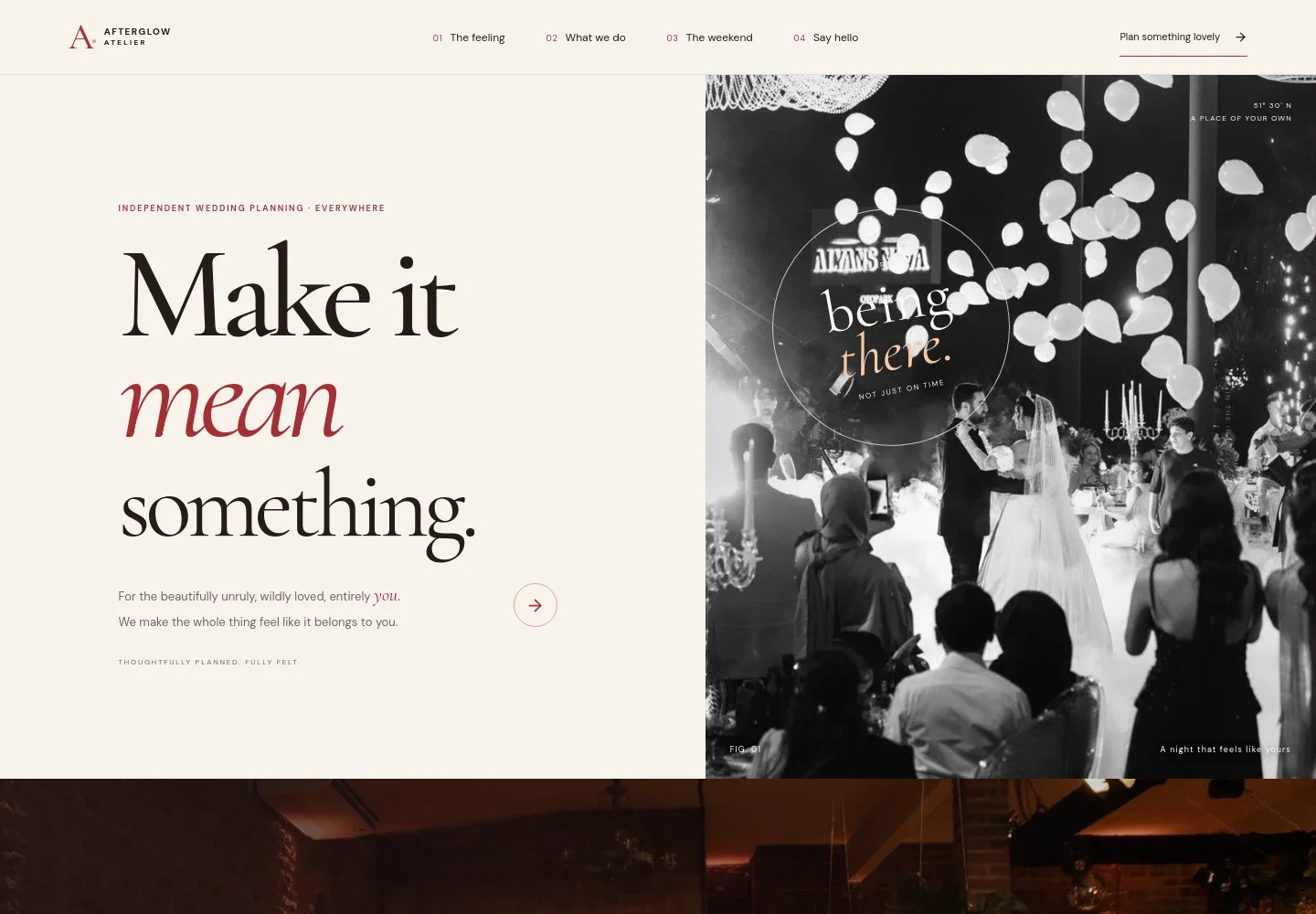
- Wedding planning introduction
- A prominent headline, celebration image, and short introduction set an expressive tone and direct visitors toward the planning approach.
- The feeling
- A story section pairs a candlelit table image with copy about creating a wedding that feels personal and centered on the couple and their guests.
- Planning approach and services
- An introduction to the planner's point of view leads into three service descriptions: full-weekend planning, targeted planning support, and coordination on the day.
- The wedding weekend
- A dedicated image and supporting copy present the idea of making time for welcome gatherings, the wedding celebration, and a relaxed morning after.
- Contact invitation
- A closing message invites couples to share their date, location if known, and the feeling they want for the celebration, with an email link to begin a conversation.
- Navigation and footer
- Section links help visitors move between the story, services, weekend feature, and contact area. The footer repeats the brand and provides a return-to-top link.
How to use this template
Open in Revamp
Click Use this template and sign in or create an account. You’ll start with your own copy of the design, ready to personalize.
Bring your content
Replace the sample text, photos, and logo with your own. Share your content, a document, or an existing website, and ask Revamp to adapt the template to your business.
Refine and publish
Ask Revamp to adjust the colors, layout, or sections, or edit directly on the page. Review desktop and mobile, then publish. You can keep making changes after launch.
Put your website to work
Make it easier to coordinate consultations, keep client details organized, and manage planning conversations. Ask Revamp to add connections to tools that suit your process.
-

Make consultation scheduling easier
CalendlyLet couples choose a time for an initial conversation. Ask Revamp to add consultation booking with Calendly.
-

Keep client inquiries and follow-ups organized
HubSpotTrack prospective couples and their planning conversations in one place. Ask Revamp to connect HubSpot for contact management.
-

Coordinate appointments around your calendar
Google CalendarKeep consultation availability aligned with your schedule. Ask Revamp to add Google Calendar scheduling.
Frequently asked questions
Is this wedding website template free?
Yes. This premium template is free to use through Use this template. The offer applies to the template itself, not hosting or other services.
Can I use my own content?
Yes. Ask Revamp to personalize the page with your business name, services, images, writing, and contact details.
Do I need coding skills?
No coding skills are needed. Ask Revamp to make content and design changes in natural language.
Can I change the design?
Yes. Ask Revamp to adjust the colors, typography, imagery, layout, or other visual details to suit your wedding planning business.
Can I keep editing after publishing?
Yes. You can keep editing your website after launch. Ask Revamp to update its content or design as your business changes.