Small Business Website Design: A Practical Guide
Plan a small business website around your customers. See design examples, choose the right pages and features, and review your site before launch.
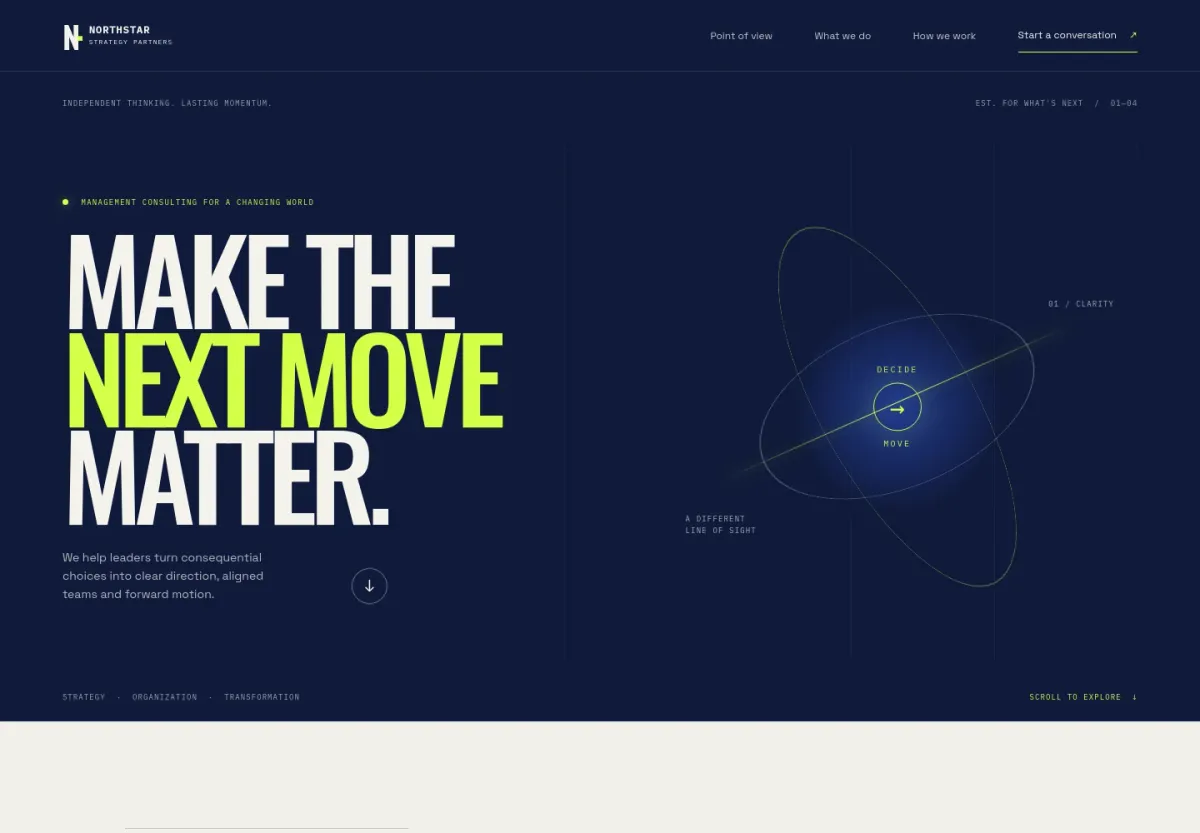
Good small business website design helps a customer understand what you offer, decide whether you are right for them, and take the next step. The pages, photographs and customer journeys should support those decisions.
Start with the work your website needs to do. A consulting practice needs to establish expertise and invite a conversation. A landscape business needs to show its work and explain where it operates. A class-based business needs a clear schedule and a way to book.
This guide helps you choose the right structure, compare ways to build it, and review the experience before launch. The image above is a design example from the Revamp template library.
Ready to create your website? Describe your business below, or choose a website template.
In this guide:
- Choose your pages
- See three design examples
- Compare ways to build
- Plan the cost
- Check your website before launch
Start with the customer’s next decision
Choose the main action your website should make easier: request a quote, arrange a consultation, book a session, or buy a product. Give that action a clear label and a natural place in the page.
For a landscape designer, “Discuss your garden” may be a better fit than an immediate booking. The customer needs to explain their property and project first. For a class business, “See classes” can lead to dates, availability and booking.
Write down these three answers before choosing the design:
- Who is the website for? Be specific about the customer and the problem that brings them to you.
- What do they need to know? Services, location, suitability, prices or the way you work.
- What happens next? Explain the response they can expect after an enquiry or booking.
These answers give you a useful brief. You can begin with a short request such as “Create a website for our landscape studio with project photos and quote requests.” Add details as you review the first version.
Choose pages that answer real questions
A small website can be complete without being crowded. Give each page a clear purpose and use familiar navigation labels.
| Page | What the customer should learn | Useful next step |
|---|---|---|
| Home | What you offer, who you serve and why they should explore further | View services or make an enquiry |
| Services | What is included, who it is suitable for and how the work starts | Ask about a specific service |
| Work or examples | What your work looks like and what each project involved | Discuss a similar project |
| About | Who will do the work and how your business operates | Meet the team or contact you |
| Contact or booking | How to reach you, where you operate and what information you need | Send an enquiry or reserve a time |
Add separate service or location pages when customers need different information. A single broad services page is harder to use if it covers unrelated offers with different prices, requirements or booking routes.
Use your own photographs, business details and approved customer quotes. Replace the example names, imagery and claims in any starting template before publishing.
Three design examples, with different business needs
These are editable designs from Revamp’s template library. Use them to explore layout and content; their example businesses are not customer case studies.
A consulting practice: explain the work before asking for a meeting
The management consulting template pairs a concise opening statement with clearly named focus areas and a contact section. Visitors can understand the firm’s approach before starting a conversation.
For your practice, replace broad claims with specific services, the situations you work on and the people involved. A first conversation may be more appropriate than publishing a fixed package price. If you add consultation booking, explain the purpose and length of that meeting.
A landscape business: let the work support the offer
The landscaping template gives garden imagery room alongside design, planting and ongoing-care services. Its contact section invites visitors to describe their property.
Use photographs of your own completed work and explain the location, project scope and services you delivered. State your service area near the enquiry route. Ask for the details needed to reply usefully, such as project type and preferred timing.
A training business: make the choice and booking understandable
A training website needs to answer who each course suits, what it covers, when it runs and what the customer receives. The course template separates the teaching method, learning journey and course format, then leads to an enquiry. It is a presentation design; ask Revamp to add the booking, payments or member access your business needs.
Keep course information close to the booking action. Show the relevant dates, location or online format, and any prerequisites before the customer commits. Review confirmations and access to materials as part of the customer journey.
Make the design feel like your business
Choose a visual direction you can explain in ordinary language: understated and spacious, warm and approachable, or bold and direct. Bring your logo, brand colors and a few relevant photographs.
Make the opening screen useful. It should identify your offer, provide a meaningful visual and make the next step easy to find. A short heading with a specific service is usually more informative than a broad promise such as “We help you succeed.”
Use a consistent approach to headings, buttons and spacing across the website. Give important content room to breathe. Keep long explanations on the relevant service page rather than placing everything in the homepage introduction.
Review the website on a phone early. Check that text is readable, navigation is easy to open, images fit the layout and enquiry fields are comfortable to complete. Also try the website with a keyboard: links, buttons and forms should be reachable with a visible focus indicator.
Choose how you want to build and maintain it
The right approach depends on the work you want to handle yourself and the relationship you want after launch.
Build and refine with an AI website platform
Choose this approach when you want to describe the result, review it directly and continue making changes in the same product. With Revamp, you can start from a short brief, use a template or redesign from your existing URL. Refine the design through chat or visual editing, then add the pages and business features you need.
Decide which customer journeys belong in the website: enquiries, bookings, payments or customer access. Review those journeys before launch. Business features and custom-domain publishing require an eligible plan; compare Revamp plans for current allowances.
Work with a designer or agency
A designer or agency can be a good choice when you want a person to lead the creative process, coordinate stakeholders or handle a defined delivery engagement.
Ask who supplies the copy and photography, which customer journeys are included, how revisions work and who manages updates after launch. Compare the ongoing relationship as well as the first design. A clear scope makes quotes more useful than comparing page counts alone.
Customize a template yourself
A template gives you a layout to evaluate before you begin. Look for a structure that suits your content and primary action, then replace the example material with your own.
Check how the template handles phones, longer headings, real photographs and the amount of information you need. In Revamp, choose a published design, open it as your own project and personalize it through conversation.
Budget for the website you will operate
Compare three parts of the cost: the initial design and content, the ongoing website plan, and later changes or connected services. A lower initial quote can still mean additional charges for revisions or maintenance.
For an agency quote, ask whether content, enquiry forms, bookings, launch help and post-launch changes are included. For a website platform, check the plan needed for your domain and business features, its usage allowances, and any separate charges from connected services.
Our website cost benchmark documents a dated selection of agency and platform prices. Use it as a reference for comparing scope, not as a universal price for your project.
Check the complete customer journey before launch
Try the website as a prospective customer, starting on a phone. Read a service page, choose the next step and complete it. Then check what your business receives.
- Enquiries: submit a test request and confirm that it reaches the right place with the information you need.
- Bookings: try the available times, rescheduling rules and confirmation message.
- Payments: use the payment provider’s test mode and check the purchase confirmation.
- Customer access: use separate test accounts to confirm that each person sees the right information.
- Content: review names, services, prices, contact details and every public claim. Remove remaining example content.
- Navigation: follow the important links on desktop and phone, including the menu and footer.
If you are replacing an existing website, review its important page addresses and search traffic before switching over. Arrange redirects where addresses change and check the new pages after launch. Follow the website redesign guide for that separate process.
Keep improving after launch
Your website should be easy to update when your business changes. Add a new service, refresh project photographs or refine the enquiry form in the same project.
Use visitor analytics to see where people arrive and what they explore. Combine that information with actual customer questions. If visitors keep asking whether you serve a particular area, make the answer easier to find.
In Revamp, return to your website and describe the change you want. Review the preview before publishing the update. Grow includes visitor analytics and SEO assistance; support is available across plans.
Common questions
How many pages does a small business website need?
Enough to explain your offer and help customers act. Start with the page purposes above. Add separate pages when a service, location or audience needs its own information, rather than choosing a page count in advance.
Can I create a business website without coding?
Yes. In Revamp, describe your business, review the first version and refine it by chatting or editing visually. You can add pages and customer journeys without choosing the technical implementation yourself.
Can I use my existing domain?
Yes, on an eligible publishing plan. Review the new website first, then follow the domain-connection steps. If the address also handles business email, preserve those email settings when you make the website change.
Should I redesign my current website or start a new one?
Start with a redesign when the existing website contains useful business content and brand context. Start a new website when you are launching a business or need a different starting structure. Revamp supports both; explore small-business redesign if you already have a site.
Create the website your business needs.
Tell Revamp what you offer and what customers should be able to do. Shape the design, add your content, and keep improving the same website.
Already have a website? Redesign your existing site.
More Guides
Website Cost Benchmarks: AI vs. Agency Development (2026)
2026 website cost benchmarks comparing AI and agency development: published build fees, first-year budgets, maintenance, design quality and editing effort.
How to Design a Website with AI
Create a professional website with AI. Bring your business information, refine the design, add working features and publish with Revamp.
How to Design a Landing Page
Design a landing page with a clear offer, professional visuals and an easy next step. Build and refine the experience in Revamp without coding.