About this template
This art blog layout helps readers quickly understand your editorial point of view and find stories to explore. A prominent artwork, a short introduction to the journal, and a featured issue with article summaries give the publication a clear identity and an inviting way into its writing.
The design pairs vivid art imagery with editorial typography, numbered story labels, reading-time and topic details, and generous space around the copy. A newsletter invitation gives interested readers a next step, while the journal overview explains the perspective behind the publication.
Who it’s for
For independent art journals, art and design writers, curators, and editorial teams sharing essays, studio visits, conversations, or reflections on looking at art.
What’s included
The page is organized like an art journal: establish the publication’s perspective, introduce current stories, offer a visual pause, and invite readers to stay in touch.
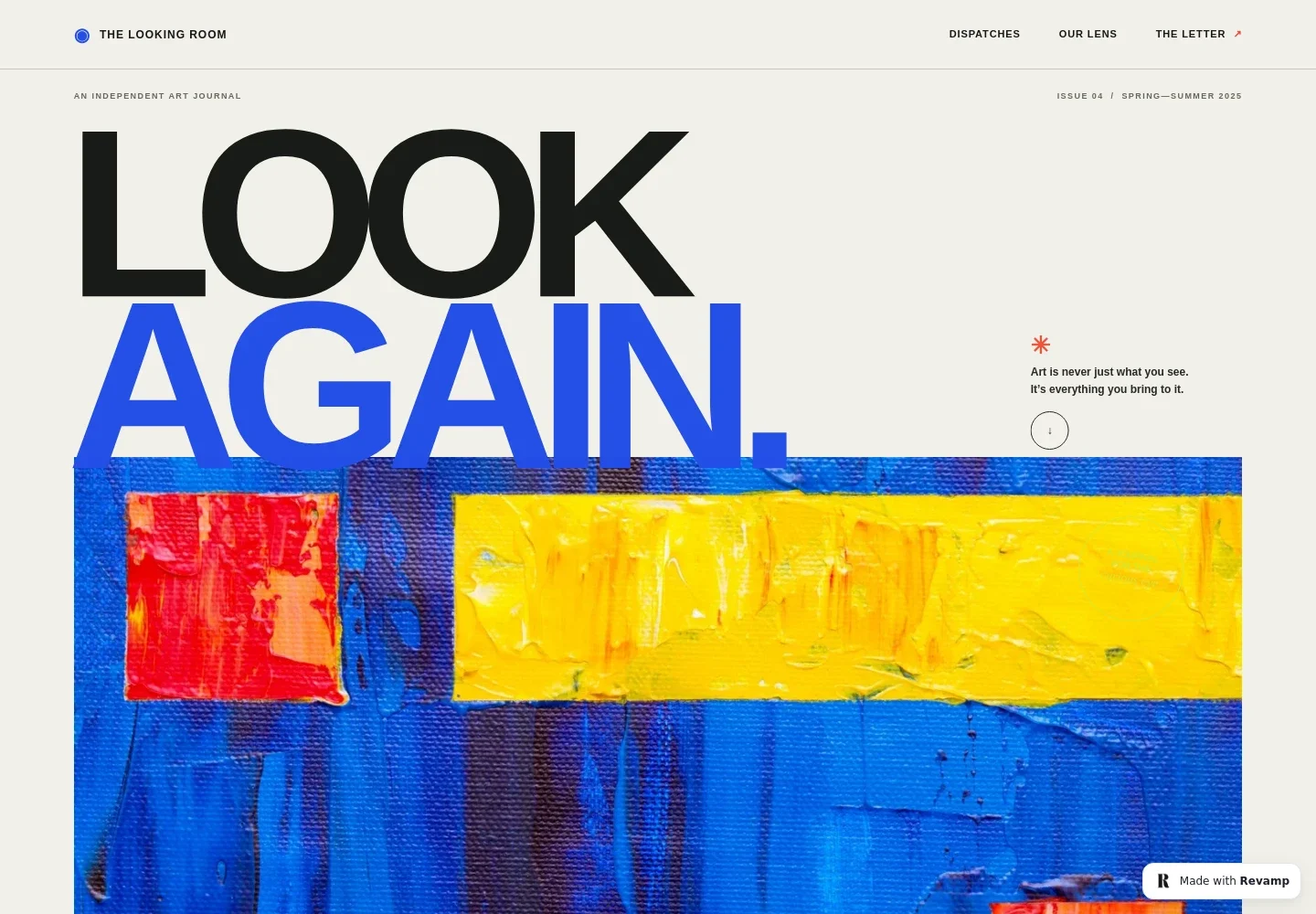
- Art journal hero
- A bold two-line headline sits beside a short statement about how to approach art. A large abstract artwork anchors the opening, with issue details and image captions framing the journal’s visual identity.
- Editorial point of view
- A dedicated journal introduction explains its interest in contemporary art and curious looking. Supporting statements distinguish the publication’s perspective and direct visitors toward the stories.
- Featured issue and stories
- The current issue is introduced with a short note, then presented through an illustrated lead story and a second studio-visit feature. Each story has a title and summary, with topic and reading-time details shown for the lead feature.
- Visual pause
- A standalone interlude uses short lines about looking and perspective to create a quiet break between the stories and newsletter invitation.
- Newsletter invitation
- A closing editorial note describes the letter and invites readers to join by email, giving the publication a direct way to welcome an ongoing readership.
- Journal footer
- The footer repeats the journal name and description, includes a return-to-top link, and provides a compact closing note.
How to use this template
Open in Revamp
Click Use this template and sign in or create an account. You’ll start with your own copy of the design, ready to personalize.
Bring your content
Replace the sample text, photos, and logo with your own. Share your content, a document, or an existing website, and ask Revamp to adapt the template to your business.
Refine and publish
Ask Revamp to adjust the colors, layout, or sections, or edit directly on the page. Review desktop and mobile, then publish. You can keep making changes after launch.
Put your website to work
Build a regular readership by asking Revamp to add a newsletter signup or connect tools for managing subscribers and editorial planning.
-

Build a subscriber list
MailchimpCollect reader signups and send editorial updates. Ask Revamp to add a newsletter signup with Mailchimp.
-

Organize editorial work
AirtableTrack story ideas, drafts, and publication plans in one place. Ask Revamp to connect Airtable for your editorial calendar.
-

Measure reader interest
Google AnalyticsUnderstand which stories attract attention and how readers find the journal. Ask Revamp to connect Google Analytics.
Frequently asked questions
Is this template free?
Yes. This premium template is free to use when you select Use this template. The offer applies to the template, not hosting or other services.
Can I use my own content?
Yes. Ask Revamp to personalize the page with your journal name, artwork, articles, issue details, and newsletter content.
Do I need coding skills?
No coding skills are needed. Ask Revamp to make content and design changes in natural language.
Can I change the design?
Yes. Ask Revamp to adjust the colors, typography, imagery, layout, or other design details to suit your publication.
Can I keep editing after publishing?
Yes. You can keep asking Revamp to update your content and design after launch.