About this template
Give readers a clear sense of your publication’s voice and subject matter, then guide them into featured essays, current dispatches and recurring themes. The design presents Margin as an independent journal about culture, making and the inner life.
A large editorial opening, image-led story features and a dedicated statement of point of view create a natural path from first impression to reading. A closing letters section gives the publication a personal way to invite correspondence.
Who it’s for
For independent publishers, writers, editors and creative teams building a subject-focused journal, magazine or editorial blog.
What’s included
The page is organized like an issue of a thoughtfully art-directed journal, with clear story labels, reading times, imagery and section numbering to help readers browse.
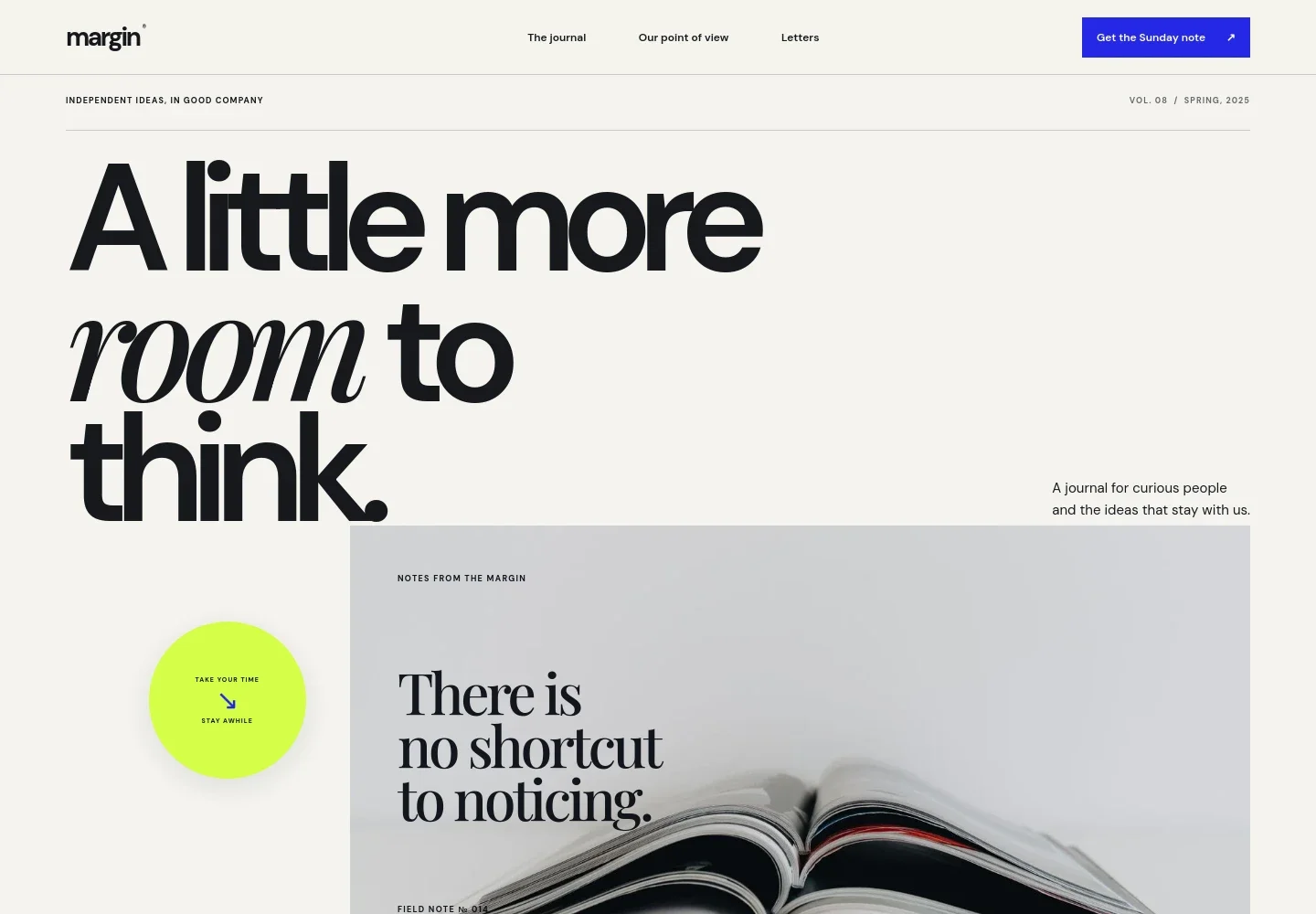
- Editorial masthead and navigation
- A publication wordmark sits alongside links to the journal, its point of view and the letters section, with a prominent Sunday note call to action.
- Journal introduction
- A spacious opening pairs a short editorial welcome with a large image, issue details and a clear link into the latest writing.
- Featured essay
- A lead story combines a photograph, subject tag, estimated reading time, headline, short introduction and a direct reading link.
- Publication point of view
- A dedicated statement explains the journal’s focus on culture, making and the inner life, giving readers context for its editorial approach.
- Dispatches and current issue list
- A second image-led story introduces a cultural observation, followed by a numbered list of additional pieces in the issue.
- Journal themes
- Culture, Making and The inner life appear as three recurring editorial themes, helping visitors understand the subjects the publication returns to.
- Letters and contact
- The closing section introduces a Sunday letter and provides a write-to-us link, followed by the publication wordmark and a return-to-top link.
How to use this template
Open in Revamp
Click Use this template and sign in or create an account. You’ll start with your own copy of the design, ready to personalize.
Bring your content
Replace the sample text, photos, and logo with your own. Share your content, a document, or an existing website, and ask Revamp to adapt the template to your business.
Refine and publish
Ask Revamp to adjust the colors, layout, or sections, or edit directly on the page. Review desktop and mobile, then publish. You can keep making changes after launch.
Put your website to work
A few publishing and audience tools could support newsletter delivery, reader relationships and editorial planning. Ask Revamp to add or connect the services that fit your publication.
-

Grow a reader newsletter
MailchimpBuild an ongoing relationship with readers through email campaigns. Ask Revamp to connect Mailchimp for newsletter signup and publication emails.
-

Organize editorial planning
Google SheetsKeep story ideas and publishing schedules organized in a shared workspace. Ask Revamp to connect Google Sheets for an editorial calendar.
Frequently asked questions
Is this blog template free?
Yes. This premium template is free to use through Use this template. The offer covers the template, not hosting or other services.
Can I use my own writing and images?
Yes. Ask Revamp to personalize the page with your publication name, articles, images, topics and contact details.
Do I need coding skills?
No. Ask Revamp to personalize the content and design for you, without coding.
Can I change the design?
Yes. Ask Revamp to adjust the layout, colors, typography and other design details to suit your publication.
Can I keep editing after publishing?
Yes. You can keep editing your site after launch. Ask Revamp to update stories, imagery, sections or design as your publication develops.