About this template
Present an independent editorial publication with a clear point of view. The page introduces the journal’s interests, explains its approach to thoughtful storytelling, and gives readers a sample of essays, conversations, and visual stories.
A large featured image and issue details set the scene, followed by concise statements about the publication’s purpose and editorial lens. Three sample story listings show how different formats can be presented, while contact links give readers and collaborators a direct way to reach the editors.
Who it’s for
For independent publishers, magazine editors, writers, and cultural journals covering subjects such as art, image-making, and everyday life.
What’s included
The page pairs spacious editorial typography and photography with clear story summaries, helping visitors understand the publication’s perspective and find a place to begin reading.
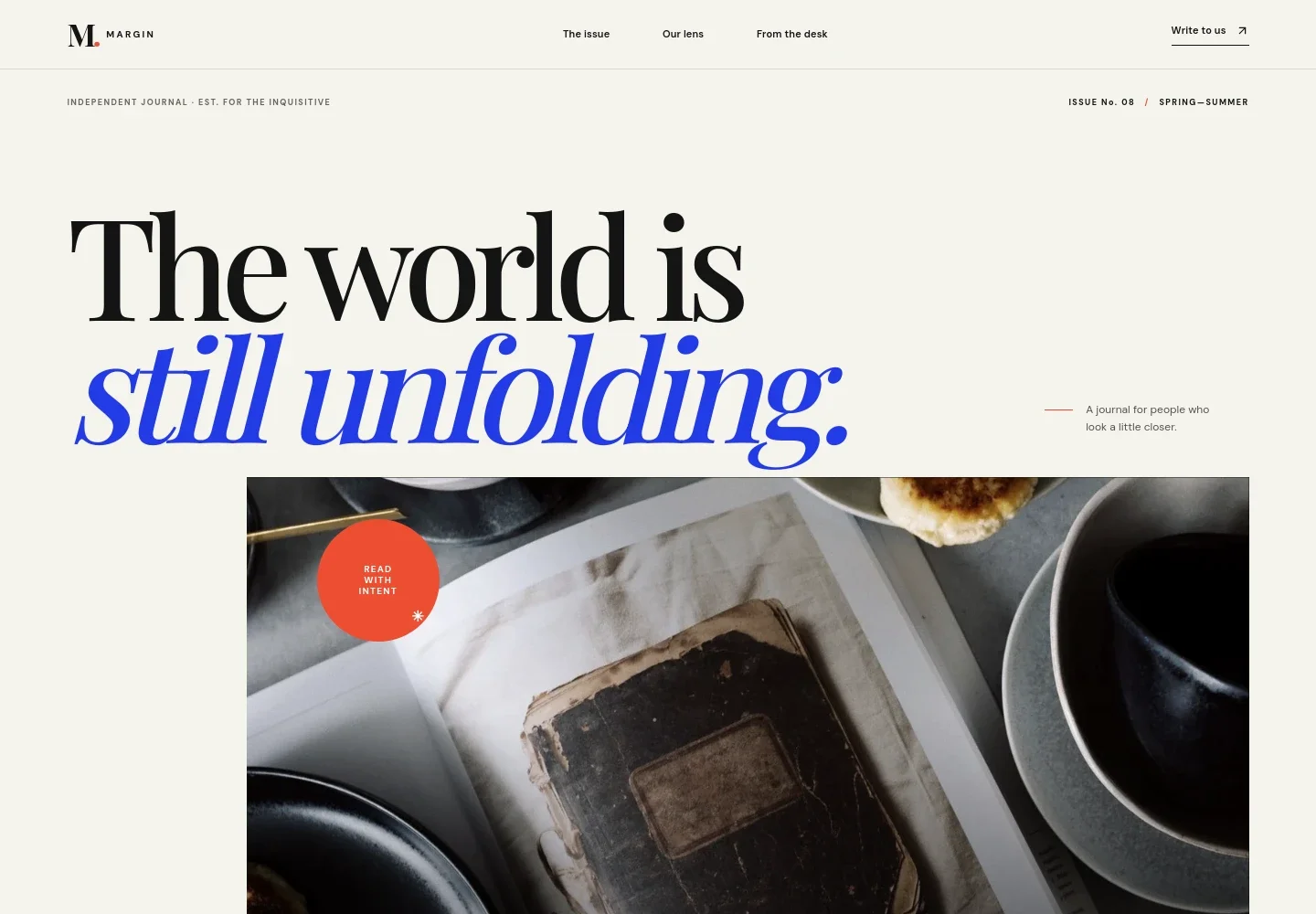
- Publication header and navigation
- A wordmark, links to the issue, editorial lens, and desk sections, plus a prominent contact link orient visitors from the top of the page.
- Featured issue
- A large headline, issue label, and featured book photograph introduce the publication and create a strong opening for the current issue.
- Editorial point of view
- A statement about the journal’s belief in sustained attention is paired with copy describing its interest in ideas, people, and creative work.
- Our editorial lens
- A portrait, editorial-practice copy, and a three-part sequence for question, context, and afterthought explain the publication’s approach to its subjects.
- From the desk
- Three sample story rows distinguish essays, conversations, and image stories, with a title and short summary for each.
- Editorial contact
- A closing invitation directs visitors to contact the team about editorial enquiries, collaborations, or a conversation.
How to use this template
Open in Revamp
Click Use this template and sign in or create an account. You’ll start with your own copy of the design, ready to personalize.
Bring your content
Replace the sample text, photos, and logo with your own. Share your content, a document, or an existing website, and ask Revamp to adapt the template to your business.
Refine and publish
Ask Revamp to adjust the colors, layout, or sections, or edit directly on the page. Review desktop and mobile, then publish. You can keep making changes after launch.
Put your website to work
Reach readers with a publication newsletter or organize editorial enquiries and collaboration follow-ups. Ask Revamp to add a connection that fits how your publication works.
-

Build a publication newsletter
MailchimpGive readers a way to receive new stories and publication updates. Ask Revamp to add newsletter signup with Mailchimp.
-

Keep editorial enquiries organized
HubSpotTrack incoming collaboration and editorial enquiries in one place. Ask Revamp to connect HubSpot for contact management.
Frequently asked questions
Is this template free?
Yes. The premium template is free to use when you select Use this template. This applies to the template itself.
Can I use my own content?
Yes. Ask Revamp to personalize the page with your publication name, editorial focus, images, story titles, summaries, and contact details.
Do I need coding skills?
No. Ask Revamp to personalize the content and design in plain language, without coding.
Can I change the design?
Yes. Ask Revamp to adjust the page’s visual style, layout, imagery, and other design details to suit your publication.
Can I keep editing after publishing?
Yes. You can keep editing the site after launch. Ask Revamp to update stories, publication details, or the design as your needs change.