About this template
Give readers a clear route from the latest stories to the reporting approach behind them. This editorial design pairs a featured story and a compact list of related headlines with sections explaining coverage priorities and principles.
The example publication focuses on climate, cities, culture, power and the people affected by change. Replace those topics, stories and publication details with your own to introduce a newsroom, independent publication or digital magazine.
Who it’s for
For editors, journalists, independent publishers and media teams presenting a news or editorial publication to readers.
What’s included
A strong lead story draws attention, while distinct sections help readers understand what the publication covers, how it approaches reporting and where to find its daily brief.
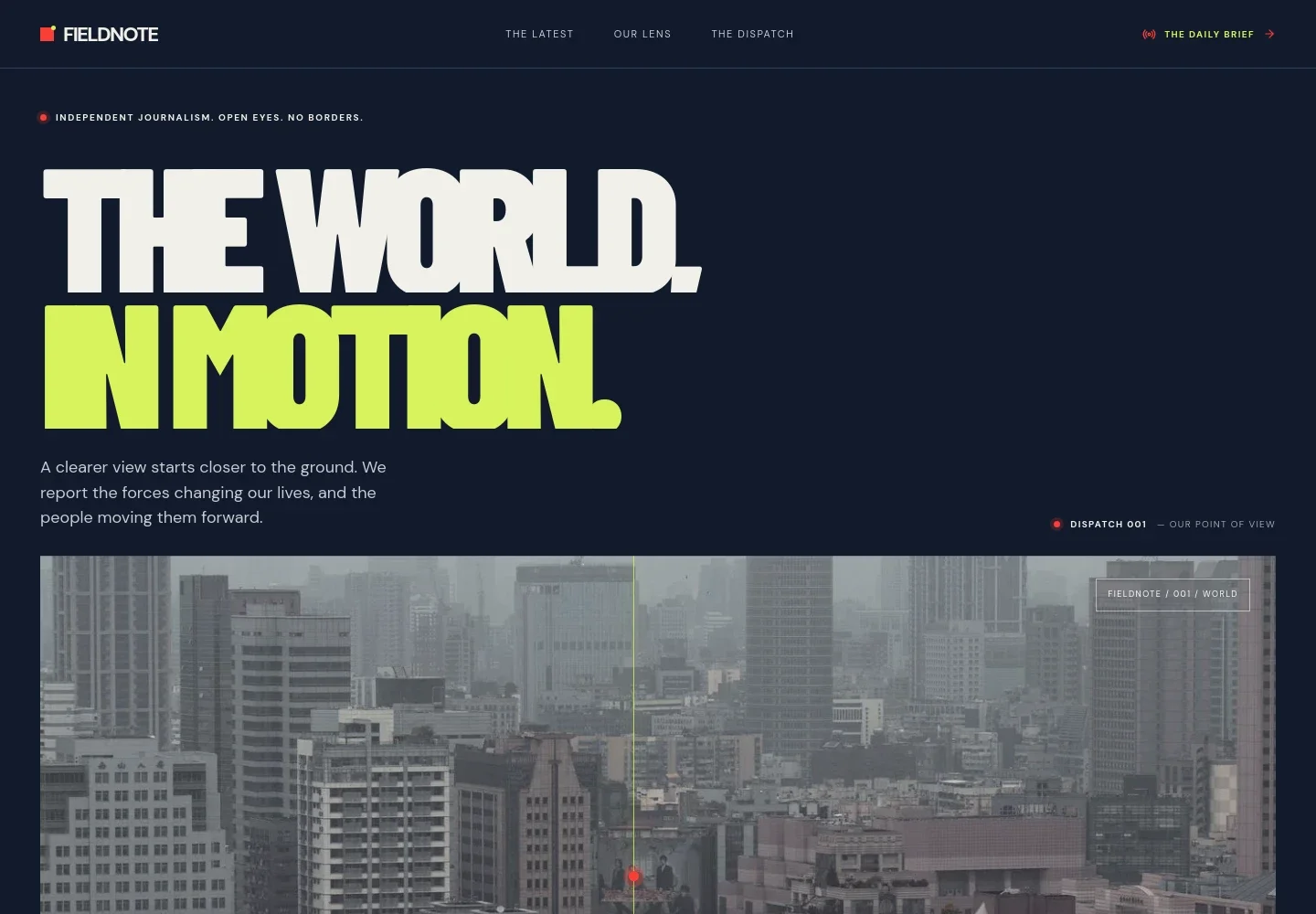
- Publication masthead and navigation
- A publication name and navigation link readers to the latest stories, editorial perspective and dispatch, with a prominent route to the daily brief.
- Editorial hero
- A large headline, publication introduction and atmospheric city image establish the publication's point of view and set an editorial tone.
- Coverage topics
- A moving topic strip highlights editorial interests such as power, climate, culture and stories beyond the headline.
- Latest stories
- A featured article includes a category, reading-time label, summary and follow-up link. Three additional headline rows make other coverage easy to scan.
- Reporting approach
- Three numbered entries describe reporting from the ground, connecting context and following stories as they develop.
- Editorial principles
- A separate perspective section presents three principles focused on firsthand reporting, making complexity clear and allowing room for thought.
- Daily brief invitation
- A concise newsletter-style section introduces a daily briefing and provides a call to action for readers interested in receiving it.
- Publication footer
- The footer brings together the publication name, contact email, links to key sections and a closing editorial note.
How to use this template
Open in Revamp
Click Use this template and sign in or create an account. You’ll start with your own copy of the design, ready to personalize.
Bring your content
Replace the sample text, photos, and logo with your own. Share your content, a document, or an existing website, and ask Revamp to adapt the template to your business.
Refine and publish
Ask Revamp to adjust the colors, layout, or sections, or edit directly on the page. Review desktop and mobile, then publish. You can keep making changes after launch.
Put your website to work
Build reader relationships and organize editorial work with tools suited to publishing. Ask Revamp to add or connect the services that fit your publication.
-

Grow a reader newsletter
MailchimpGive readers a way to receive editorial updates by email. Ask Revamp to add a newsletter signup with Mailchimp.
-

Manage editorial inquiries
HubSpotKeep advertising, partnership and reader inquiries organized for follow-up. Ask Revamp to connect contact forms with HubSpot.
Frequently asked questions
Is this template free?
Yes. This premium template is free to use when you select Use this template. This applies to the template itself.
Can I use my own content?
Yes. Ask Revamp to personalize the publication name, reporting topics, headlines, images, contact details and other content for your newsroom.
Do I need coding skills?
No. Ask Revamp to personalize the content and design in plain language, without coding.
Can I change the design?
Yes. Ask Revamp to adjust the layout, colors, typography, imagery and other design details to suit your publication.
Can I keep editing after publishing?
Yes. You can keep editing your site after launch. Ask Revamp to update stories, sections or design details as your publication changes.