About this template
Help families understand your school's educational approach, picture a day of learning, and find a clear next step. This design is framed around an independent school for ages 3 to 14, with messaging that presents curiosity, hands-on learning, and experiences beyond the classroom.
The page moves from a prominent school introduction to the learning philosophy, a four-step learning sequence, an outdoor learning story, and an invitation to visit. Large photography, section labels, and direct navigation help parents follow the story and reach the visit section.
Who it’s for
Independent schools and school leaders who want to introduce their learning approach to prospective families and invite them to visit. The example is written for a school serving children ages 3 to 14, and its content can be personalized for other school communities.
What’s included
The completed design gives prospective families a guided introduction to the school's approach and student experience, ending with a prominent invitation to plan a visit.
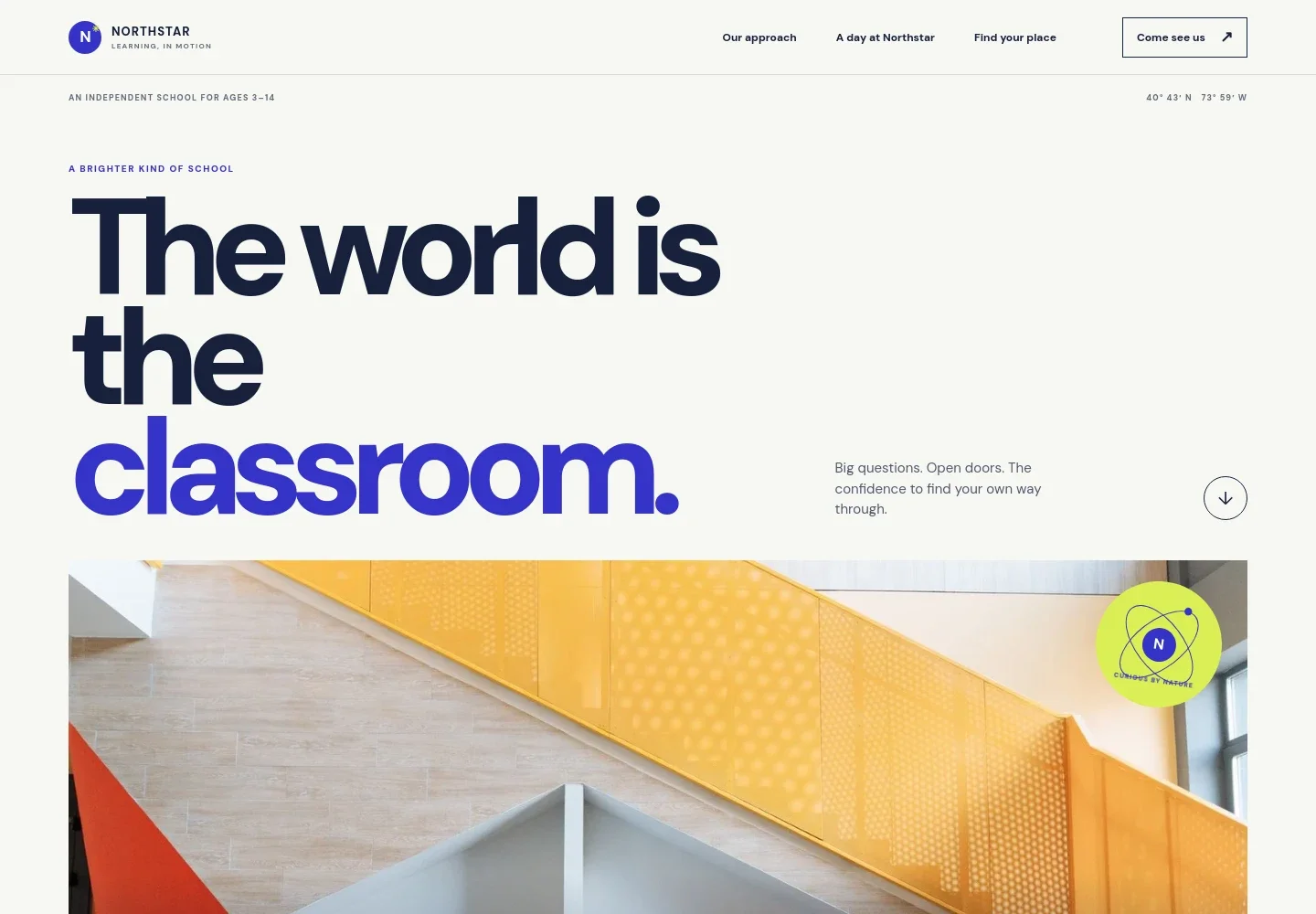
- School introduction
- A large headline, school age range, and welcoming school photography introduce the example school and its focus on curiosity. Navigation links lead visitors to the learning approach, school day, and visit invitation.
- The Northstar Way
- A statement of educational philosophy explains the school's emphasis on strong fundamentals, possibility, and each learner's development, followed by a link to the learning section.
- Learning in motion
- The design describes classrooms as studios, gardens, and workshops, then presents learning as four steps: Notice, Make, Connect, and Share. An accompanying image supports this explanation.
- A promise to every learner
- A short statement about different forms of brilliance adds a concise expression of the school's commitment to making room for every learner.
- Learning beyond the classroom
- Outdoor photography and examples such as garden field notes and a neighborhood map show how learning can connect with the surrounding world.
- Plan a visit
- The closing invitation explains what families can experience during a school visit and provides a prominent contact link. Ask Revamp to personalize the example contact details and visit information for your school.
How to use this template
Open in Revamp
Click Use this template and sign in or create an account. You’ll start with your own copy of the design, ready to personalize.
Bring your content
Replace the sample text, photos, and logo with your own. Share your content, a document, or an existing website, and ask Revamp to adapt the template to your business.
Refine and publish
Ask Revamp to adjust the colors, layout, or sections, or edit directly on the page. Review desktop and mobile, then publish. You can keep making changes after launch.
Put your website to work
School communication and family inquiry tools can help keep prospective families informed and make it easier to arrange a visit. Ask Revamp to add the tools that suit your school's process.
-

Make family visit scheduling easier
CalendlyAsk Revamp to add appointment booking with Calendly so families can request a suitable time to visit.
-

Keep school visit dates organized
Google CalendarAsk Revamp to add event scheduling with Google Calendar so staff can manage visit times alongside their calendars.
-

Share school updates with prospective families
MailchimpAsk Revamp to add email newsletter sign-up with Mailchimp for families who want updates about the school.
Frequently asked questions
Is this school website template free?
Yes. This premium template is free to use when you select Use this template. Free refers to the template itself.
Can I use my school's own content?
Yes. Ask Revamp to personalize the text, images, school details, and visit information for your school.
Do I need coding skills to customize it?
No. You can ask Revamp to personalize the content and design without coding.
Can I change the design?
Yes. Ask Revamp to adjust the layout, colors, typography, imagery, and other design details to suit your school.
Can I keep editing the site after publishing?
Yes. You can keep asking Revamp to make changes after your site launches.


